PANTGRUNTS_VIEW
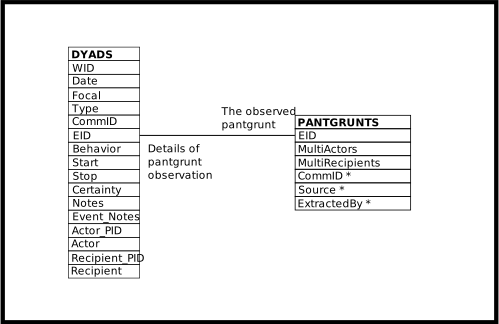
Each row represents a dyadic pantgrunt interaction between two individuals. Rows resemble the MS Access database structure, which may make the data easier to work with.
The view puts the individual performing the pantgrunt and the individual receiving the pantgrunt in separate columns of one row.
Use the PANTGRUNTS_VIEW as a template to query other events involving
dyadic interactions between individuals.
Queries similar to the SELECT statement found within the
PANTGRUNTS_VIEW definition, below, may report on behaviors such as
groomings, matings, aggressions, etc.
In the SELECT code below, substitute the appropriate table,
GROOMINGS, MATINGS, AGGRESSIONS, etc., and that table’s columns,
in place of the PANTGRUNTS table and its columns.
Execute your new SELECT statement.
(Cutting and pasting your SELECT statement into the code below
creates a new view.
Probably not the desired outcome.)
The Style column indicates whether the pantgrunting was directed or mutual.
The values of Style are those of the DYADS.Style column, although given
the nature of the pantgrunt data the only Style values that can occur
are directed and mutual.
The documentation of the DYADS view contains more detail.
Definition
CREATE OR REPLACE VIEW pantgrunts_view (
  date
 ,animid
 ,time
 ,actor
 ,recipient
 ,multiactors
 ,multirecipients
 ,style
 ,commid
 ,pg_commid
 ,source
 ,enteredby
 ,notes
 ,event_notes
  -- Administrative information
 ,type
 ,wid
 ,eid
 ,actor_pid
 ,recipient_pid
  )
  AS
    SELECT
      dyads.date AS date
     ,dyads.animid AS animid
     ,dyads.start AS time
     ,dyads.actor AS actor
     ,dyads.recipient AS recipient
     ,pantgrunts.multiactors AS multiactors
     ,pantgrunts.multirecipients AS multirecipients
     ,dyads.style AS style
     ,dyads.commid AS commid
     ,pantgrunts.commid AS pg_commid
     ,pantgrunts.source AS source
     ,pantgrunts.enteredby AS enteredby
     ,dyads.notes AS notes
     ,dyads.event_notes AS event_notes
     ,dyads.type AS type
     ,dyads.wid AS wid
     ,dyads.eid AS eid
     ,dyads.actor_pid AS actor_pid
     ,dyads.recipient_pid AS recipient_pid
     FROM dyads
       JOIN pantgrunts
            ON (pantgrunts.eid = dyads.eid);
ER Diagram
PANTGRUNTS_VIEW
Columns of the PANTGRUNTS_VIEW View
Column |
From |
Description |
|---|---|---|
Date |
Date of pantgrunt |
|
AnimID |
Focal of follow, or focal of a non-existent follow, or an un-interesting AnimID |
|
Time |
Time of pantgrunt |
|
Actor |
The BIOGRAPHY_DATA.AnimID of the individual pantgrunting, or mutually pantgrunting |
|
Recipient |
The BIOGRAPHY_DATA.AnimID of the individual receiving the pantgrunt, or mutually pantgrunting |
|
MultiActors |
Boolean, |
|
MultiRecipients |
Boolean, |
|
Style |
|
|
CommID |
The community identifier associated either with the follow or with the ad-hoc recording of the pantgrunt |
|
PG_CommID |
The community identifier associated with the record of the pantgrunt |
|
Source |
Code for the source of the pantgrunt information |
|
Notes |
Textual notes on the follow or the ad-hoc observation of the pantgrunt |
|
Event_Notes |
Textual notes on the pantgrunt event |
|
EnteredBy |
Code for the person who extracted the pantgrunt information from the written records |
|
Type |
Type, reporting whether or not the pantgrunt was observed during a follow |
|
WID |
Identifier of the related WATCHES row |
|
EID |
Identifier of the related EVENTS and PANTGRUNTS rows |
|
Actor_PID |
Identifier of the ROLES row containing the individual performing the pantgrunt, or mutually pantgrunting |
|
Recipient_PID |
Identifier of the ROLES row containing the individual receiving the pantgrunt, or mutually pantgrunting |
Operations Allowed
Internally, to manipulate the content of the the EVENTS, WATCHES, and ROLES tables, operations done on the PANTGRUNTS_VIEW do the equivalent operation on DYADS. This means the rules regarding what data must be supplied when INSERTing into DYADS, and when DYADS re-uses existing rows or creates new rows, also apply to PANTGRUNTS_VIEW.
This also means errors in the data supplied to the PANTGRUNTS_VIEW are reported by the DYADS view, as well as by the underlying tables. This impacts the text of the error messages presented to the user. In particular, the PANTGRUNTS_VIEW.Time column is used to supply the DYADS.Start and DYADS.Stop values. So errors involving the PANTGRUNTS_VIEW.Time column will be reported as a problem with either the DYADS.Start or DYADS.Stop column.
INSERT
INSERTing a row into the PANTGRUNTS_VIEW inserts a row into PANTGRUNTS and two rows into into ROLES. One row may be inserted into EVENTS, and one may be inserted into WATCHES.
The columns EID, WID, AnimID, Date, and Time may all be used, in the various combinations described in the DYADS documentation, to relate new PANTGRUNTS and ROLES rows to existing EVENTS rows, or to create new EVENTS and WATCHES rows when they do not already exist.
If an existing EVENTS row matches, the new PANTGRUNTS row and the new ROLES rows are related to the EVENTS row so discovered. Otherwise they are related to the newly created EVENTS row.
When existing rows are found in the database, all (non-
NULL) data values supplied must match the data values that already exist.As with the DYADS view, the WID, EID, Actor_PID, and Recipient_PID columns do not have their values inserted into new rows. If non-
NULLvalues are supplied for these columns they must match the values already existing in, or inserted into, the database.
- UPDATE
UPDATEing the PANTGRUNTS_VIEW view updates the underlying tables, as expected.
- DELETE
DELETEing rows from the PANTGRUNTS_VIEW view deletes rows from the underlying tables.
Rows are always deleted from PANTGRUNTS and ROLES, and may be deleted from EVENTS and WATCHES as well.
The process of deleting rows from ROLES, EVENTS, and WATCHES is delegated to the DYADS view. See the documentation of the DYADS view for further detail.
Page last generated: 2026-08-19 21:06:34 UTC