DYADS
Each row represents a dyadic interaction between two individuals. Having both individuals appear in one row can make the data easier to work with.
This view extends the OBS view with columns for the individual performing the action and the individual receiving the action. It puts the individual performing an action and the individual receiving the action in separate columns of one row.[1]
The DYADS view can be a core component when querying dyadic
interactions.
Having said that, instead of copying and altering the example DYADS
query given below, it may be best to alter and use the
PANTGRUNTS_VIEW‘s SELECT statement.
It uses DYADS to supply the date, time, and participants and adds to
that the detailed data on pantgrunts found in PANTGRUNTS.
Queries similar to the SELECT statement found within the
PANTGRUNTS_VIEW definition may often be the simplest way to report
on other behaviors recorded as dyadic interactions – groomings,
matings, aggressions, etc.
The Style column indicates whether the action is directed, mutual, or of unknown direction. The possible values and their meaning are:
directedThe individual designated in the Actor column performed the action upon the individual designated in the Recipient column.
mutualThe action was mutual. There is no meaning to the placement of the interacting individuals into the Actor and Recipient columns.
unknownWhich individual performed the action, and whether it was mutual or not, is unknown. There is no meaning to the placement of the interacting individuals into the Actor and Recipient columns.
The following example finds every (unique) grooming event, from the groomings recording during B-Record interval scanning, and the individual doing the grooming, whether or not the grooming is reciprocal:
SELECT dyads.wid, dyads.eid, dyads.date
     , dyads.start AS time
     , dyads.actor AS animid
  FROM dyads
    JOIN groom_scans_b ON (groom_scans_b.eid = dyads.eid)
  WHERE (dyads.style = 'directed'
         OR dyads.style = 'mutual')
        AND NOT groom_scans_b.duplicate
  ORDER BY dyads.actor, dyads.date, dyads.start;
The above example produces the same output as the grooming query example presented in the OBS documentation.
Again, for another use of the DYADS view, see the PANTGRUNTS_VIEW documentation. It joins the DYADS view with the PANTGRUNTS table to provide a more-or-less complete report on pantgrunt data.
Definition
CREATE OR REPLACE VIEW dyads (
  wid
 ,date
 ,animid
 ,type
 ,commid
 ,eid
 ,behavior
 ,start
 ,stop
 ,certainty
 ,actor_pid
 ,actor
 ,recipient_pid
 ,recipient
 ,style
 ,notes
 ,event_notes
  )
  AS
    SELECT
      obs.wid
     ,obs.date
     ,obs.animid
     ,obs.type
     ,obs.commid
     ,obs.eid
     ,obs.behavior
     ,obs.start
     ,obs.stop
     ,obs.certainty
     ,actors.pid AS actor_pid
     ,actors.participant AS actor
     ,recipients.pid AS recipient_pid
     ,recipients.participant AS recipient
     ,CASE
        WHEN actors.role = 'Actor' THEN
          'directed'
        WHEN actors.role = 'Mutual' THEN
          'mutual'
        ELSE
          'unknown'
      END AS style
     ,obs.notes
     ,obs.event_notes
     FROM obs
       JOIN roles AS actors
            ON (actors.eid = obs.eid
                AND (actors.role = 'Actor'
                     OR actors.role = 'Mutual'
                     OR actors.role = 'UNKPair'))
       JOIN roles AS recipients
            ON (recipients.eid = obs.eid
                AND (recipients.role = 'Actee'
                     OR recipients.role = 'Mutual'
                     OR recipients.role = 'UNKPair'))
     WHERE (actors.role = 'Actor'
            OR -- Without further conditions, when dyads are mutual,
               -- the two individuals appear as 4 rows: paired, paired
               -- in reverse order, and each matched with themselves.
               -- Assure consistent placement, among query executions,
               -- in the actor or recipient columns.
               actors.pid < recipients.pid);
ER Diagram
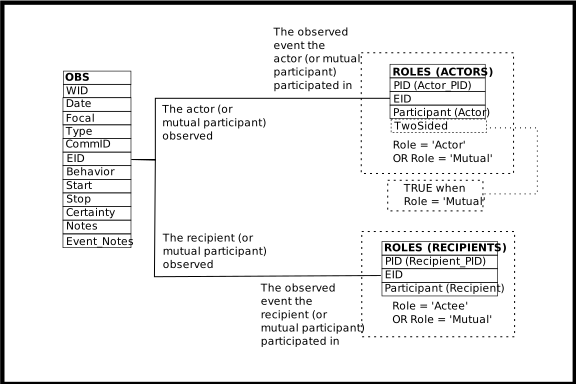
DYADS
Columns of the DYADS View
Column |
From |
Description |
|---|---|---|
WID |
Identifier of the related WATCHES row |
|
Date |
Date of the event |
|
AnimID |
Focal of follow, or focal of a non-existent follow, or an un-interesting AnimID |
|
Type |
Category of observation, often determining the data collection protocol: follow, feeding station attendance, groom scans, etc. |
|
CommID |
The community identifier associated with the Date/AnimID/Type |
|
EID |
Identifier of the EVENTS row |
|
Behavior |
Code designating the type of event observed |
|
Start |
Time the event started (inclusive) |
|
Stop |
Time the event finished (inclusive) |
|
Certainty |
Certainty of the event observation, when meaningful |
|
Actor_PID |
Identifier of the ROLES row containing the individual performing the action, or mutually acting |
|
Actor |
The BIOGRAPHY_DATA.AnimID of the individual performing the action, or mutually acting |
|
Recipient |
The BIOGRAPHY_DATA.AnimID of the individual receiving the action, or mutually acting |
|
Recipient_PID |
Identifier of the ROLES row containing the individual receiving the action, or mutually acting |
|
Style |
|
|
Notes |
Textual notes on the observation for the Date/AnimID/Type |
|
Event_Notes |
Textual notes on the event |
Operations Allowed
- INSERT
INSERTing a row into DYADS inserts two rows into ROLES. One row may also be inserted into EVENTS, and one may be inserted into WATCHES.
The columns EID, WID, AnimID, Date, Type, Behavior, Start, and Stop may all be used, in the various combinations described below, to relate the new ROLES rows to existing EVENTS rows, or to create new EVENTS and WATCHES rows when they do not already exist.
If an EID is supplied, that is all that is required. The identified EVENTS row must already exist.
If an EID is not supplied, the columns WID, AnimID, Date, Type, Behavior, Start, and Stop are used to query OBS to discover if a matching EVENTS row exists or if there is no match and new one must be inserted. The Behavior, Start, and Stop columns must be supplied in this case.
If a WID is supplied it is used, along with Behavior, Start, and Stop, to match against database content. If a WID is not supplied, the AnimID, Date, and Type columns must be supplied. Then they are used, along with Behavior, Start, and Stop, to match against database content.
If no match is found, a row is inserted into OBS. This means the rules regarding what data must be supplied when INSERTing into OBS, and when OBS re-uses existing rows or creates new rows, also apply to DYADS.
If an existing EVENTS row matches, the new ROLES rows are related to the EVENTS row so discovered. Otherwise they are related to the newly created EVENTS row.
When existing rows are found in the database, all (non-
NULL) data values supplied must match the data values that already exist.The WID, EID, Actor_PID, and Recipient_PID columns do not have their values inserted into new rows. If non-
NULLvalues are supplied for these columns they must match the values already existing in, or inserted into, the database.- UPDATE
UPDATEing the DYADS view updates the underlying tables, as expected.
- DELETE
DELETEing rows from the DYADS view deletes rows from the underlying tables.
Rows are always deleted from ROLES, and may be deleted from EVENTS and WATCHES as well.
If, after deletion of the ROLES rows, there are no ROLES rows related to the EVENTS row (that is, the EVENTS row which was related to deleted ROLES rows), the EVENTS row is deleted.
If, after deletion of the EVENTS row, there are no EVENTS rows related to the WATCHES row (that is, the WATCHES row which was related to the deleted EVENTS row), the WATCHES row is deleted.
Note that EVENTS rows almost always have related rows on another table, and an EVENTS row cannot be deleted if it has a related row. For example, pantgrunt events will have a related row on PANTGRUNTS. To delete a pantgrunt event, first delete the PANTGRUNTS row and then delete the DYADS row.
To make this process easier, there may be a view available. For example, the PANTGRUNTS_VIEW deletes rows from the PANTGRUNTS table before deleting rows from DYADS.
Footnotes
Page last generated: 2026-08-19 21:06:34 UTC