OBS (OBservationS)
Each row represents an event that occurred. Events may be recorded as part of a follow, at the feeding station, or on some other, more ad-hoc, basis.
OBS rows are EVENTS rows, but extended with the date, AnimID, and other information found on WATCHES.
It is important to remember that the AnimID value presented, the OBS.AnimID column, is the value found in WATCHES.AnimID. This is not always the individual observed to have exhibited some behavior or otherwise participated in the event. That individual is found in a related ROLES row, in the ROLES.Participant column.
The OBS.AnimID column contains the chimpanzee who, in some sense, is the reason why the observers were present. Often this is the focal of the follow that was ongoing when the event occurred.[3] Feeding station attendance observations have for their OBS.AnimID value, the individual who arrived at the feeding station.[4] Other kinds of events, distinguished by their OBS.Behavior values, have other rules regarding the identity of the individual recorded in the OBS.AnimID column. See the documentation of the EVENTS table for more information.
Many events are expected to have NONE as their OBS.AnimID value, indicating that no focal or other
watch-associated individual existed. This differs from UNK,
which indicates that an individual existed in the role represented by
AnimID but the individual’s identity is unknown.
An example of this could be a pantgrunt event observed while the field
researchers were on some errand.
The OBS view is convenient when writing queries, instead of having to
JOIN EVENTS with WATCHES every time behavior is queried.
Even more convenient is to use a view, one often, ultimately, based on OBS, tailored to a specific purpose. Like the PANTGRUNTS_VIEW view, which is tailored to querying pantgrunt information.
At the time of this writing, not many of these special purpose views exist. You may, instead, need to tailor some of the examples below, or code shown in the DYADS view or PANTGRUNTS_VIEW documentation, to suit your purpose.
For example, below is a query that returns all the arrivals and departures from the feeding station attendance records, showing bananas eaten. Use this example as a template to query other events not involving dyadic interactions. (Events not involving pairs of individuals.) Queries similar to the following may report on events such as feeding bouts, location observations, other species present, colobus encounters, etc. From the example, substitute the appropriate table, FOOD_EVENTS, LOCATIONS_UTM, SPECIES_PRESENT, COLOBUS, etc., and that table’s columns, in place of the ARRIVALS_A table and its columns.
SELECT obs.wid, obs.eid, obs.date, obs.animid
     , obs.start AS arrived, obs.stop AS departed
     , arrivals_a.bananas
  FROM obs
    JOIN arrivals_a ON (arrivals_a.eid = obs.eid)
  ORDER BY obs.animid, obs.date, obs.start;
The above example queries events, arrivals at the feeding station, which involve only a single individual. These are the queries that OBS is best suited for.
The next example involves grooming, which is always recorded as being between pairs of individuals. Queries involving pairs, dyadic interactions, are often most easily queried using the DYADS view. But there is nothing wrong with using OBS to query dyadic interactions. The example below may be compared with the example presented in the DYADS view, which accomplishes the same purpose.
Grooming information is recorded in B-Record follows. So, as noted above, the OBS.AnimID is the focal of the follow, not necessarily the individual doing the grooming. To find every (unique) grooming event, from the groomings recording during B-Record interval scanning, and the individual doing the grooming, whether or not the grooming is reciprocal, the ROLES.Participant column must be used[1], as in the following query:
SELECT obs.wid, obs.eid, obs.date
     , obs.start AS time
     , roles.participant AS animid
  FROM obs
    JOIN roles ON (roles.eid = obs.eid)
    JOIN groom_scans_b ON (groom_scans_b.eid = obs.eid)
  WHERE (roles.role = 'Actor'
         OR roles.role = 'Mutual')
        AND NOT groom_scans_b.duplicate
  ORDER BY roles.participant, obs.date, obs.start;
The following query returns every day every individual was observed exhibiting a behavior[2], or observed being a recipient or otherwise involved in a behavior[5]:
SELECT obs.date, roles.participant AS animid
  FROM obs
    JOIN roles ON (roles.eid = obs.eid)
  GROUP BY roles.participant, obs.date
  ORDER BY roles.participant, obs.date;
Definition
CREATE OR REPLACE VIEW obs (
  wid
 ,date
 ,animid
 ,type
 ,commid
 ,eid
 ,behavior
 ,start
 ,stop
 ,certainty
 ,notes
 ,event_notes
  )
  AS
    SELECT
      watches.wid
     ,watches.date
     ,watches.animid
     ,watches.type
     ,watches.commid
     ,events.eid
     ,events.behavior
     ,events.start
     ,events.stop
     ,events.certainty
     ,watches.notes
     ,events.notes
     FROM watches
       JOIN events
            ON (events.wid = watches.wid);
ER Diagram
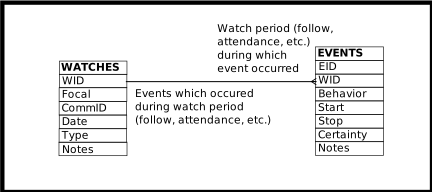
OBS
Columns of the OBS View
Column |
From |
Description |
|---|---|---|
WID |
Identifier of the related WATCHES row |
|
Date |
Date of the event |
|
AnimID |
Focal of follow, or focal of a non-existent follow, or an un-interesting AnimID |
|
Type |
Category of observation, often determining the data collection protocol: follow, feeding station attendance, groom scans, etc. |
|
CommID |
The community identifier associated with the Date/AnimID/Type |
|
EID |
Identifier of the EVENTS row |
|
Behavior |
Code designating the type of event observed |
|
Start |
Time the event started (inclusive) |
|
Stop |
Time the event finished (inclusive) |
|
Certainty |
Certainty of the event observation, when meaningful |
|
Notes |
Textual notes on the observation for the Date/AnimID/Type |
|
Event_Notes |
Textual notes on the event |
Operations Allowed
- INSERT
INSERTing a row into OBS inserts a row into EVENTS, and will also INSERT a row into WATCHES if no row already exists that matches the data supplied.
If a WID is supplied, the identified WATCHES table row must already exist.
If a WID is not supplied, the Date, AnimID, and Type columns must be supplied. Their values are matched to existing database content. If an existing WATCHES row matches, the new EVENTS row is related to the WATCHES row so discovered.
In either case, whether or not a WID is supplied, when a matching WATCHES row exists the (non-
NULL) data values supplied must match the values that already exist.The WID and EID columns do not have their values inserted into new rows. If non-
NULLvalues are supplied for these columns they must match the values already existing in, or inserted into, the database.- UPDATE
UPDATEing an OBS row updates the underlying tables.
- DELETE
Deleting an OBS row deletes the underlying EVENTS row. If the underlying WATCHES row then has no related EVENTS rows, it too is deleted.
Footnotes
Page last generated: 2026-08-19 21:06:34 UTC