SokweDB
Technical Documentation
Introduction
This document describes the design and capabilities of the SokweDB database and related systems.
About This Document
This document describes the SokweDB data management system, it’s features and capabilities. This includes the system design principals, a description of the database’s tables, and the intended usage of related programs. It does not describe the procedures used to enter data into the system or extract data from it. Nor does it describe the details of how to operate all related programs, or maintain the underlying software.
Conventions
In other words, this document describes the system’s capabilities. How to use the system on a day-to-day basis, which features are used in which ways, and similar, are to be found elsewhere.[1]
This section describes the conventions used within this document, which also speaks to the conventions of the overall database design.
There are a number of conventions regarding character case. The database is case insensitive when it comes to the names used to identify content – table names and column names and so forth.[2] Within this document schema names are written with an initial capital letter, table and view names are written in all upper case, and column names are written with initial capital letters.
Unless otherwise noted all columns must contain a value.
Note that an
empty string, the series of characters consisting of zero characters,
is a value.
The empty string[3] is a string and so it is
reasonable to compare it with other non-empty strings.
The empty
string is distinct from NULL[4], which means “no
information”, and is used when there is no value/no data at all.
Data consistency is guaranteed only when the guarantee is explicitly mentioned.[5] Care must be taken when updating data unless there is an explicit guarantee of data consistently.
This document uses a particular vocabulary, which informs the table names within the database. The selection of the vocabulary is based on the terminology in use at the JGI and may need some study for those not familiar with it.
A Guide for the Reader
This is a reference document, and as such is not expected to be read from front-to-back.
That said, the recommenced approach for someone new to SokweDB is to:
Skim thorough the next section’s (System Design) overview, but read all the detail in the About sub-sections.
Read the section and sub-section headings in the System Architecture section. Read in full whatever (sub-)sections are of interest, but at least scan the Databases and Schemas sections.
Scan briefly the ER diagrams, and the key, only to get a sense of what that part of the documentation looks like.
Refer back to the diagrams when necessary while reading the rest of the documentation
Read the entirety of the Views and SokweDB’s Structure section, its sub-sections, and the documentation of the various views found therein.
The Views and SokweDB’s Structure section is different from the rest of the documentation in that it is, in some way, a tutorial. Rather than present views alphabetically, this section’s table of contents structures the presentation order to guide the reader’s understanding of the entire system.
Further, the SQL examples presented in the section contain techniques that may be useful when querying database content, and can be modified to produce results that are useful.
Read the introductory paragraph of each table in the Data Tables section to familiarize yourself with the broad outlines of where data is kept.
After that, the reader should have enough background to explore whatever other parts of the documentation that are of interest, when they become of interest.
It wouldn’t hurt to try logging in to the database and executing example queries while reading.
Care must be taken when querying columns which allow NULL values.
SQL uses a three valued logic, the values being TRUE,
FALSE, and NULL. This only comes into play when a NULL value is
encountered but can be a particularly important factor when a single
query relates multiple tables.
Footnotes
Page last generated: 2026-08-13 23:03:54 UTC
System Design
The system design emphasizes first, data integrity, and second, low long-term cost. The database engine chosen, PostgreSQL, supports concurrent multi-user data entry and retrieval, which minimizes the amount of inter-user coordination required and enhances usability.
These design goals lead to the following design elements.
Data integrity is enforced within the database. This allows any program to be used to interact with the database and update database content. Costs are kept down because generic Open Source user interfaces may be used to interact with the database. No matter the tool used, the integrity of the data is maintained.
A web-based user interface, including a wiki which allows rapid web-page development, maximizes availability. The primary method of interacting with the database is SQL, the industry standard relational query language. The amount of SQL which must be learned can be, depending on the amount of development effort spent, reduced to an
absolute minimum through the use of views – in short, pre-packaged queries.
Data is kept secure though industry-standard practices. These include the encryption of communications, the association of accounts with individuals, the secure authentication required for account access, and the use of in-database access controls to limit the permissions of user accounts. Because individual people are granted direct, but controlled, access to the database itself there is no “middleware” which, when bypassed, has unlimited access to the data.
A minimal number of bespoke programs limits the amount of code development required, and, even more significantly, limits the long-term maintenance costs. The Open Source licensing of the SokweDB system minimizes cost by sharing long-term development of those portions of the system used by more than one institution.
Costs are kept down by minimizing the amount of user-interaction available through bespoke programs. Interacting with a person, particularly reporting errors which arise, requires a lot of programming. Therefore the system is designed around bulk input and output.
Individual accounts are given their own, private, workspaces (schemas). This separates private from shared data, which allows for better long-term data maintenance.
About Databases
In PostgreSQL a database is a stand-alone data store. Queries can easily interact with and combine all data kept within a single database. Access to data outside a database, from within the database, is possible but requires additional work that depends upon the data source.
About Tables
Databases store data in tables. Related singleton datum, such as a single name, a single birthdate, a mother, are kept together in a single row of a table constructed to hold this particular kind of data. Data of the same kind kept within a single table are are found in a column of the table. Columns have names, like “name”, “birthdate”, and “mother_id”.
So a table is a grid containing (classically) a single value in each cell of the grid. Each row of the table represents a physical thing, such as a chimpanzee, or an abstract thing, such as the distance to some designated chimpanzee. E.g., a row with the 2 columns: a distance in meters, and the id of the 2nd chimpanzee. Each column of a table is expected to contain the same “kind” of data; a name should not go in the “birthdate”column.
The SokweDB design endeavors to name tables in the plural, as they hold multiple rows. Column names are singular, as each column of each table holds a single value.
About Views
Views appear to be tables but they are not. Views are virtual, when queried they deliver the results of a query run against the database’s actual tables. An SQL query can freely intermix the use of tables and views. When setup to do so, changing the data in a view can change data in the database’s underlying tables.
Views make it easy to reuse complex or commonly used queries, or portions of queries. They allow a database designed around the capabilities of the computer to be interacted with in a fashion that makes sense to people. Although the views do not appear in the entity relationship diagrams that document the underlying database, and so are omitted from the high level overview these diagrams provide, most users will greatly benefit if they take the time to understand how the views fit into the overall database. Where views exist, most will usually find it easier to work with the views than with the underlying tables.
Views that have the structure, the corresponding columns, of the data after collection in the field and entry into electronic form, are used to upload data into the database. Inserting data into these views distributes the uploaded data into the underlying tables. These sorts of views may or may not be useful when retrieving data from the database for analysis. Investigate to see if some other view or query is better suited rather than automatically using a view created for data upload to do analysis.
About Schemas
Schemas partition databases.[1] [2] They work like directories or folders do in filesystems, but can be only one level deep. A schema cannot contain another schema.
Schemas organize database content. One purpose is to allow a user to focus on the content of some schema(s) and ignore what is in other schemas.
About Transactions
A database transaction is a series of data content alterations that either all succeed, or fail to alter the content of the database in any way. Because SokweDB has transaction isolation, data alterations that occur within a transaction are not visible to concurrent database users. That is to say, they are not visible unless the transaction completes successfully.
Transactions are completed by “committing” them. At that point they either succeed or fail.
It is possible to interact with PostgreSQL in such a way that multiple violations of SokweDB’s data integrity rules, violations that all occur within a single transaction, are reported. Of course, when this happens the transaction fails and the database content is not changed.
But, some of SokweDB’s data integrity rules are checked at transaction commit time. It is not possible to report more than one violation of data integrity rules that are checked at transaction commit time.
This impacts the bulk-loading of data into SokweDB and the procedures that may involve discovering and correcting errors in the data when bulk-loading.
Database Architecture
An overview of the database’s architecture is found in the Views and SokweDB’s Structure section of the documentation.
Footnotes
Page last generated: 2026-08-13 23:03:54 UTC
Page last generated: 2026-08-13 23:03:54 UTC
System Architecture
Primary importance is placed on data integrity. The system is optimized for data integrity rather than maximal performance.[1]
The expectation is that the database will be read more often than written and is configured with that in mind.[2]
Databases
SokweDB utilizes at least 3 databases, each for a different purpose. There may also be other databases available.[1]
sokwedb
The sokwedb database contains the final, “official”, data. All
research takes place in this database.
sokwedb_test
The sokwedb_test database is used, by everyone, for testing.
Typically, this database contains a copy of the sokwedb data. It
may be desirable to upload new data into the sokwedb_test
database before uploading into the sokwedb database. This allows
the data to be cleaned and examinations made before upload into
production.
sokwedb_dev
The sokwedb_dev database is for software and database development.
It is primarily used by the system’s developers to try new features.
After coordinating with the developers, it could used by anyone to
test something that seems particularly dangerous and might interfere
with normal operations if tested in the sokwedb_test database.
Footnotes
Page last generated: 2026-08-13 23:03:54 UTC
Special Data Values
As much as possible SokweDB utilizes a controlled vocabulary within the system’s data store. To provide the system’s users[1] with control over the codes used, this vocabulary may be tailored by adding or deleting codes to or from the tables which define the system’s vocabulary.
At times, SokweDB recognizes that particular codes have special
meanings, for example, the BIOGRAPHY_DATA table’s F (female)
Sex code. The meaning of these codes is fixed into the logic of the
system. As examples, an individual must be female to be allowed to
have a menstruation, or, the individual must be in the community to be
sighted in the community. Some of these codes, like sex, are not
defined in tables, they are hardcoded into the system. Others are
defined in support or other tables. Because these codes have intrinsic
meaning, they cannot be removed from the SokweDB system nor should
their presence in the data be used to code a different meaning from
that which the code presently has. For example, the meaning of
DEPARTTYPES code value O (alive[2]) should
not be changed to mean “death due to meteorite impact” because the
system’s programs would then allow individuals to have sexual cycles
after death. Each of the “special” values that the system requires
retain particular meaning is listed in the Special Values section of
the code table’s documentation. For further information on the meaning
of the “special” values, see the description of the table(s) that
contain the code values. Should the meaning of one of these “special”
values need to be changed, the logic in the SokweDB programs should be
adjusted to reflect the change.
SokweDB prevents ordinary users from altering rows that give meaning to
special values in an attempt to prevent mis-configuration of the
system. Only users with permissions to modify a table’s triggers may
alter the table’s special values.[3] This is not a panacea. To
return to the example above, not only does the system expect a
DEPARTTYPES code of O to mean alive, it also
expects O to be the only code in DEPARTTYPES that
means alive. If another DEPARTTYPES code is created to indicate a
more specific sort of “alive-ness”, unless re-programmed the system
will consider all individuals given that code to be dead, not alive. A
careful review of the documentation should be undertaken before
modifying the content of tables that instantiate special values.
Footnotes
Page last generated: 2026-08-13 23:03:54 UTC
Dates and Times
In SQL dates and times are written as strings, so are enclosed in single quotes (or dollar quotes). Sometimes, as when a value is being inserted into a column that holds a date, the system automatically converts the given string value. But sometimes the system must be told that the data is a date, or a time, etc.[1] The easy way to type this is to follow the string with two colons and then the name of the appropriate data type. This is best illustrated with an example:
SELECT '1707-05-23'::DATE;
Time Precision
Unless otherwise noted, all times have a precision of 1 minute.
The seconds portion of the time value is always 0.
Input and Output Representations
Date values are always output in YYYY-MM-DD format.[2] This is unambiguous and more universal than most date representations.
Date values may be input in a wide variety of formats. Ideally, they would be input as YYYY-MM-DD but when this is not the case the system first attempts to recognize dates as if they were written in MM-DD-YYYY format.
For further information on date and time representation see the PostgreSQL documentation, either that on dates and times or the details of date/time interpretation.
Time Zones
SokweDB contains few, if any, time-zone aware columns. For this reason, and reasons given below, most users will not need to concern themselves with time zones.
Date + time combinations, called timestamps, may or may not be time zone aware. This is also true of plain, 24-hour, time values. Time zone aware values display differently depending on the time zone in which they are viewed – or at least they can display differently. A time zone aware time value which displays as 10:00AM in the US/Eastern time zone would display as 9:00AM in the US/Central time zone.
Dates and times without a time zone, most time-related data recorded in SokweDB, are as-of the time recorded in the field. So in Gombe time, and the time values won’t change no matter where viewed.
Some other dates and times, perhaps those involving administrative actions like, perhaps, the automatically recorded time of database updates, may be time zone aware.
By default, time-zone aware data is input and output in the UCT
time zone.
If you wish to have time-related data be input and output in a different
time zone you must tell the server which time zone you are in.[3]
This does not happen automatically.
Further, the change to your time zone only lasts for the duration
of your connection to the database.
Practically speaking, this usually, depending on the tool you use to access
the database, means that you must change your time zone every
time you submit SQL statements to the server.
To sum up, most of the time-related values you work with will be
in Gombe time. The rest are in UCT unless you
put some work into changing your time zone.
TIMESTAMPS and Absolute Time Comparisons
The TIMESTAMP data type stores a date and a time as a single unit
of data.
In other words, it records a point in time that is absolute.
A time recorded as a TIMESTAMP value contains everything you can
know about the time value itself.
Although SokweDB contains few, if any, TIMESTAMP data types it can
be convenient to produce them when you want to compare absolute times.
Data recorded as DATE and TIME data types can be converted to
a TIMESTAMP value by adding the time to the date.
For example, to find DYADS rows that involve events that started before OBS rows’ events started, there are the following two approaches, presented here as fragments of a (nonsensical, as it stands) hypothetical SQL query:
WHERE (dyads.date < obs.date
       OR (dyads.date = obs.date AND dyads.start < obs.start))
WHERE (dyads.date + dyads.start < obs.date + obs.start)
Page last generated: 2026-08-13 23:03:54 UTC
Database Permission Levels
The database associates each login with specific permissions to objects (tables, etc.) within the database.[1]
To access the data in the database permission must be granted. This is done per user login.
There are 2 ordinary levels of permission. Their names are:
readerPermission to query database content.
writerAll the permissions of
readerplus permission to alter the content of the database.
Ordinary permissions are database roles.
Changing A User’s Permissions
Normally, users are given the desired level of access when their login is created using SokweDB administration tools. There are various ways permissions can be granted or changed. One way is with SQL[2], e.g.:
GRANT reader TO someuser;
The Administrator Permission Levels
Administrators are in two groups, role_owner and
admin.
The admin permission level has near-maximal permissions.
It owns all database objects.
The role_owner group manages all roles and has permission to
create new users.[3]
It is the admin role that owns all the SOKWEDB database
objects, the tables, views, etc.
As PostgreSQL introduces new pre-defined roles the
admin should be added as a member of those roles.
This will give all administrators the requisite additional access.
Footnotes
Page last generated: 2026-08-13 23:03:54 UTC
Logins
Each person should have their own login/username, which should not be shared. Most people will have a single login but because it is best-practice to do regular work with only the minimal amount of permission necessary some people will have more than one login; a login for each level of required access.
In addition to regular logins, which are used for regular database work and have either read-only or read-write access to database content, there are the following other kinds of logins.
Administrators
Administrators have near-maximal permissions. The primary purpose of an administrator login is to create or destroy other logins, and that is pretty much the only regular use of an administrator login. Some other administrative tasks, such as killing runaway PostgreSQL queries and monitoring database activity, are also done occasionally.
Caution
Administrative logins have access to the underlying operating system files in the same way as a Unix shell user has access. Administrative users can even run operating system level commands. Administrative accounts should be well-secured and utilize good passwords.
The build system and other supplied tools automatically ensure that
tasks performed as an administrator are done by the appropriate group
on behalf of the administrator.
Administrators are in, and can become, the role_owner group
and so can create and destroy roles.
And they are in and can become the admin and therefore
create and destroy tables, create and destroy user logins, etc.
Only a few people are expected to have administrator privileges.
Those people with administrator privileges will typically have 2 logins, one ordinary login and a second login with administrator privileges. The administrative login should be used only when necessary, as when a new person is given access to SokweDB and a new database login must be created. Ordinary interactions with the database, data entry, data retrieval, etc., should be done with a non-administrator login.
PostgreSQL also has a superuser role.[4]
Superusers have permission to do anything with a database.
As with the Unix root user, there should usually be only a single
PostgreSQL role with superuser privileges.[1]
Developers
Developers, the users who maintain the database structure, etc., are a special kind of administrator and the same care should be taken handing out and securing developer logins as administrative logins.[2]
The difference between developers and administrators is that developers do not have the ability to create or drop database logins, or have any more rights to administer permissions than a regular user has.[3]
Like administrators, developers have the ability to monitor database activity, kill runaway queries, and so forth. They full have access to all database content and also the ability to change the database’s structure, rule validation, and so forth.
Developers are expected to have ordinary logins, for use when interacting with database content.
Creating Logins
Creating (and destroying) logins is best done using the SokweDB supplied tools. They take care of the relatively complex task of controlling permission management to prevent removal of permissions from logins created by another login that is later deleted.
Creating Administrators
When creating administrative users connect to the database using an “administrative user”. This is a role designated as such, with elevated permissions, which will always exist. Don’t use a role belonging to a person but a role such as the bootstrap PostgreSQL superuser. (You must use the bootstrap PostgreSQL superuser when you do not have a PostgreSQL role that can login and create groups.) If you do not use a role that always exists, then when the creating role is dropped the created role will lose part of its administrative privilege and will no longer be able to use the SokweDB tools to create users.
Hint: Use Unix privilege escalation techniques to execute the SokweDB command line tool in an environment that gives the tool access to the PostgreSQL superuser.
Creating Non-Administrative Logins
Creating logins that are not administrative logins, logins for developers or regular users, should be done using a regular administrative login. (Don’t use an “administrative user” such as the bootstrap PostgreSQL superuser.)
The logins which should be used, when managing logins or at other times, are those assigned per-person, for each person’s use. This includes the per-person administrative logins and the system’s design assumes that the per-person administrative logins will be used to for login management.
Footnotes
Page last generated: 2026-08-13 23:03:54 UTC
Schemas
Each SokweDB database contains a number of schemas. Some of these schemas will not be documented herein; it is likely that some schemas will be created to hold shared data, data not part of SokweDB itself but related to it.
The sokwedb schema
The sokwedb schema contains the data collected in the field. It
is the primary schema of interest to the researcher.
The codes schema
The codes schema exists so that the sokwedb schema is not
cluttered with un-interesting tables, and other things.[1]
The codes schema contains those tables which control the data
vocabulary defining the codes able to be recorded in the database.
Because the codes defined in this schema are often used and well-known
the schema’s tables are not often of interest.
Most of the tables in this schema contain one row per defined
code. The codes are usually kept in a column that has the name of
table, but a name which is singular instead of plural. There is also
a Description column, which describes the coded value.
A few of the tables in this schema are more complex, and contain more than 2 columns. These are often tables which contain ‘meta information’ involving the mechanics of the data collection process. Things like lists of researchers, observers, or equipment used in the data collection process.
The codes schema also contains functions and other tools used to
administer the system.[2]
The housekeeping schema
The housekeeping schema contains tables related to the
administration of the database’s data.
For the most part, this consists of records of what was updated when.
These are, usually, of only occasional interest.
Because these tables are usually queried without the involvement of other tables, they do not generally appear on the ER diagrams.
The upload schema
The upload schema contains the views used during the data upload
process. These are, usually, of interest only to those who upload
data into the database.
The lib schema
The lib schema (short for “library”) contains things used by
SokweDB’s internal mechanisms. The end-user should not need to be
concerned with its content.
The per-user private schemas
Individuals are given their own schemas in which they can do whatever they wish. So each regular account/login/username has an associated schema with a name the same as that of the account.
Caution
It is usually bad practice to grant another person access to something in a private schema. It is often better to create another, shared, schema. In this way individuals, and their accounts and private schemas, can come and go without affecting the work of the institution.
Because of the schema search order the schema name must be used to
qualify anything created in the user’s schema. E.g., to create the
table foo in the user mylogin’s schema:
CREATE TABLE mylogin.foo (somecolumn INTEGER);
Footnotes
Page last generated: 2026-08-13 23:03:54 UTC
Footnotes
Page last generated: 2026-08-13 23:03:54 UTC
Entity Relationship Diagrams
Entity Relationship Diagrams, or ER Diagrams, are graphic pictures of how rows in the database’s tables relate to other rows. They are dense in information about what data exists and in what tables it can be found.
ER diagrams are useful because they provide at-a-glance overviews. They allow you to locate the data in which you are interested and give guidance as to how to retrieve it.
Most tables have have an id, or key, column that contains a number unique to that row within its table. The id can be used, in perpetuity, to refer to its related row and distinguish it from all the other rows of the table. Ids are arbitrary, although for convenience they are often sequentially generated integers. The name of the column holding the id value is not always Id, although it sometimes is.
A relationship is established between the rows of two tables when an id value from one table appears as data in the other. The relationship notion is made most clear by way of diagrams and examples. The relationship concept is at the heart of relational databases and, while the underlying idea is rather simple, it took many years to develop relational database concepts so don’t expect a full understanding immediately.
When an id value of a row in one table appears as data in a second table, the data in the second table can be used to retrieve the identified row from the first table.[1] When an id value of a row in the first table appears as data only once in the second table, the two tables are said to have a one-to-one relationship. One row in the first table relates to one (or possibly zero) row(s) in the second table. When a row’s id value can appear in more than one row of a second table, the two tables are said to have a one-to-many relationship. One row of the first table can be related to many rows in the second table. One-to-many relationships are more common than one-to-one relationships. In the ER diagrams each table (corresponding to a real-world entity) is a box, and each box contains a list of the table’s columns. The lines between the boxes represent the relationships between the tables.
For example, individuals can transfer between communities zero or more times. A single individual is one kind of entity recorded in the database, one transfer of a single individual between communities is a second kind of entity. Each individual is represented in the database as a single row in a table. Each transfer is likewise represented by a single row in a different table.
The ER diagram of this shows that a row representing a one individual can be “connected to” zero or more rows recording community transfers. The diagram also shows that a transfer must be “connected to” exactly one individual, the individual who is changing communities. A transfer should not be able to exist unless the individual transferring also exists.
Not every table appears in an entity relationship diagram. Tables only appear when they hold data, as opposed to those tables used solely to control the values used as codes, and when they are related to other tables – when they are not log tables.
Key
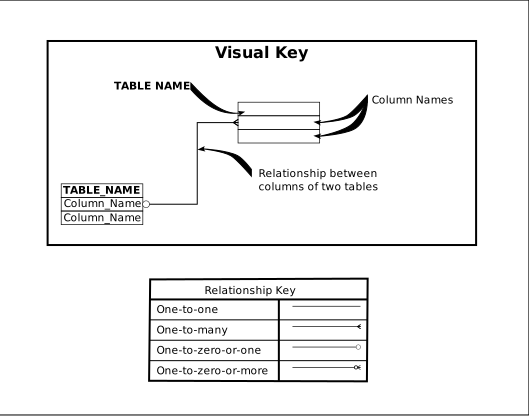
Key to the Entity Relationship Diagrams
Page last generated: 2026-08-13 23:03:54 UTC
Demography
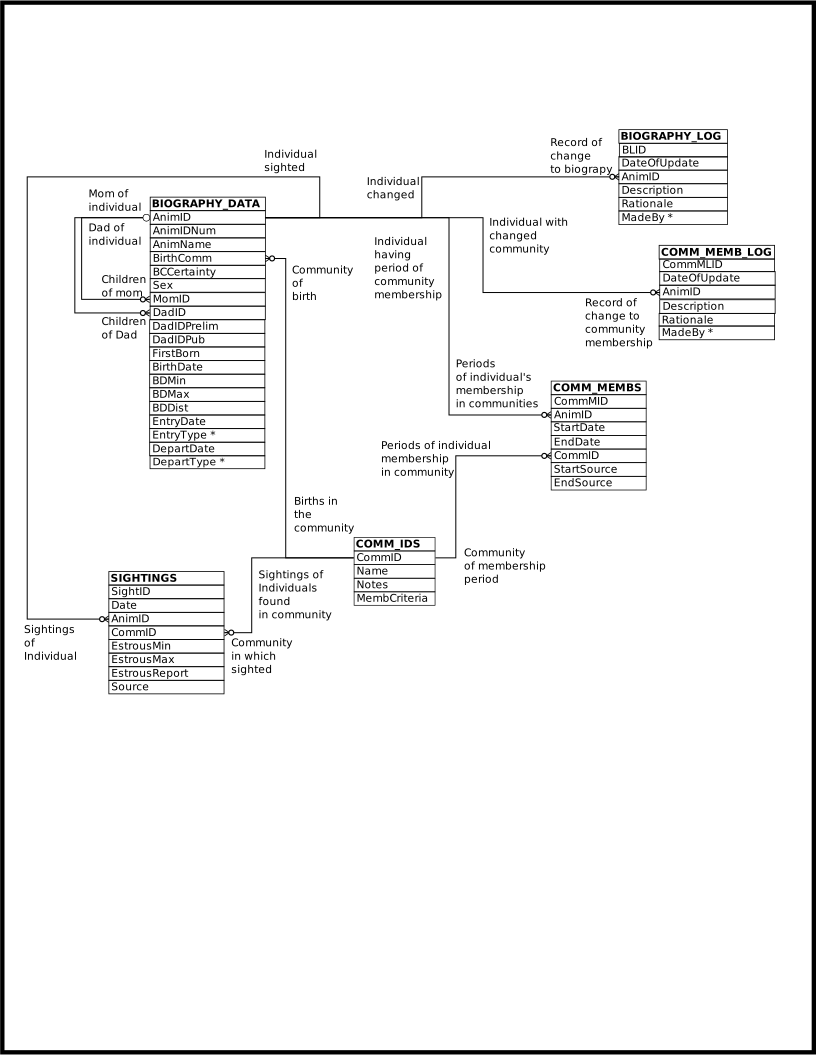
Demography
Page last generated: 2026-08-13 23:03:54 UTC
Female Reproduction
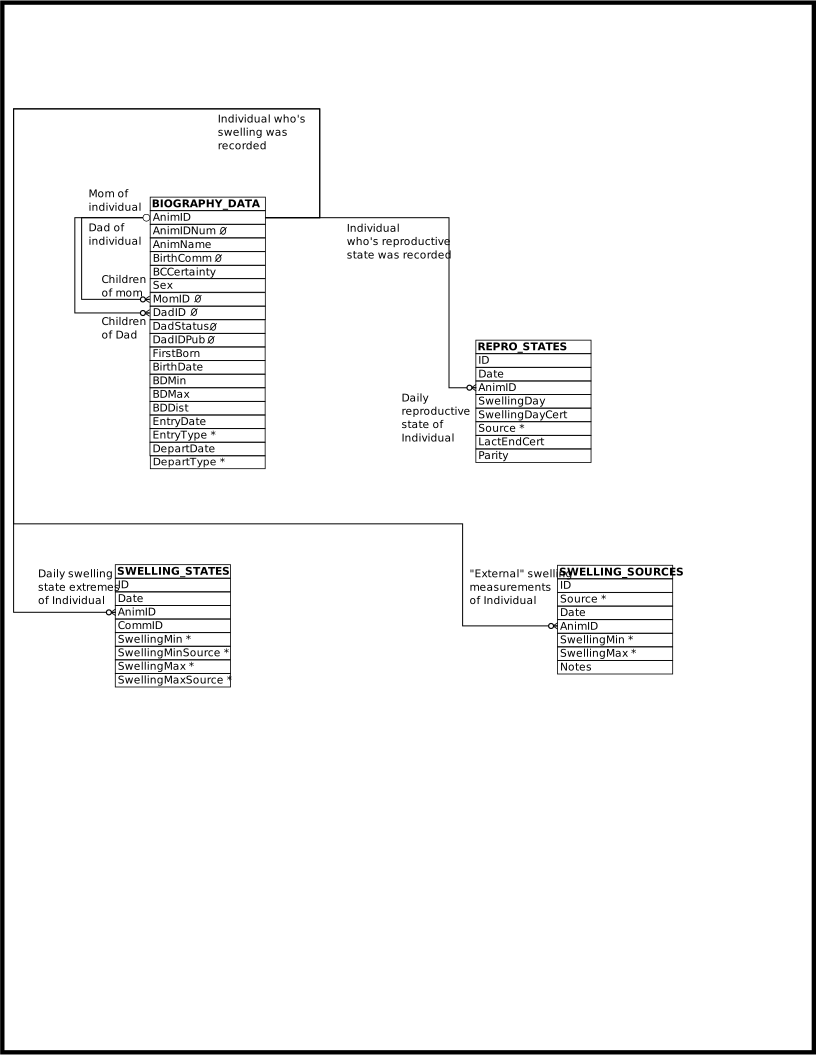
Female Reproduction
Page last generated: 2026-08-13 23:03:54 UTC
Watches
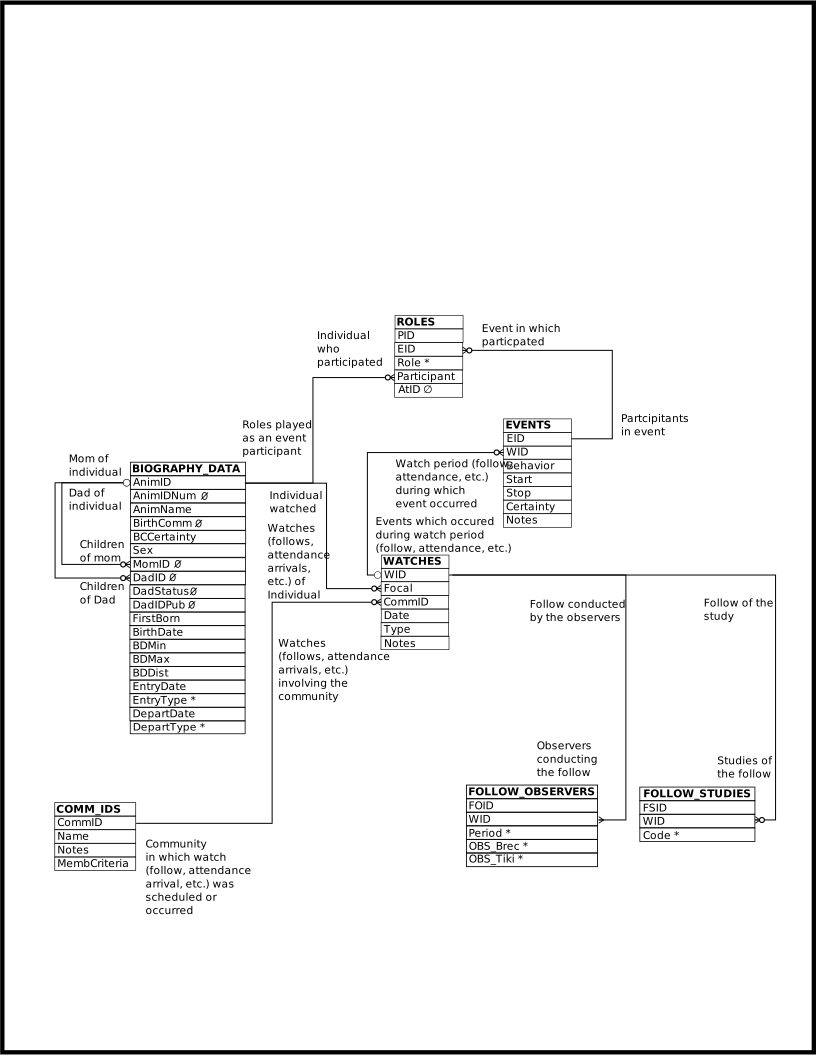
Watches
Page last generated: 2026-08-13 23:03:54 UTC
Events
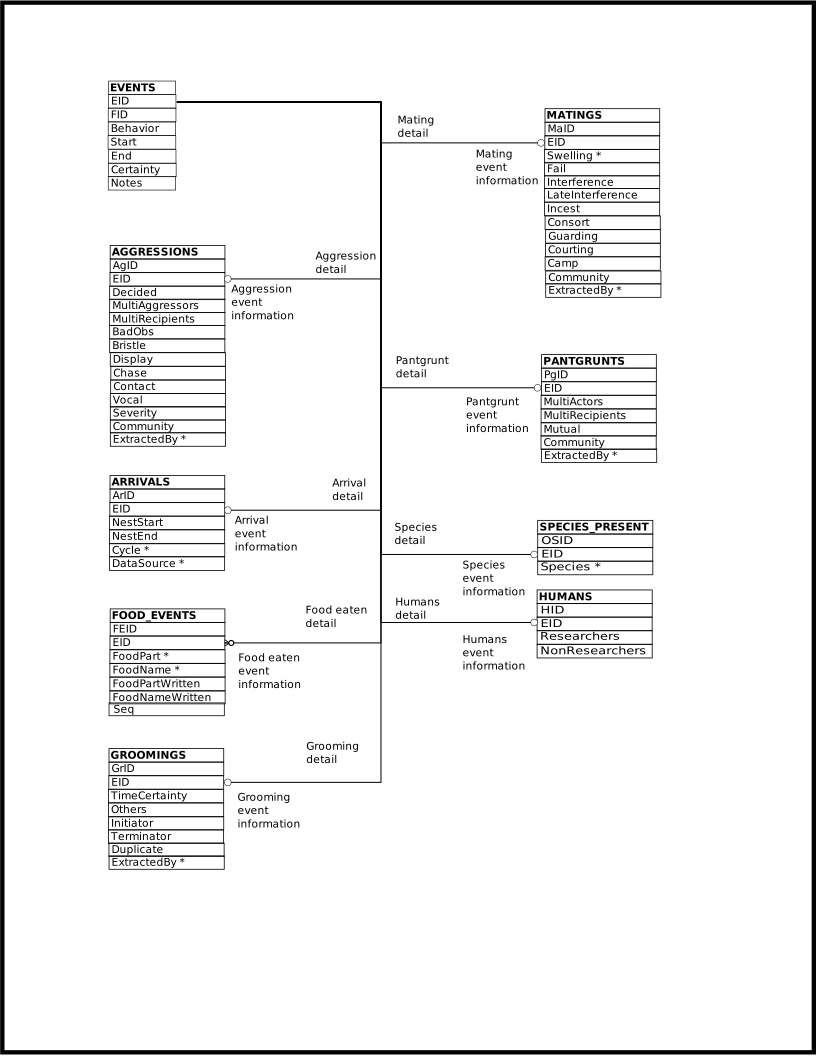
Events
Page last generated: 2026-08-13 23:03:54 UTC
Additional Events
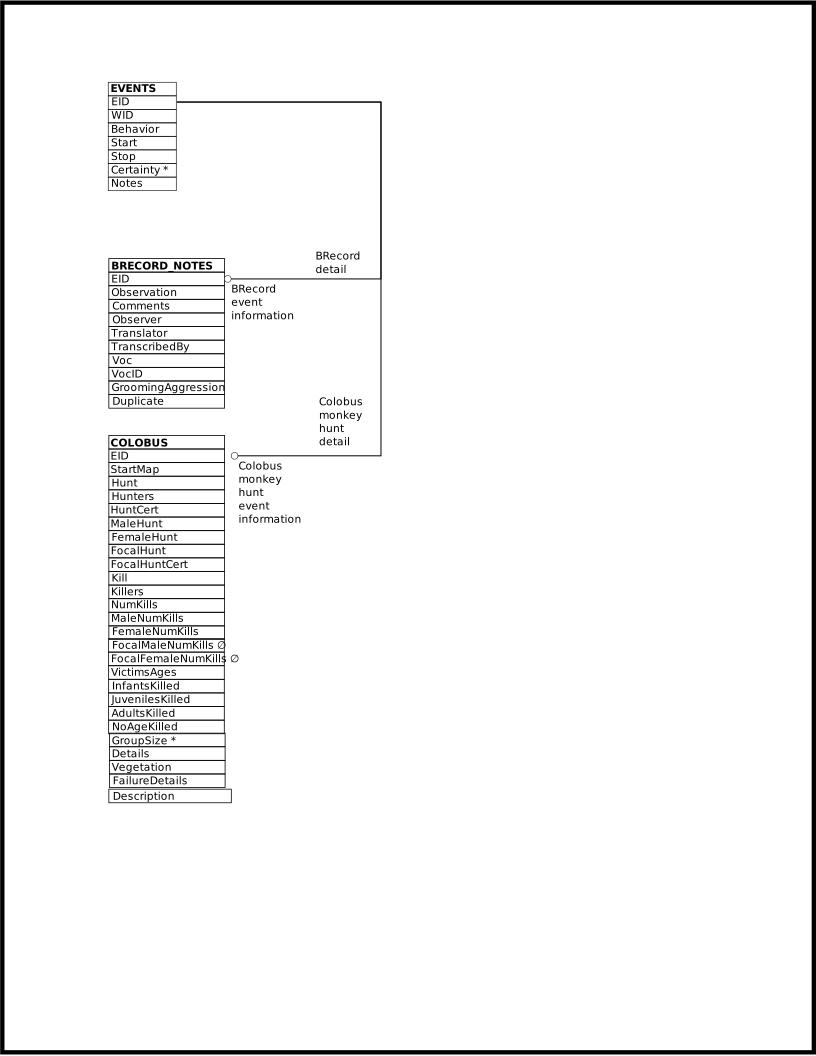
Additional Events
Page last generated: 2026-08-13 23:03:54 UTC
Footnotes
Page last generated: 2026-08-13 23:03:54 UTC
Views and SokweDB’s Structure
As mentioned in the Introduction, views are queries that look like tables. As such, they can, and usually do, combine multiple tables into something that looks like a single table.
Views are important to SokweDB because they appear to transform the underlying structure of the database’s tables into something more akin to the traditional paper data collection sheets used to collect data in the field.
To understand what this means we’ll look at grooming and aggression.
The paper data collection sheets have separate columns for the individual doing the grooming and the individual receiving the grooming. Or, similarly, the individual aggressing and the individual aggressed against. These two different types of data could each be stored in separate tables, with columns in the aggressions table for aggressor and aggressee, and columns in the grooming table for groomer and groomee.
This organizational structure works well when one wants to query each of these behaviors in isolation. It begins to break down when querying across data sets, particularly as the number of data sets increases beyond a few.
To ask a simple question like “when was the last time we observed individual A”, or “how many times has individual A been involved in an interaction with individual B”, one must combine the results of querying all the behavioral tables. This is simple when there’s only two types of data we’re collecting, aggressions and groomings, but becomes increasingly complicated as more categories of data are collected.
To solve this problem SokweDB structures the database around events. Events are times when data is collected. An event may record a behavior, an individual’s location, or even be something like a record of what was recorded in ad-hoc textual notes. Events are categorized by behavior. A grooming event has its own behavior, an aggression event has it’s own behavior, and so forth.
Because an event can be one of so many different things, an event’s behavior code does not necessarily correspond with a behavior that a chimpanzee might exhibit. But the terminology works well enough. Queries specify an event’s behavior to report on a specific chimpanzee behavior.
Events are organized into watches, a period of time when an observer was observing – observing something.
Very many watches are follows, so all the behaviors recorded during a single follow of a focal are events that are related to a single watch.
Most other watches are records of an observation of a chimpanzee at the feeding station. In these cases there’s no actual follow, but the individual observed “takes the place” of the focal.
And some watches are just ad-hoc observations. For example, a pantgrunt observed by happenstance. In these cases a watch may be related to only one event.
Watches are categorized by type. These map to things like follows, feeding station observations, and the recording of chimpanzee locations. Queries specify a watch’s type to report on a specific data collection protocol, like a follow.
Individual chimpanzees are associated with events. Each individual plays a role in the event. Like a role in a theater play, where an actor may play a different role in different performances, chimpanzees play different roles in different events. Any event can be associated with multiple roles, each played by a different chimpanzee.
Each role, associated with some specific event, designates both a chimpanzee and, by way of a role code, the role the chimpanzee plays in the event.
Some roles are “special”, the system knows they have special meaning.
Most (if not all) roles associated with dyadic events, pairwise events like groomings or aggressions, have special meaning.
In the case of groomings and aggressions we only mention here two
of the special role codes, although there are others.
These are the special role codes Actor and Actee.
The individual aggressing and the individual performing the grooming have the Actor role.
The individual receiving the aggression and the individual receiving
the grooming have the Actee role.
By making these two role codes “generic” and using them in both the case of grooming and the case of aggression, instead of having four codes, “groomer” and “groomee” and “aggressor” and “aggressee”, we can more easily query across behaviors. It becomes simple to ask questions, irrespective of behavior, about those receiving behaviors and those performing them.
The structure of the tables that hold the SokweDB support are very flexible in the kinds of data they may hold. It takes little in the way of modification to record hitherto unrecorded behaviors or to use new data collection protocols. And the real benefit is the relative ease of writing queries that return cross-behavioral or cross protocol information.
The cost is an increase in the complexity of writing a query that returns information on a single behavioral category, collected using a single protocol, like groomings involving the focal collected during a follow.
But views, which are relatively easy to create and maintain, can entirely remove the barrier to querying on a single behavioral category.[1] They do this by appearing to be a table, that looks just like a table that holds data on a single behavioral category.
The PANTGRUNTS_VIEW view is a good example of this.[2] It combines the all the underlying data kept in separate tables, and, in the case of roles, data that’s kept in separate rows – data that’s specifically pantgrunt related like whether there were multiple pantgrunt recipients, with the chimpanzees that play the roles of pantgrunter and pantgrunt receiver, with the time of the event, and with the date and focal (if the watch is a follow) of the watch –, into what looks and acts just like a regular table.
Data Retrieval Views
The views appearing in this section exist for convenience in querying. Some exist to make the data look more like the “old” data, as it appeared in the old MS Access database. Others reproduce common query patterns, eliminating the need to connect (join) multiple tables.
View |
One row for each |
Purpose |
Tables/Views used |
|---|---|---|---|
BIOGRAPHY_DATA row |
Reproduce “old” data data |
||
BRECORD_NOTES row |
Simplify queries that join BRECORD_NOTES with other EVENTS related tables |
BIOGRAPHY
Each row represents a chimpanzee and is a transformation of the
corresponding BIOGRAPHY_DATA row, making the data more like the
traditional format and therefore, in one sense, easier to work with. This view (like the underlying BIOGRAPHY_DATA
table itself) contains one row for each chimpanzee on which data has
ever been recorded (in SokweDB). Additional rows exist for various
codes used when a chimpanzee is partially or entirely unidentified,
such as UNK or MGF. An additional
NONE row is used when it does not make sense to record an
individual.
BIOGRAPHY contains the basic demographic data of
individual chimpanzees.
BIOGRAPHY is a simple view, consisting of a single table along with a few expressions which construct data to be presented in computed (virtual, in a sense) columns. In this spirit, here is a relatively simple query. (It does contain a computed column, and does use a computation to determine sort order.[1]) It reports on males, sorting them first by whether or not they are alive, missing, known to be dead, etc., and within that by age, and within that by name.
SELECT biography.animid, biography.departtype, biography.animname
     , biography.birthdate
     , (biography.departdate - biography.birthdate) / 365.25
       AS years_old
  FROM biography
  WHERE sex = 'M'
  ORDER BY biography.departtype
         , (biography.departdate - biography.birthdate)
         , biography.animname;
Definition
CREATE OR REPLACE VIEW biography (
   animid
  ,animidnum
  ,animname
  ,birthcomm
  ,bccertainty
  ,sex
  ,momid
  ,dadid
  ,dadidpub
  ,firstborn
  ,birthdate
  ,bdmin
  ,bdmax
  ,bddist
  ,entrydate
  ,entrytype
  ,departdate
  ,departtype)
  AS
    SELECT
        biography_data.animid
       ,biography_data.animidnum
       ,biography_data.animname
       ,biography_data.birthcomm
       ,biography_data.bccertainty
       ,biography_data.sex
       ,biography_data.momid
       ,CASE
          WHEN biography_data.dadstatus = 'Prelim'
            THEN biography_data.dadid || '_prelim'
          ELSE biography_data.dadid
       END CASE
       ,biography_data.dadidpub
       ,biography_data.firstborn
       ,biography_data.birthdate
       ,biography_data.bdmin
       ,biography_data.bdmax
       ,biography_data.bddist
       ,biography_data.entrydate
       ,biography_data.entrytype
       ,biography_data.departdate
       ,biography_data.departtype
     FROM biography_data;
Columns of the BIOGRAPHY View
Column |
From |
Description |
AnimID |
Animal IDentifier |
|
AnimIDNum |
Animal IDentifier Number |
|
AnimName |
Animal Name |
|
BirthComm |
Birth Community |
|
BCCertainty |
Certainty of BirthComm |
|
Sex |
Individual’s Sex |
|
MomID |
AnimID of the individual’s mother |
|
DadID |
AnimID of the individual’s father,
suffixed with |
|
DadIDPub |
Publication of Paternity citation |
|
FirstBorn |
First born status code |
|
BirthDate |
Birth Date |
|
BDMin |
Minimum Birth Date |
|
BDMax |
Maximum Birth Date |
|
BDDist |
Birth Date Distribution |
|
EntryDate |
Date of study Entry |
|
EntryType |
Entry status code |
|
DepartDate |
Date last seen |
|
DepartType |
Depart date status code |
Operations Allowed
None.
Footnotes
Page last generated: 2026-08-13 23:03:54 UTC
BREC_NOTES_VIEW (BRECord NOTES VIEW)
This view contains one row for each row on the BRECORD_NOTES table. The view simplifies writing queries which show BRECORD_NOTES together with the content of other EVENTS related tables, for the purpose of comparing each with the other. The rows of the BREC_NOTES_VIEW are BRECORD_NOTES rows, but extended with the time, date, AnimID, and other information found on EVENTS and WATCHES.
The BREC_NOTES_VIEW view is convenient when writing queries.[1]
Below is a query that shows some BRECORD_NOTES information alongside pantgrunt information, when a note was taken during the same follow, at exactly the same time, as the pantgrunt occurred.
SELECT brec_notes_view.wid, brec_notes_view.eid
     , brec_notes_view.date
     , brec_notes_view.animid, brec_notes_view.time
     , brec_notes_view.commid, brec_notes_view.observation
     , pantgrunts_view.actor, pantgrunts_view.recipient
     , pantgrunts_view.style, pantgrunts_view.commid
     , pantgrunts_view.source
  FROM brec_notes_view
    JOIN pantgrunts_view
      ON (pantgrunts_view.date = brec_notes_view.date
          AND pantgrunts_view.animid = brec_notes_view.animid
          AND pantgrunts_view.time = brec_notes_view.time)
  ORDER BY brec_notes_view.animid, brec_notes_view.date
         , brec_notes_view.time, brec_notes_view.eid;
Here is a second query that shows some BRECORD_NOTES information alongside grooming information, when a note was taken during the same follow as the grooming was recorded, while the grooming was ongoing.
SELECT brec_notes_view.wid, brec_notes_view.eid
     , brec_notes_view.date
     , brec_notes_view.animid, brec_notes_view.time
     , brec_notes_view.commid, brec_notes_view.observation
     , dyads.start, dyads.stop
     , dyads.actor, dyads.recipient
     , dyads.style, dyads.commid
     , groomings.initiator, groomings.terminator
  FROM brec_notes_view
    JOIN dyads
      ON (dyads.date = brec_notes_view.date
          AND dyads.animid = brec_notes_view.animid)
    JOIN groomings
  WHERE dyads.start <= brec_notes_view.time
        AND brec_notes_view.time <= dyads.stop
        AND dyads.behavior = 'GROOM'
  ORDER BY brec_notes_view.animid, brec_notes_view.date
         , brec_notes_view.time, brec_notes_view.eid;
There is, at the time of this writing, no view incorporating GROOMINGS, to make it easier to query. So the above query explicitly uses DYADS and GROOMINGS.
And, here is a query showing some BRECORD_NOTES information alongside arrival information, when a note was taken during the same follow, within 5 minutes of the time the arriving chimpanzee arrived.
SELECT brec_notes_view.wid, brec_notes_view.eid, brec_notes_view.date
     , brec_notes_view.animid, brec_notes_view.time
     , brec_notes_view.commid, brec_notes_view.observation
     , roles.participant AS whoarrived
     , obs.start AS arrivaltime
     , obs.stop AS departuretime
     , obs.commid
     , arrivals.seq, arrivals.neststart, arrivals.nestend
     , arrivals.swelling, arrivals.datasource
  FROM brec_notes_view
    JOIN obs
      ON (obs.date = brec_notes_view.date
          AND obs.animid = brec_notes_view.animid)
    JOIN roles
      ON (roles.eid = obs.eid)
    JOIN arrivals
      ON (arrivals.eid = obs.eid)
  WHERE obs.start - '5 minutes'::INTERVAL <= brec_notes_view.time
        AND brec_notes_view.time <= obs.start + '5 minutes'::INTERVAL
        AND obs.behavior = 'ARR'
  ORDER BY brec_notes_view.animid, brec_notes_view.date
         , brec_notes_view.time, brec_notes_view.eid
         , obs.start, obs.eid;
There is, at the time of this writing, no view using ARRIVALS to make it easy to query. So the above query explicitly uses OBS and ARRIVALS, instead of DYADS as in the grooming query above, because arrivals involve a single individual instead of two individuals. Further, OBS does not contain any data from ROLES (because that varies depending on the event), so ROLES must be added to the query to show the BIOGRAPHY_DATA.|BIOGRAPHY_DATA.AnimID| of the individual who arrived.
Definition
CREATE OR REPLACE VIEW brec_notes_view (
  wid
 ,date
 ,animid
 ,type
 ,commid
 ,eid
 ,time
 ,observation
 ,comments
 ,observer
 ,translator
 ,transcribedby
 ,voc
 ,vocid
 ,groomingaggression
 ,duplicate
 ,notes
 ,event_notes
  )
  AS
  SELECT obs.wid
       , obs.date
       , obs.animid
       , obs.type
       , obs.commid
       , obs.eid
       , obs.start AS time
       , brecord_notes.observation
       , brecord_notes.comments
       , brecord_notes.observer
       , brecord_notes.translator
       , brecord_notes.transcribedby
       , brecord_notes.voc
       , brecord_notes.vocid
       , brecord_notes.groomingaggression
       , brecord_notes.duplicate
       , obs.notes
       , obs.event_notes
   FROM obs
     JOIN brecord_notes ON (brecord_notes.eid = obs.eid);
ER Diagram
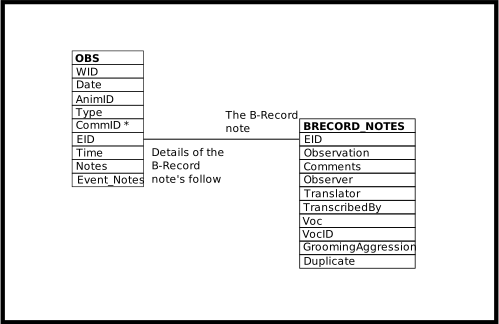
BREC_NOTES_VIEW
Columns of the BREC_NOTES_VIEW View
Column |
From |
Description |
|---|---|---|
WID |
OBS.WID |
Identifier of the related WATCHES row |
Date |
OBS.Date |
Date of the event |
AnimID |
OBS.AnimID |
Focal of follow, or focal of a non-existent follow, or an un-interesting AnimID |
Type |
OBS.Type |
Category of observation, often determining the data collection protocol: follow, feeding station attendance, groom scans, etc. |
CommID |
OBS.CommID |
The community identifier associated with the Date/AnimID/Type |
EID |
OBS.EID |
Identifier of the EVENTS row |
Behavior |
OBS.Behavior |
Code designating the type of event observed |
Time |
OBS.Start |
Time the B-Record note was recorded |
Observation |
A narrative account of the observation |
|
Comments |
Additional comments |
|
Observer |
Name of field assistant who recorded the notes |
|
Translator |
Name of translator |
|
TranscribedBy |
Name of person who transcribed the translation |
|
Voc |
Text to do with chimpanzee vocalizations |
|
VocID |
More text to do with chimpanzee vocalization |
|
GroomingAggression |
The English translation of the text of the observation |
|
Duplicate |
Text related to duplicate data tracking |
|
Notes |
OBS.Notes |
Textual notes on the observation for the Date/AnimID/Type |
Event_Notes |
OBS.Event_Notes |
Textual notes on the event |
Operations Allowed
None.
Footnotes
Page last generated: 2026-08-13 23:03:54 UTC
Data Modification Views
The views appearing in this section exist so that data can be more easily uploaded into the database and more easily modified. These views may also be suitable for querying.
Some exist to make the data look more like the “old” data, as it appeared in the old MS Access database. Others reproduce common query patterns, eliminating the need to connect (join) multiple tables.
View |
One row for each |
Purpose |
Tables/Views used |
|---|---|---|---|
EVENTS row, where the behavior observed is a dyadic interaction |
Simplifies querying – puts the two individuals involved in a dyadic interactions into a single row. |
||
OBS (Observations) |
EVENTS row, so one row for every observed event |
Simplifies querying – attaches a date and a AnimID, etc., to each event. |
|
EVENTS row related to a PANTGRUNTS row |
Upload pantgrunt data, reproduce “old” data |
OBS (OBservationS)
Each row represents an event that occurred. Events may be recorded as part of a follow, at the feeding station, or on some other, more ad-hoc, basis.
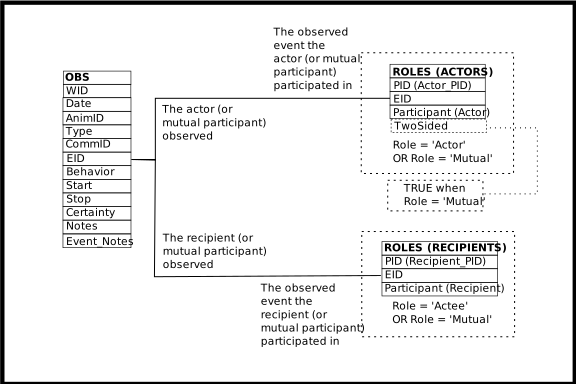
OBS rows are EVENTS rows, but extended with the date, AnimID, and other information found on WATCHES.
It is important to remember that the AnimID value presented, the OBS.AnimID column, is the value found in WATCHES.AnimID. This is not always the individual observed to have exhibited some behavior or otherwise participated in the event. That individual is found in a related ROLES row, in the ROLES.Participant column.
The OBS.AnimID column contains the chimpanzee who, in some sense, is the reason why the observers were present. Often this is the focal of the follow that was ongoing when the event occurred.[3] Feeding station attendance observations have for their OBS.AnimID value, the individual who arrived at the feeding station.[4] Other kinds of events, distinguished by their OBS.Behavior values, have other rules regarding the identity of the individual recorded in the OBS.AnimID column. See the documentation of the EVENTS table for more information.
Many events are expected to have NONE as their OBS.AnimID value, indicating that no focal or other
watch-associated individual existed. This differs from UNK,
which indicates that an individual existed in the role represented by
AnimID but the individual’s identity is unknown.
An example of this could be a pantgrunt event observed while the field
researchers were on some errand.
The OBS view is convenient when writing queries, instead of having to
JOIN EVENTS with WATCHES every time behavior is queried.
Even more convenient is to use a view, one often, ultimately, based on OBS, tailored to a specific purpose. Like the PANTGRUNTS_VIEW view, which is tailored to querying pantgrunt information.
At the time of this writing, not many of these special purpose views exist. You may, instead, need to tailor some of the examples below, or code shown in the DYADS view or PANTGRUNTS_VIEW documentation, to suit your purpose.
For example, below is a query that returns all the arrivals and departures from the feeding station attendance records, showing bananas eaten. Use this example as a template to query other events not involving dyadic interactions. (Events not involving pairs of individuals.) Queries similar to the following may report on events such as feeding bouts, location observations, other species present, colobus encounters, etc. From the example, substitute the appropriate table, FOOD_EVENTS, LOCATIONS_UTM, SPECIES_PRESENT, COLOBUS, etc., and that table’s columns, in place of the ARRIVALS_A table and its columns.
SELECT obs.wid, obs.eid, obs.date, obs.animid
     , obs.start AS arrived, obs.stop AS departed
     , arrivals_a.bananas
  FROM obs
    JOIN arrivals_a ON (arrivals_a.eid = obs.eid)
  ORDER BY obs.animid, obs.date, obs.start;
The above example queries events, arrivals at the feeding station, which involve only a single individual. These are the queries that OBS is best suited for.
The next example involves grooming, which is always recorded as being between pairs of individuals. Queries involving pairs, dyadic interactions, are often most easily queried using the DYADS view. But there is nothing wrong with using OBS to query dyadic interactions. The example below may be compared with the example presented in the DYADS view, which accomplishes the same purpose.
Grooming information is recorded in B-Record follows. So, as noted above, the OBS.AnimID is the focal of the follow, not necessarily the individual doing the grooming. To find every (unique) grooming event, from the groomings recording during B-Record interval scanning, and the individual doing the grooming, whether or not the grooming is reciprocal, the ROLES.Participant column must be used[1], as in the following query:
SELECT obs.wid, obs.eid, obs.date
     , obs.start AS time
     , roles.participant AS animid
  FROM obs
    JOIN roles ON (roles.eid = obs.eid)
    JOIN groom_scans_b ON (groom_scans_b.eid = obs.eid)
  WHERE (roles.role = 'Actor'
         OR roles.role = 'Mutual')
        AND NOT groom_scans_b.duplicate
  ORDER BY roles.participant, obs.date, obs.start;
The following query returns every day every individual was observed exhibiting a behavior[2], or observed being a recipient or otherwise involved in a behavior[5]:
SELECT obs.date, roles.participant AS animid
  FROM obs
    JOIN roles ON (roles.eid = obs.eid)
  GROUP BY roles.participant, obs.date
  ORDER BY roles.participant, obs.date;
Definition
CREATE OR REPLACE VIEW obs (
  wid
 ,date
 ,animid
 ,type
 ,commid
 ,eid
 ,behavior
 ,start
 ,stop
 ,certainty
 ,notes
 ,event_notes
  )
  AS
    SELECT
      watches.wid
     ,watches.date
     ,watches.animid
     ,watches.type
     ,watches.commid
     ,events.eid
     ,events.behavior
     ,events.start
     ,events.stop
     ,events.certainty
     ,watches.notes
     ,events.notes
     FROM watches
       JOIN events
            ON (events.wid = watches.wid);
ER Diagram
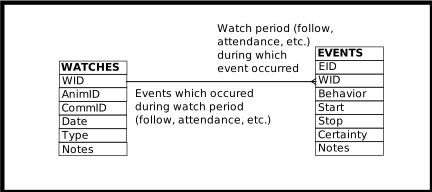
OBS
Columns of the OBS View
Column |
From |
Description |
|---|---|---|
WID |
Identifier of the related WATCHES row |
|
Date |
Date of the event |
|
AnimID |
Focal of follow, or focal of a non-existent follow, or an un-interesting AnimID |
|
Type |
Category of observation, often determining the data collection protocol: follow, feeding station attendance, groom scans, etc. |
|
CommID |
The community identifier associated with the Date/AnimID/Type |
|
EID |
Identifier of the EVENTS row |
|
Behavior |
Code designating the type of event observed |
|
Start |
Time the event started (inclusive) |
|
Stop |
Time the event finished (inclusive) |
|
Certainty |
Certainty of the event observation, when meaningful |
|
Notes |
Textual notes on the observation for the Date/AnimID/Type |
|
Event_Notes |
Textual notes on the event |
Operations Allowed
- INSERT
INSERTing a row into OBS inserts a row into EVENTS, and will also INSERT a row into WATCHES if no row already exists that matches the data supplied.
If a WID is supplied, the identified WATCHES table row must already exist.
If a WID is not supplied, the Date, AnimID, and Type columns must be supplied. Their values are matched to existing database content. If an existing WATCHES row matches, the new EVENTS row is related to the WATCHES row so discovered.
In either case, whether or not a WID is supplied, when a matching WATCHES row exists the (non-
NULL) data values supplied must match the values that already exist.The WID and EID columns do not have their values inserted into new rows. If non-
NULLvalues are supplied for these columns they must match the values already existing in, or inserted into, the database.- UPDATE
UPDATEing an OBS row updates the underlying tables.
- DELETE
Deleting an OBS row deletes the underlying EVENTS row. If the underlying WATCHES row then has no related EVENTS rows, it too is deleted.
Footnotes
Page last generated: 2026-08-13 23:03:54 UTC
DYADS
Each row represents a dyadic interaction between two individuals. Having both individuals appear in one row can make the data easier to work with.
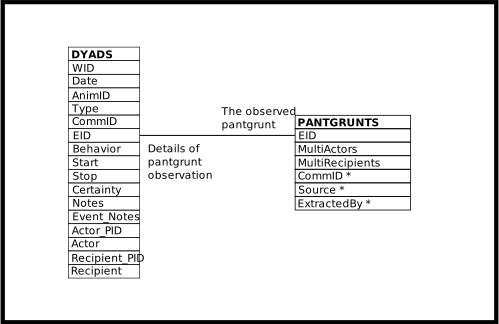
This view extends the OBS view with columns for the individual performing the action and the individual receiving the action. It puts the individual performing an action and the individual receiving the action in separate columns of one row.[1]
The DYADS view can be a core component when querying dyadic
interactions.
Having said that, instead of copying and altering the example DYADS
query given below, it may be best to alter and use the
PANTGRUNTS_VIEW‘s SELECT statement.
It uses DYADS to supply the date, time, and participants and adds to
that the detailed data on pantgrunts found in PANTGRUNTS.
Queries similar to the SELECT statement found within the
PANTGRUNTS_VIEW definition may often be the simplest way to report
on other behaviors recorded as dyadic interactions – groomings,
matings, aggressions, etc.
The Style column indicates whether the action is directed, mutual, or of unknown direction. The possible values and their meaning are:
directedThe individual designated in the Actor column performed the action upon the individual designated in the Recipient column.
mutualThe action was mutual. There is no meaning to the placement of the interacting individuals into the Actor and Recipient columns.
unknownWhich individual performed the action, and whether it was mutual or not, is unknown. There is no meaning to the placement of the interacting individuals into the Actor and Recipient columns.
The following example finds every (unique) grooming event, from the groomings recording during B-Record interval scanning, and the individual doing the grooming, whether or not the grooming is reciprocal:
SELECT dyads.wid, dyads.eid, dyads.date
     , dyads.start AS time
     , dyads.actor AS animid
  FROM dyads
    JOIN groom_scans_b ON (groom_scans_b.eid = dyads.eid)
  WHERE (dyads.style = 'directed'
         OR dyads.style = 'mutual')
        AND NOT groom_scans_b.duplicate
  ORDER BY dyads.actor, dyads.date, dyads.start;
The above example produces the same output as the grooming query example presented in the OBS documentation.
Again, for another use of the DYADS view, see the PANTGRUNTS_VIEW documentation. It joins the DYADS view with the PANTGRUNTS table to provide a more-or-less complete report on pantgrunt data.
Definition
CREATE OR REPLACE VIEW dyads (
  wid
 ,date
 ,animid
 ,type
 ,commid
 ,eid
 ,behavior
 ,start
 ,stop
 ,certainty
 ,actor_pid
 ,actor
 ,recipient_pid
 ,recipient
 ,style
 ,notes
 ,event_notes
  )
  AS
    SELECT
      obs.wid
     ,obs.date
     ,obs.animid
     ,obs.type
     ,obs.commid
     ,obs.eid
     ,obs.behavior
     ,obs.start
     ,obs.stop
     ,obs.certainty
     ,actors.pid AS actor_pid
     ,actors.participant AS actor
     ,recipients.pid AS recipient_pid
     ,recipients.participant AS recipient
     ,CASE
        WHEN actors.role = 'Actor' THEN
          'directed'
        WHEN actors.role = 'Mutual' THEN
          'mutual'
        ELSE
          'unknown'
      END AS style
     ,obs.notes
     ,obs.event_notes
     FROM obs
       JOIN roles AS actors
            ON (actors.eid = obs.eid
                AND (actors.role = 'Actor'
                     OR actors.role = 'Mutual'
                     OR actors.role = 'UNKPair'))
       JOIN roles AS recipients
            ON (recipients.eid = obs.eid
                AND (recipients.role = 'Actee'
                     OR recipients.role = 'Mutual'
                     OR recipients.role = 'UNKPair'))
     WHERE (actors.role = 'Actor'
            OR -- Without further conditions, when dyads are mutual,
               -- the two individuals appear as 4 rows: paired, paired
               -- in reverse order, and each matched with themselves.
               -- Assure consistent placement, among query executions,
               -- in the actor or recipient columns.
               actors.pid < recipients.pid);
ER Diagram
DYADS
Columns of the DYADS View
Column |
From |
Description |
|---|---|---|
WID |
Identifier of the related WATCHES row |
|
Date |
Date of the event |
|
AnimID |
Focal of follow, or focal of a non-existent follow, or an un-interesting AnimID |
|
Type |
Category of observation, often determining the data collection protocol: follow, feeding station attendance, groom scans, etc. |
|
CommID |
The community identifier associated with the Date/AnimID/Type |
|
EID |
Identifier of the EVENTS row |
|
Behavior |
Code designating the type of event observed |
|
Start |
Time the event started (inclusive) |
|
Stop |
Time the event finished (inclusive) |
|
Certainty |
Certainty of the event observation, when meaningful |
|
Actor_PID |
Identifier of the ROLES row containing the individual performing the action, or mutually acting |
|
Actor |
The BIOGRAPHY_DATA.AnimID of the individual performing the action, or mutually acting |
|
Recipient |
The BIOGRAPHY_DATA.AnimID of the individual receiving the action, or mutually acting |
|
Recipient_PID |
Identifier of the ROLES row containing the individual receiving the action, or mutually acting |
|
Style |
|
|
Notes |
Textual notes on the observation for the Date/AnimID/Type |
|
Event_Notes |
Textual notes on the event |
Operations Allowed
- INSERT
INSERTing a row into DYADS inserts two rows into ROLES. One row may also be inserted into EVENTS, and one may be inserted into WATCHES.
The columns EID, WID, AnimID, Date, Type, Behavior, Start, and Stop may all be used, in the various combinations described below, to relate the new ROLES rows to existing EVENTS rows, or to create new EVENTS and WATCHES rows when they do not already exist.
If an EID is supplied, that is all that is required. The identified EVENTS row must already exist.
If an EID is not supplied, the columns WID, AnimID, Date, Type, Behavior, Start, and Stop are used to query OBS to discover if a matching EVENTS row exists or if there is no match and new one must be inserted. The Behavior, Start, and Stop columns must be supplied in this case.
If a WID is supplied it is used, along with Behavior, Start, and Stop, to match against database content. If a WID is not supplied, the AnimID, Date, and Type columns must be supplied. Then they are used, along with Behavior, Start, and Stop, to match against database content.
If no match is found, a row is inserted into OBS. This means the rules regarding what data must be supplied when INSERTing into OBS, and when OBS re-uses existing rows or creates new rows, also apply to DYADS.
If an existing EVENTS row matches, the new ROLES rows are related to the EVENTS row so discovered. Otherwise they are related to the newly created EVENTS row.
When existing rows are found in the database, all (non-
NULL) data values supplied must match the data values that already exist.The WID, EID, Actor_PID, and Recipient_PID columns do not have their values inserted into new rows. If non-
NULLvalues are supplied for these columns they must match the values already existing in, or inserted into, the database.- UPDATE
UPDATEing the DYADS view updates the underlying tables, as expected.
- DELETE
DELETEing rows from the DYADS view deletes rows from the underlying tables.
Rows are always deleted from ROLES, and may be deleted from EVENTS and WATCHES as well.
If, after deletion of the ROLES rows, there are no ROLES rows related to the EVENTS row (that is, the EVENTS row which was related to deleted ROLES rows), the EVENTS row is deleted.
If, after deletion of the EVENTS row, there are no EVENTS rows related to the WATCHES row (that is, the WATCHES row which was related to the deleted EVENTS row), the WATCHES row is deleted.
Note that EVENTS rows almost always have related rows on another table, and an EVENTS row cannot be deleted if it has a related row. For example, pantgrunt events will have a related row on PANTGRUNTS. To delete a pantgrunt event, first delete the PANTGRUNTS row and then delete the DYADS row.
To make this process easier, there may be a view available. For example, the PANTGRUNTS_VIEW deletes rows from the PANTGRUNTS table before deleting rows from DYADS.
Footnotes
Page last generated: 2026-08-13 23:03:54 UTC
PANTGRUNTS_VIEW
Each row represents a dyadic pantgrunt interaction between two individuals. Rows resemble the MS Access database structure, which may make the data easier to work with.
The view puts the individual performing the pantgrunt and the individual receiving the pantgrunt in separate columns of one row.
Use the PANTGRUNTS_VIEW as a template to query other events involving
dyadic interactions between individuals.
Queries similar to the SELECT statement found within the
PANTGRUNTS_VIEW definition, below, may report on behaviors such as
groomings, matings, aggressions, etc.
In the SELECT code below, substitute the appropriate table,
GROOMINGS, MATINGS, AGGRESSIONS, etc., and that table’s columns,
in place of the PANTGRUNTS table and its columns.
Execute your new SELECT statement.
(Cutting and pasting your SELECT statement into the code below
creates a new view.
Probably not the desired outcome.)
The Style column indicates whether the pantgrunting was directed or mutual.
The values of Style are those of the DYADS.Style column, although given
the nature of the pantgrunt data the only Style values that can occur
are directed and mutual.
The documentation of the DYADS view contains more detail.
Definition
CREATE OR REPLACE VIEW pantgrunts_view (
  date
 ,animid
 ,time
 ,actor
 ,recipient
 ,multiactors
 ,multirecipients
 ,style
 ,commid
 ,pg_commid
 ,source
 ,enteredby
 ,notes
 ,event_notes
  -- Administrative information
 ,type
 ,wid
 ,eid
 ,actor_pid
 ,recipient_pid
  )
  AS
    SELECT
      dyads.date AS date
     ,dyads.animid AS animid
     ,dyads.start AS time
     ,dyads.actor AS actor
     ,dyads.recipient AS recipient
     ,pantgrunts.multiactors AS multiactors
     ,pantgrunts.multirecipients AS multirecipients
     ,dyads.style AS style
     ,dyads.commid AS commid
     ,pantgrunts.commid AS pg_commid
     ,pantgrunts.source AS source
     ,pantgrunts.enteredby AS enteredby
     ,dyads.notes AS notes
     ,dyads.event_notes AS event_notes
     ,dyads.type AS type
     ,dyads.wid AS wid
     ,dyads.eid AS eid
     ,dyads.actor_pid AS actor_pid
     ,dyads.recipient_pid AS recipient_pid
     FROM dyads
       JOIN pantgrunts
            ON (pantgrunts.eid = dyads.eid);
ER Diagram
PANTGRUNTS_VIEW
Columns of the PANTGRUNTS_VIEW View
Column |
From |
Description |
|---|---|---|
Date |
Date of pantgrunt |
|
AnimID |
Focal of follow, or focal of a non-existent follow, or an un-interesting AnimID |
|
Time |
Time of pantgrunt |
|
Actor |
The BIOGRAPHY_DATA.AnimID of the individual pantgrunting, or mutually pantgrunting |
|
Recipient |
The BIOGRAPHY_DATA.AnimID of the individual receiving the pantgrunt, or mutually pantgrunting |
|
MultiActors |
Boolean, |
|
MultiRecipients |
Boolean, |
|
Style |
|
|
CommID |
The community identifier associated either with the follow or with the ad-hoc recording of the pantgrunt |
|
PG_CommID |
The community identifier associated with the record of the pantgrunt |
|
Source |
Code for the source of the pantgrunt information |
|
Notes |
Textual notes on the follow or the ad-hoc observation of the pantgrunt |
|
Event_Notes |
Textual notes on the pantgrunt event |
|
EnteredBy |
Code for the person who extracted the pantgrunt information from the written records |
|
Type |
Type, reporting whether or not the pantgrunt was observed during a follow |
|
WID |
Identifier of the related WATCHES row |
|
EID |
Identifier of the related EVENTS and PANTGRUNTS rows |
|
Actor_PID |
Identifier of the ROLES row containing the individual performing the pantgrunt, or mutually pantgrunting |
|
Recipient_PID |
Identifier of the ROLES row containing the individual receiving the pantgrunt, or mutually pantgrunting |
Operations Allowed
Internally, to manipulate the content of the the EVENTS, WATCHES, and ROLES tables, operations done on the PANTGRUNTS_VIEW do the equivalent operation on DYADS. This means the rules regarding what data must be supplied when INSERTing into DYADS, and when DYADS re-uses existing rows or creates new rows, also apply to PANTGRUNTS_VIEW.
This also means errors in the data supplied to the PANTGRUNTS_VIEW are reported by the DYADS view, as well as by the underlying tables. This impacts the text of the error messages presented to the user. In particular, the PANTGRUNTS_VIEW.Time column is used to supply the DYADS.Start and DYADS.Stop values. So errors involving the PANTGRUNTS_VIEW.Time column will be reported as a problem with either the DYADS.Start or DYADS.Stop column.
INSERT
INSERTing a row into the PANTGRUNTS_VIEW inserts a row into PANTGRUNTS and two rows into into ROLES. One row may be inserted into EVENTS, and one may be inserted into WATCHES.
The columns EID, WID, AnimID, Date, and Time may all be used, in the various combinations described in the DYADS documentation, to relate new PANTGRUNTS and ROLES rows to existing EVENTS rows, or to create new EVENTS and WATCHES rows when they do not already exist.
If an existing EVENTS row matches, the new PANTGRUNTS row and the new ROLES rows are related to the EVENTS row so discovered. Otherwise they are related to the newly created EVENTS row.
When existing rows are found in the database, all (non-
NULL) data values supplied must match the data values that already exist.As with the DYADS view, the WID, EID, Actor_PID, and Recipient_PID columns do not have their values inserted into new rows. If non-
NULLvalues are supplied for these columns they must match the values already existing in, or inserted into, the database.
- UPDATE
UPDATEing the PANTGRUNTS_VIEW view updates the underlying tables, as expected.
- DELETE
DELETEing rows from the PANTGRUNTS_VIEW view deletes rows from the underlying tables.
Rows are always deleted from PANTGRUNTS and ROLES, and may be deleted from EVENTS and WATCHES as well.
The process of deleting rows from ROLES, EVENTS, and WATCHES is delegated to the DYADS view. See the documentation of the DYADS view for further detail.
Page last generated: 2026-08-13 23:03:54 UTC
Footnotes
Page last generated: 2026-08-13 23:03:54 UTC
Data Tables
The tables listed here come from primary data sources, in contrast to the tables that are automatically constructed and are therefore the result of at least a rudimentary analytical process.
AGGRESSIONS
Each row, taken together with the related EVENTS row, represents an aggression event recording during a follow. Aggressions are recorded as dyadic pairs.
When there are multiple individuals, whether aggressor or recipient,
involved in simultaneous aggressive behavior, there should be multiple
rows in the AGGRESSIONS table.
There should be one row for each dyad.
When multiple individuals are involved in aggressive behavior this is
flagged in the MultiAggressors and
MultiRecipients columns.
The system generates a warning when either of these columns are TRUE
and there are not multiple dyads present, having identical follow and
time information, and sharing one of the individuals involved.
Caution
The system’s design cannot distinguish between multiple multi-party aggression events that are recorded as part of a single follow and occur at a given time, and a single, larger, multi-party aggression event recorded in the given follow at the given time.[1] [2]
The related EVENTS row must be an aggression event; it must have an
EVENTS.Behavior value of AGG.
This related EVENTS row supplies the time of the aggression and
relates to the follow, and the ROLES role related to the event
supplies information on the individuals involved.
The system will generate a warning if the community of the follow is not the community associated with the aggression event. This means, if the AGGRESSIONS.CommID is not the WATCHES.CommID of the follow.
For further information, including additional data integrity rules, see the documentation of the EVENTS table.
The DYADS view is useful when querying AGGRESSIONS.
SELECT dyads.wid, dyads.type
     , dyads.eid
     , dyads.actor_pid, dyads.recipient_pid
     , dyads.date
     , dyads.animid AS focal
     , dyads.commid AS followcommid
     , dyads.start AS time
     , dyads.certainty
     , dyads.actor, dyads.recipient
     , dyads.style
     , aggressions.decided
     , aggressions.multiaggressors
     , aggressions.multirecipients
     , aggressions.badobs
     , aggressions.bristle
     , aggressions.display
     , aggressions.chase
     , aggressions.contact
     , aggressions.vocal
     , aggressions.severity
     , aggressions.commid AS aggressionscommid
     , aggressions.extractedby
     , dyads.notes
     , dyads.event_notes
     , aggressions.aggressorbehavior
     , aggressions.recipientbehavior
     , aggressions.fullaccount
  FROM dyads
    JOIN aggressions
         ON (aggressions.eid = dyads.eid)
  WHERE dyads.behavior = 'AGG'
  ORDER BY dyads.actor, dyads.date, dyads.start
         , dyads.recipient, dyads.eid;
EID (Event ID)
The EVENTS.EID identifying the aggression event. A unique, automatically generated, positive integer which serves to identify the row. The value of this column cannot be changed. The related event contains information on the time of the aggression and is related to the participants in the aggression event.
This column may not be NULL.
Decided
A boolean, TRUE when there was a clear winner or loser.
FALSE when there was not, or when there is no data.
See the AGGRESSION_EVENT_LOG table for information as to whether or
not this column contains useful information.
This column may not be NULL.
MultiAggressors
A boolean, whether or not there were multiple aggressors.
True when there were multiple aggressors.
False when there were not multiple aggressors. This column may not be NULL.
MultiRecipients
A boolean, whether or not there were multiple recipients of
aggression.
True when there were multiple recipients of aggression.
False when there were not multiple recipients of aggression, and
for rows representing record-keeping before the tracking of multiple
recipients was systematized.
This column is only valid from 1994 onward, with the exception of
female-to-female decided aggression. This column may not be NULL.
BadObs (BAD OBservation)
A boolean, whether or not the record of the observation was complete. This column may not be NULL.
Bristle
A boolean, whether or not the one of the participants was
recorded as bristling.
True when bristling occurred.
False when bristling did not occur, and for rows representing
record-keeping before the tracking of bristling was systematized.
This column is only valid from 1994 onward. This column may not be NULL.
Display
A boolean, whether or not the one of the participants was
recorded as displaying.
True when a display occurred.
False when a display did not occur, and for rows representing
record-keeping before display tracking was systematized.
This column is only valid from 1994 onward. This column may not be NULL.
Chase
A boolean, whether or not the one of the participants was
recorded as chasing.
True when a chase occurred.
False when a chase did not occur, and for rows representing
record-keeping before the tracking of chasing was systematized.
This column is only valid from 1994 onward. This column may not be NULL.
Contact
A boolean, whether or not the one of the participants was
recorded as contacting.
True when contact occurred.
False when contact did not occur, and for rows representing
record-keeping before the tracking of contact was systematized.
This column is only valid from 1994 onward. This column may not be NULL.
Vocal
A boolean, whether or not the one of the participants was
recorded as vocalizing.
True when vocalization occurred.
False when vocalization did not occur, and for rows representing
record-keeping before the tracking of vocalization was systematized.
This column is only valid from 1994 onward. This column may not be NULL.
Severity
A value indicating the severity of the aggression. AN AGG_SEVERITIES.Severity value.
This column may not be NULL.
AggressorBehavior
Text describing the behavior exhibited by the aggressor.
This is extracted from the FullAccount column.
This column may not be NULL.
RecipientBehavior
Text describing the behavior exhibited by the recipient of the aggression.
This is extracted from the FullAccount column.
This column may not be NULL.
FullAccount
Text providing an account of the aggression event.
This column may not be NULL.
CommID
The community of the follow, retained as part of the data collected on aggression for historical purposes. The COMM_IDS.CommID of the of the focal.
Note
This is not the canonical source of information on the focal’s community at the time of observation or the community under observation when the data was collected. It may, in fact, differ from the community recorded elsewhere.
Further, this column is not validated to the extent that WATCHES.CommID is validated. In particular, the COMM_IDS.Studied column is not examined to ensure that an individual is not observed in a study community before their BIOGRAPHY_DATA.EntryDate.
This column exists because of the way the community was recorded in the old MS Access database. There, the community was recorded twice, once in the follow and again with the record of aggression.
This column exists so no information was lost in the conversion of the MS Access data to SokweDB. At some point in the future, perhaps when all inconsistencies between the value of this column and the community information recorded elsewhere are resolved, this column may be removed from this table.
This column may not be NULL.
Extractedby
Code for the person who extracted the aggression information from
the written records and prepared it for data entry into the
database.
A PEOPLE.Person value. This column may not be NULL.
Page last generated: 2026-08-13 23:03:54 UTC
ARRIVALS
Each row, taken together with the related EVENTS row, represents
an arrival or departure of an individual from the observation
conducted during a follow.
The related EVENTS row must be an arrival event; it must have an
EVENTS.Behavior value of ARR.
This related EVENTS row supplies arrival and departure time values,
and the ROLES role related to the event supplies information on the
individual arriving and departing.
The system will generate a warning when there are 2 different arrival
events for the same arriving individual, in the same follow, that have
an EVENTS.Certainty of 1, with
EVENTS.Start to EVENTS.Stop intervals that
overlap, endpoints included.
Arrivals that are not certain, those with an EVENTS.Certainty that is not 1, may overlap
each other, as well as arrivals that are certain, without any warning.
Care should be taken when using uncertain arrivals.
The system will generate a warning when there are 2 different arrival events for the same arriving individual, in the same follow, that have identical EVENTS.Certainty values, which span a contiguous time period. Spanning a contiguous time period means that the EVENTS.Stop value of the first arrival is one minute less than the EVENTS.Start value of second other interval, so that the first arrival stops just when the second starts. .. If necessary this warning can be adjusted so that it only reports .. on arrivals that are certain.
For further information, including additional data integrity rules, see the documentation of the EVENTS table.
The OBS view is useful when querying ARRIVALS.
SELECT obs.wid, obs.type
     , obs.eid
     , roles.pid
     , obs.date
     , obs.animid AS focal
     , roles.participant AS arrival
     , obs.commid
     , arrivals.seq
     , obs.start AS arrived
     , obs.stop AS departed
     , obs.certainty
     , arrivals.neststart
     , arrivals.nestend
     , arrivals.swelling
     , arrivals.datasource
     , arrivals.updated
     , obs.notes
     , obs.event_notes
  FROM obs
    JOIN arrivals
         ON (arrivals.eid = obs.eid)
    JOIN roles
         ON (roles.eid = obs.eid)
  WHERE obs.behavior = 'ARR'
  ORDER BY roles.participant, obs.date, obs.start, obs.stop
         , obs.eid;
EID (Event ID)
A unique, automatically generated, positive integer which serves to identify the row. The value of this column cannot be changed. The EVENTS.EID identifying the arrival event that is related to the arrival and departure. The related event contains information on arrival and departure times.
This column may not be NULL.
Seq (Sequence)
An integer indicating the order in which an individual arrived, in the sequence of arrivals of a given individual, in a given follow.
This column records the ordering of the arrivals of a single
individual, within a given follow.
The values start with 1 and increase without gaps, each successive
arrival of an individual incrementing by one the value of the previous
arrival.
The order is determined by, first, the time the individual arrived in a given follow. Ties are broken by the time the individual left the follow. Ties remaining are broken by the time the row was inserted into the system, meaning by the EID value, or, in the case of data imported from the old MS Access database, by that database’s FOLLOW_ARRIVAL.FA_seq_num column’s value, which determined the EID value sequencing.
The value of this column is automatically maintained by the system.
Values inserted into this column must be NULL (or the column may
be omitted from the INSERT statement).
The value of this column cannot be changed.
The value of this column is never NULL.
NestStart (in Nest at the Start time)
A boolean, whether or not the related participant, related
through EVENTS and ROLES, was in a nest at the time of arrival. This column may not be NULL.
NestStart (in Nest at the Stop time)
A boolean, whether or not the related participant, related
through EVENTS and ROLES, was in a nest at the time of departure. This column may not be NULL.
Swelling
A CYCLE_STATES.Code value indicating the amount of the arriving individual’s sexual swelling.
All individuals, female or not, have a value in this column, to avoid tri-valued logic and therefore simplify querying. The value used for males and other non-cycling individuals is un-interesting.
This column may not be NULL.
DataSource (Data Source)
An ARRIVAL_SOURCES.Code value designating the
document or procedure that was used to determine the arrival and
departure information. This column may not be NULL.
Updated
Date the row was last updated.
This date may not be before 1960-07-14.
This column may be NULL when there is no information on the date
last updated.
Page last generated: 2026-08-13 23:03:54 UTC
ARRIVALS_A
Each row represents an interval during which a single chimpanzee was present at the feeding station.
The system generates a warning when the sexual swelling information associated with an individual violates what is expected:
Females should not be assigned the swelling code reserved for males
(and individuals of unknown sex).
The system will generate a warning if the n/a code
is assigned to a female, an individual with a BIOGRAPHY_DATA.Sex value of F.
Males (and individuals of unknown sex) should always be assigned the
swelling code reserved for them.
The system will generate a warning if any code other than the
n/a code is assigned to an individual who is not a
female, an individual with a BIOGRAPHY_DATA.Sex
value that is not F.
The system will generate a warning when females that are not
adolescent are assigned a code that indicates an adolescent swelling.
This means that, except for the unknown female individuals, those with
a BIOGRAPHY_DATA.AnimID of
MGF, or MGF2, or
MGF3, the system will generate a warning if the
U code is assigned to a female less than
5 years old or more
than 14 years old.
The system will generate a warning if females that are not yet
adolescent, or so old that menopause is almost assured, are assigned codes
that indicate adult female swelling.
Except for the unknown female individuals, those with a
BIOGRAPHY_DATA.AnimID of MGF,
or MGF2, or MGF3, the system
will generate a warning if a code that is not one of
n/a, U,
0, and MISS is assigned to a
female that is at least 8
years old and less than or equal to
60 years old.
The Recorder value may not be the same as the Observer2 value.
The OBS view is useful when querying ARRIVALS_A.
SELECT obs.wid, obs.type
     , obs.eid
     , roles.pid
     , obs.date
     , obs.animid
     , roles.participant AS arrival
     , obs.commid
     , arrivals_a.seq
     , obs.start AS arrived
     , obs.stop AS departed
     , arrivals_a.swelling
     , arrivals_a.bananas
     , arrivals_a.arrivaldegree
     , arrivals_a.departuredegree
     , arrivals_a.recorder
     , arrivals_a.observer2
     , arrivals_a.cycleold
     , obs.notes
     , obs.event_notes
  FROM obs
    JOIN arrivals_a
         ON (arrivals_a.eid = obs.eid)
    JOIN roles
         ON (roles.eid = obs.eid)
  WHERE obs.behavior = 'sdb_arrivals_a'
  ORDER BY roles.participant, obs.date, obs.start, obs.stop
         , obs.eid;
EID (Event ID)
The EVENTS.EID identifying the feeding station arrival event that is related to the arrival and departure. A unique, automatically generated, positive integer which serves to identify the row. The value of this column cannot be changed. The related event contains information on arrival and departure times.
This column may not be NULL.
Seq (Sequence)
An integer indicating the order in which an individual arrived, in the sequence of arrivals of a given individual, in a given feeding station attendance event. This means the order of the arrival, per individual, per day.
This column records the ordering of the arrivals of a single individual, within a given given day, at the feeding station.
The values should start with 1 and increase without gaps, each
successive arrival of an individual incrementing by one the value of
the previous arrival.
The system will generate a warning, per condition, if either of these
2 conditions are not met.
This column may not be NULL.
Swelling
A code indicating the degree of the individual’s sexual swelling.
A CYCLE_STATES.Code value.
This column may not be NULL.
Bananas
An integer, the number of bananas that were given to the
individual.
This value must be a positive number, less than or equal to
12.
This column may be NULL when there is no record of whether or not
bananas were given.
ArrivalDegree
The direction from which the individual arrived, on a 360 degree
circle with 0 being north.
The value of this column must be an integer between 0
and 359, inclusive.
This column may be NULL when there is no record of the direction
from which the individual arrived.
DepartureDegree
The direction toward which the individual traveled when they
departed, on a 360 degree circle with 0 being north.
The value of this column must be an integer between 0
and 359, inclusive.
This column may be NULL when there is no record of the direction
toward which the individual traveled when they departed.
Recorder
The observer who recorded the arrivals_a record.
A PEOPLE.Person value. This column may not be NULL.
Observer2
A second observer who was present when the arrivals_a was recorded.
A PEOPLE.Person value.
This column may not be NULL.
CycleOld
Text comprising the initial digitization of information related to the individuals sexual swelling.
This column may be empty text. It need not contain characters, but it
may not contain only whitespace characters. This column may not be NULL.
Page last generated: 2026-08-13 23:03:54 UTC
BIOGRAPHY_DATA
Each row represents a chimpanzee. This table contains one row for
each chimpanzee on which data has ever been recorded (in SokweDB).
Additional rows exist for various codes used when a chimpanzee is
partially or entirely unidentified, such as UNK or
MGF. An additional NONE row is used
when it does not make sense to record an individual. BIOGRAPHY_DATA contains the basic demographic data of
individual chimpanzees.
A mother must be female; the Sex must be F
(female) of the BIOGRAPHY_DATA row identified by an offspring’s
MomID.
A father must be male; the Sex must be M (male)
of the BIOGRAPHY_DATA row identified by an offspring’s DadID.
A female cannot be too young when giving birth. The difference between the mother’s maximum birthdate, the BDMin of the BIOGRAPHY_DATA row identified by an offspring’s MomID, and the offspring’s minimum birthdate, the BDMin of the offspring, cannot be less than 10 years.
A male cannot be too young when becoming a parent. The difference between the father’s maximum birthdate, the BDMin of the BIOGRAPHY_DATA row identified by an offspring’s DadID, and the offspring’s minimum birthdate, the BDMin of the offspring, cannot be less than 10 years.
When the individual is not the first recorded offspring of their
mother, based on the BirthDate of all recorded maternal
siblings, the FirstBorn value must be
N (not first born).
The date the individual entered the study (EntryDate) may not be before the individual’s birth date (BirthDate).
The date the individual left the study (DepartDate) may not be before the date the individual entered the study (EntryDate).
The maximum age of an individual, the time span between the
individual’s earliest possible birth date (BDMin) and their
DepartDate, may not be more than 70
years, unless the AnimID is one of:
UNK, NONE, MGM,
MGF, MGF2, or
MGF3.
DadStatus must be NULL when DadID is NULL,
otherwise DadStatus must not be NULL.
DadIDPub must be NULL when DadID is NULL,
otherwise DadIDPub must not be NULL.
The row defining the unknown individual, the BIOGRAPHY_DATA row having
an AnimID value of UNK, is
special and cannot be altered or deleted by ordinary
user accounts.
Also special to the system are the other
unknown individual AnimID codes:
MGM, MGF,
MGF2, and MGF3.
AnimID (Animal IDentifier)
A short sequence of characters which uniquely identifies the chimpanzee,
or a code, like NONE, that has a special meaning to SokweDB. Each value stored in this column must be unique. This column may not be NULL. This column may not be empty text, its textual values must contain
characters. This column may not contain whitespace characters. The value of this column cannot be changed.
AnimIDNum (Animal IDentifier Number)
A unique positive integer used to identify the chimpanzee in SIV papers. Each value stored in this column must be unique. This column may be NULL.
These are the former Ch numbers from Beatrice Hahn’s lab.
AnimName (Animal Name)
The name of the chimpanzee. Each value stored in this column must be unique. This column may not be empty text, its textual values must contain
characters and must contain at least one non-whitespace
character. This column may not be NULL.
BirthComm (Birth Community)
The COMM_IDS.CommID of the community in which the
individual was born. This column may be NULL when the birth
community is unknown.
BCCertainty (Birth Community Certainty)
A code indicating the certainty of the BirthComm, the
certainty of the birth community. Only 2 values are allowed,
C when the birth community is certain and
U when the birth community is uncertain. This column may not be NULL.
Sex
A code indicating the sex of the individual. Only 3 values are allowed:
M for males, F for females, and U
when the sex is unknown. This column may not be NULL.
MomID (Mother’s AnimID)
The AnimID of the individual’s mother, when known. This column may be NULL.
DadID (Father’s AnimID)
The AnimID of the individual’s father, or NULL when not known.
This column may be NULL.
DadStatus
A code indicating the status of the paternity assignment.
A DAD_STATUSES.Status value. This column may be NULL.
DadIDPub (Publication of Paternity)
Citation of the publication where paternity was declared, or ‘Unknown’ when
paternity has not yet been published. This column may not be empty text, its textual values must contain
characters and must contain at least one non-whitespace
character. This column may be NULL.
FirstBorn
A code indicating whether the individual is the mother’s first
born. One of 3 values are allowed: Y means known to
be the first born, N means known not to be the
first born, and U means that the firstborn
status is unknown. This column may not be NULL.
BirthDate
The individual’s (often estimated) birth date. This column may not be NULL. This value may not be before 1900-01-01 or after
the current date.
BDMin (Minimum Birth Date)
The earliest possible birthdate. If born into the study, this is the last
date prior to birth that the mother was seen without the infant. This column may not be NULL.
This value may not be before 1900-01-01 or after
the current date.
BDMin (Maximum Birth Date)
The latest possible birthdate. If born into the study, this is date of the
first sighting of the infant. This column may not be NULL. This value may not be before 1900-01-01 or after
the current date.
BDDist (Birth Date Distribution)
The probability distribution of the likelihood of birth between
BDMin and BDMax. Only one of 2 values are
allowed, N when it is most likely that the
actual birthdate is closer to BirthDate than to
BDMin or BDMax, or U
when any birthdate between BDMin and BDMax
is equally likely. This column may not be NULL.
EntryDate
The date the individual entered the study; the date first seen. This column may not be NULL.
EntryType
An ENTRYTYPES.EntryType code indicating how the
individual entered the study. This column may not be NULL.
DepartDate
The date the individual was last in the study, or the date the
individual was last seen. For living individuals this is the date
of last census. This column may not be NULL.
DepartType
A DEPARTTYPES.DepartType code indicating that the
individual is still alive and under study, or how the individual
left the study. The DEPARTTYPES.DepartType
O value is special. It indicates the individual
is still alive and in the community. This column may not be NULL.
Page last generated: 2026-08-13 23:03:54 UTC
BRECORD_NOTES
Each row contains the English translation of notes that were taken at a particular time during a B-Record focal follow. The related EVENTS row contains the time of the note taking.
The EVENTS row related to each BRECORD_NOTES row must be a B-Record
translation event; it must have an EVENTS.Behavior value
of BREC.
This related EVENTS row supplies the time the note was taken.
Because this is textual data, no attempt is made to make the table’s content more than a collection of plain text.
EID (Event ID)
The EVENTS.EID identifying a BRecord translation event.
A unique, automatically generated, positive integer which serves to
identify the row. The value of this column cannot be changed.
The related event contains information on the time the textual record
was taken.
This column may not be NULL.
Observation
The (translated to English) text of the observation. A narrative account of the focal chimp’s behavior and interactions with others.
This column may not be empty text, its textual values must contain
characters and must contain at least one non-whitespace
character.
This column must not begin or end with whitespace, i.e., spaces,
tabs, etc.
This column may not be NULL.
Observer
First and last name of the field assistant(s) who recorded the
BRecord notes.
This column may be empty text. It need not contain characters, but it
may not contain only whitespace characters.
This column may not be NULL.
Translator
Name of translator.
This column may be empty text. It need not contain characters, but it
may not contain only whitespace characters.
This column may not be NULL.
TranscribedBy
Name of the person who transcribed the translation.
This column may be empty text. It need not contain characters, but it
may not contain only whitespace characters.
This column may not be NULL.
Voc
Text to do with the vocalizations made by the chimpanzees.
This column may be empty text. It need not contain characters, but it
may not contain only whitespace characters.
This column may not be NULL.
VocID
More text to do with the vocalizations made by the chimpanzees.
This column may be empty text. It need not contain characters, but it
may not contain only whitespace characters.
This column may not be NULL.
GroomingAggression
Text containing very short codes that describe the grooming and
aggression that occurred.
This column may be empty text. It need not contain characters, but it
may not contain only whitespace characters.
This column may not be NULL.
Duplicate
Text related to duplicate data tracking.
This column may be empty text. It need not contain characters, but it
may not contain only whitespace characters.
This column may not be NULL.
Page last generated: 2026-08-13 23:03:54 UTC
COLOBUS (COLOBUS encounters)
Each row, taken together with the related EVENTS row, represents a record of a colobus monkey/chimpanzee encounter. One recorded during a follow.
The related EVENTS row must be a colobus monkey encounter event; it
must have an EVENTS.Behavior value of COL.
This related EVENTS row supplies the start and stop times for the
encounter, as well as comments and/or a description of the encounter.
There should be only one colobus monkey encounter event occurring at any given time, in any given follow. This means that the system will generate a warning when there are two EVENTS rows with the same WID value and the Start of the first is equal to or before the Start of the second, and the Stop of the first is equal to or after the Start of the second.
If the FocalMaleNumKills column is not NULL, and not
0, the focal of the follow should be male.
The system will generate a warning when there are kills recorded for
the focal male and the focal is not male – when the
BIOGRAPHY_DATA.Sex column has a value other than
M.
If the FocalFemaleNumKills column is not NULL, and not
0, the focal of the follow should be female.
The system will generate a warning when there are kills recorded for
the focal female and the focal is not female – when the
BIOGRAPHY_DATA.Sex column has a value other than
F.
The BIOGRAPHY_DATA.AnimIDs in the Hunters column’s text should be separated by commas. The system will generate a warning if the comma-separated components of this column are not BIOGRAPHY_DATA.AnimID values.
The BIOGRAPHY_DATA.AnimIDs in the Killers column’s text should be separated by commas. The system will generate a warning if the comma-separated components of this column are not BIOGRAPHY_DATA.AnimID values.
For further information, including additional data integrity rules, see the documentation of the EVENTS table.
The OBS view is useful when querying COLOBUS.
SELECT obs.wid, obs.type
     , obs.eid
     , obs.date
     , obs.animid AS focal
     , obs.commid
     , obs.start
     , obs.stop
     , colobus.startmap
     , colobus.hunt
     , colobus.hunters
     , colobus.huntcert
     , colobus.malehunt
     , colobus.femalehunt
     , colobus.focalhunt
     , colobus.focalhuntcert
     , colobus.kill
     , colobus.killers
     , colobus.numkills
     , colobus.malenumkills
     , colobus.femalenumkills
     , colobus.focalmalenumkills
     , colobus.focalfemalenumkills
     , colobus.victimsages
     , colobus.infantskilled
     , colobus.juvenileskilled
     , colobus.adultskilled
     , colobus.noagekilled
     , colobus.groupsize
     , colobus.details
     , colobus.vegetation
     , colobus.failuredetails
     , colobus.description
     , obs.notes
     , obs.event_notes
  FROM obs
    JOIN colobus
         ON (colobus.eid = obs.eid)
  WHERE obs.behavior = 'COL'
  ORDER BY obs.animid, obs.date, obs.start, obs.stop
         , obs.eid;
EID (Event ID)
A unique, automatically generated, positive integer which serves to identify the row. The value of this column cannot be changed. The EVENTS.EID identifying the colobus monkey encounter event. The related event contains information on encounter start and stop times, and notes.
This column may not be NULL.
StartMap (START time rounded to MAPping interval)
The start time of the encounter rounded to the nearest 15 minute interval. Rounding is down, when the start time is after the 15 minute interval by 7 minutes or less. Otherwise rounding is up.
The goal is to have a time which corresponds to the location times of the LOCATIONS_PAPER rows. [1] In some cases, changes were made based on notes.
This column may not be NULL.
Hunt (was there a HUNT?)
A boolean, TRUE when at least one chimpanzee hunted. This column may not be NULL.
Hunters
Text listing the BIOGRAPHY_DATA.AnimIDs of the individuals that were seen to climb in pursuit of monkeys.
This column may be empty text. It need not contain characters, but it
may not contain only whitespace characters.
This column may not be NULL.
HuntCert (HUNT CERTantity)
A boolean, TRUE when the notes were of sufficient detail to
determine if at least one chimp climbed in pursuit.
This column may not be NULL.
MaleHunt (did a MALE HUNT?)
A boolean, TRUE when a male (of any age) climbed in pursuit.
This column may not be NULL.
FemaleHunt (did a FEMALE HUNT?)
A boolean, TRUE when a female (of any age) climbed in pursuit.
This column may not be NULL.
FocalHunt (did the FOCAL HUNT?)
A boolean, TRUE when the focal chimpanzee climbed in pursuit.
This column may not be NULL.
FocalHuntCert (is it CERTain the FOCAL HUNTed?)
A boolean, TRUE when the notes were of sufficient detail to
determine that the focal chimp climbed in pursuit.
This column may be NULL when there is no information.
Kill
A boolean, TRUE when a monkey was killed by any chimpanzee.
This column may not be NULL.
Killers
Text listing the BIOGRAPHY_DATA.AnimIDs of the individuals that were seen to kill a monkey.
This column may be empty text. It need not contain characters, but it
may not contain only whitespace characters.
This column may not be NULL.
NumKills
The total number of colobus killed.
This column may not be NULL.
MaleNumKills
The total number of colobus killed by males.
This column may not be NULL.
FocalMaleNumKills
The total number of colobus killed by the focal male.
This column may be NULL when there is no information.
FocalFemaleNumKills
The total number of colobus killed by the focal female.
This column may be NULL when there is no information.
VictimsAges
Text recording the age of each colobus killed, if known.
This column may be empty text. It need not contain characters, but it
may not contain only whitespace characters.
This column may not be NULL.
InfantsKilled (by males)
The number of colobus infants killed by males.
This column may not be NULL.
JuvenilesKilled (by males)
The number of colobus juveniles killed by males.
This column may not be NULL.
AdultsKilled (by males)
The number of colobus adults killed by males.
This column may not be NULL.
NoAgeKilled (by males)
The number of colobus for which there was no age data killed by
males.
This column may not be NULL.
GroupSize
A code indicating the size of the colobus group.
A COLOBUS_GROUP_SIZES.Size value.
This column may not be NULL.
Details (colobus troop DETAILS)
Specific information regarding the colobus troop.
This column may be empty text. It need not contain characters, but it
may not contain only whitespace characters.
This column may not be NULL.
Vegetation (details of the area’s VEGETATION)
Text consisting of specific information regarding the vegetation
type in which the encounter occurred.
This column may be empty text. It need not contain characters, but it
may not contain only whitespace characters.
This column may not be NULL.
FailureDetails (hunt FAILURE DETAILS)
Text consisting of specific information regarding why the hunt failed.
This column may be empty text. It need not contain characters, but it
may not contain only whitespace characters.
This column may not be NULL.
Description
Description of the encounter, usually copied directly from the
translation.
This column may be empty text. It need not contain characters, but it
may not contain only whitespace characters.
This column may not be NULL.
Footnotes
Page last generated: 2026-08-13 23:03:54 UTC
COMM_MEMBS
Each row represents an un-interrupted series of days during which
the given chimpanzee is a member of the given community.
The unit of time is the day; it is not possible to place any given
chimpanzee in more than one community within a single day. Leaving a community, whether to join another or
not, ends this period of community membership.
Another row in COMM_MEMBS is required to record a newer period of
community membership, whether in the same or a different community.
An individual may not be recorded in more than one community on any
given day, although there may be days during which the individual is
not placed in any community.
Further, an individual may not be placed in the same community, by
use of two COMM_MEMBS rows, on the same day.
There can be no “overlap” of COMM_MEMBS rows.
The StartDate to EndDate intervals, of all
the COMM_MEMBS rows with a given AnimID, may not
overlap.
Two COMM_MEMBS rows may not be used to place a single individual
in the same community on successive days.
Instead, combine the two COMM_MEMBS rows into one.
The StartDate of an individual with a given
CommID may not be the day after the EndDate
of a COMM_MEMBS row having the same AnimID value.
An individual may not be a member of any community before their birth date. This means, the StartDate may not be before the individual’s BIOGRAPHY_DATA.BirthDate.
An individual may be a member of their birth community before they became under study, but may not be a member of any other community until they have come under study. This means, when the CommID is not the BIOGRAPHY_DATA.BirthComm, then the StartDate may not be before the individual’s BIOGRAPHY_DATA.EntryDate.
An individual may not be a member of a community after they cease to be under study. This means, the EndDate may not be after the individual’s BIOGRAPHY_DATA.DepartDate.
The StartDate must not be after the EndDate.
CommMID (Community Memberships IDentifier)
A unique, automatically generated, positive integer which serves to
identify the row. The value of this column cannot be changed. This column may not be NULL.
AnimID (Animal IDentifier)
The BIOGRAPHY_DATA.AnimID which identifies the
chimpanzee who’s community membership is recorded. This column may not be NULL.
StartDate
The date on which the individual joined the community; the
start date, inclusive, of the interval of continuous membership. This column may not be NULL.
EndDate
The last date on which the individual was a community member; the
end date, inclusive, of the interval of continuous membership This column may not be NULL.
CommID (Community IDentifier)
The COMM_IDS.CommID identifying the community in which
the row records membership. This column may not be NULL.
StartSource
The COMM_MEMBS_SOURCES.CommMembsSource
value which identifies the data source used to determine the
StartDate. This column may not be NULL.
EndSource
The COMM_MEMBS_SOURCES.CommMembsSource
value which identifies the data source used to determine the
EndDate. This column may not be NULL.
Page last generated: 2026-08-13 23:03:54 UTC
EVENTS
Each row represents an event that occurred. Typically, events involve one or more chimpanzees. Events may be recorded during a follow, whether involving a focal or not, events may be recorded at the feeding station, or events may be recorded as ad-hoc observations such as records of pantgrunts recorded opportunistically.
Whether an event is related to a follow or to an attendance record or to something else is dependent upon the event’s Behavior code.
Each Behavior code can have a one-to-one association with a
table in the database, a table that contains additional event detail.
An AGG Behavior code is associated with the
AGGRESSIONS table.
An ARR Behavior code is associated with the
ARRIVALS table.
And so forth.
The system will generate a warning when an EVENTS row exists and there
is no related row in the table that corresponds to the row’s
Behavior code.
Each Behavior code has its own rules regarding what other information must or should be present in the database in order to retain data validity, and what each code implies about the meaning of related data. The following table lists these rules and implications:
AARR(Arrival at the feeding station)The EVENTS row must be associated with an observation that has a A-Record-like protocol. This means the WID column must reference a WATCHES row with a WATCHES.Type value of
A.The related WATCHES row should identify an individual. The system will generate a warning when the WATCHES.AnimID value is
NONE.A related row should exist on ARRIVALS_A; there should be a row on ARRIVALS_A with an ARRIVALS_A.EID value of the event’s EID. There may be at most one of these related ARRIVALS_A rows. The system will generate a warning when there is no ARRIVALS_A row related to the arrival event.
The ROLES row related to the event, the row with a ROLES.EID value equal to the EVENTS.EID value, designates the arriving/departing individual in the ROLES.Participant column. There may be at most one ROLES row related to the arrival event. The system will generate a warning when there is no ROLES row related to the arrival event.
The EVENTS.Start column contains the arrival time of the individual identified in the related ROLES row.
The EVENTS.Stop column contains the departure time of the the individual identified in the related ROLES row.
For records of attendance at the feeding station, the EVENTS.Certainty column must be
1.An individual should not be recorded as being at the feeding station more than once during any given time period. The system will generate a warning when there are overlaps in an individual’s presence at the feeding station. This means that for any given EVENTS row, with a given WID value, there should not be another EVENTS row with that WID value, with an Start value less than or equal to the given EVENTS row’s start time, when the other row’s Stop value is greater than or equal to the given EVENTS row’s start time. A similar rule applies to the given EVENTS row’s stop time. Which means, for any given EVENTS row, with a given WID value, there should not be another EVENTS row with that WID value, with an Start value less than or equal to the given EVENTS row’s stop time, when the other row’s Stop value is greater than or equal to the given EVENTS row’s stop time.
AGG(Aggression)The EVENTS row must be associated with an observation that is not a location. The related WATCHES row can be of an A-Record, a B-Record, or a Other WATCHES.Type. This means the WID column must not reference a WATCHES row with a WATCHES.Type value of
L.A related row should exist on AGGRESSIONS; there should be a row on AGGRESSIONS with an AGGRESSIONS.EID value of the event’s EID. There may be at most one of these related AGGRESSIONS rows. The system will generate a warning when there is no AGGRESSIONS row related to the aggression event.
The ROLES rows related to the event, the rows with a ROLES.EID value equal to the EVENTS.EID value, designates the individuals involved in the aggression event. The ROLES.Role code of each individual that the ROLES table relates to the aggression event describes whether that individual aggressed or was aggressed upon during the aggression event.
There should be exactly two ROLES row related to the aggression event. The only two ROLES.Role codes allowed are
ActorandActee. One of those two roles must beActorand the other must beActee. The system will generate a warning when there are not exactly two ROLES rows related to an aggression event.The two participants in an aggression event must be different individuals. This means that their ROLES.Participant values must differ.
Both the EVENTS.Start and EVENTS.Stop columns record the time of the aggression event. This means the value of the EVENTS.Start column must equal the value of the EVENTS.Stop column.
Aggressions are allowed to have no record of the time they occurred, in which case the special value of
00:00is used. See below for more detail.For aggression events, the EVENTS.Certainty column records the certainty of the identity of the recipient, that is to say, the certainty of the individual with the role of
Actee.
AGSCAN(Attendance SCAN interval Groomings)The EVENTS row must be associated with an observation that has a A-Record-like protocol. This means the WID column must reference a WATCHES row with a WATCHES.Type value of
A.The ROLES rows related to the event, the rows with a ROLES.EID value equal to the EVENTS.EID value, designates the individuals involved in the grooming event. The ROLES.Role code of each individual that the ROLES table relates to the grooming event describes whether that individual groomed or was groomed during the attendance grooming interval sampling event.
There should be exactly two ROLES row related to the attendance grooming interval sampling event. Only the codes
Actor,Actee, andMutualmay be used as ROLES.Role code values. The system will generate a warning when there are not exactly two ROLES rows related to a attendance grooming event.The two participants in a attendance grooming event must be different individuals. This means that their ROLES.Participant values must differ.
Both the EVENTS.Start and EVENTS.Stop columns record the time of the scan when the attendance grooming was observed. This means the value of the EVENTS.Start column must equal the value of the EVENTS.Stop column.
For attendance grooming interval sampling events, the EVENTS.Certainty column must be
1.The DYADS view is useful when querying attendance scan interval groomings.
Using DYADS to query attendance scan interval groomings¶SELECT dyads.wid , dyads.eid , dyads.actor_pid, dyads.recipient_pid , dyads.date , dyads.animid , dyads.commid , dyads.start AS time , dyads.actor, dyads.recipient , dyads.style , dyads.notes , dyads.event_notes FROM dyads WHERE dyads.behavior = 'AGSCAN' ORDER BY dyads.actor, dyads.date, dyads.start , dyads.recipient, dyads.eid;
ARR(Arrival)The EVENTS row must be associated with an observation that has a B-Record-like protocol. This means the WID column must reference a WATCHES row with a WATCHES.Type value of either
BorO.The related WATCHES row should identify an individual. The system will generate a warning when the WATCHES.AnimID value is
NONE.A related row should exist on ARRIVALS; there should be a row on ARRIVALS with an ARRIVALS.EID value of the event’s EID. There may be at most one of these related ARRIVALS rows. The system will generate a warning when there is no ARRIVALS row related to the arrival event.
The ROLES row related to the event, the row with a ROLES.EID value equal to the EVENTS.EID value, designates the arriving/departing individual. There must be exactly one ROLES row related to the arrival event, but only when there is a related ARRIVALS row.
The EVENTS.Start column contains the arrival time of the individual identified in the related ROLES row.
The EVENTS.Stop column contains the departure time of the the individual identified in the related ROLES row.
BREC(B-RECord note translation)The EVENTS row must be associated with an observation that has a B-Record-like protocol. This means the WID column must reference a WATCHES row with a WATCHES.Type value of either
BorO.A related row should exist on BRECORD_NOTES; there should be a row on BRECORD_NOTES with a BRECORD_NOTES.EID value of the event’s EID. There may be at most one of these related BRECORD_NOTES rows. The system will generate a warning when there is no BRECORD_NOTES row related to the B-Record note taking event.
An individual should have only one B-Record note taken at any given time. This means that the system will generate a warning when the combination of WID and Start is not unique.
There can be no ROLES rows related to the event. The concept behind this is that, even though B-Record notes are associated with an individual, the related WATCHES.AnimID, B-Record note translations are an administrative record. The focal of the B-Record follow, therefore, is not playing a particular role in some behavioral category and so there should be no row on ROLES for the individual.
Both the EVENTS.Start and EVENTS.Stop columns record the time the note was taken. This means the value of the EVENTS.Start column must equal the value of the EVENTS.Stop column.
For B-Record note taking events, the EVENTS.Certainty column must be
1.For B-Record note taking events, the EVENTS.Notes column is expected to be empty. (The expectation is that notes on the record-taking belong in the BRECORD_NOTES.Comments column.) The system will generate a warning when EVENTS.Notes is not the empty string.
COL(COLOBUS monkey encounter data)There is one row for each record of colobus monkey/chimpanzee interaction.
The EVENTS row must be associated with an observation that has a B-Record-like protocol. This means the WID column must reference a WATCHES row with a WATCHES.Type value of either
BorO.A related row should exist on COLOBUS; there should be a row on COLOBUS with an COLOBUS.EID value of the event’s EID. There may be at most one of these related COLOBUS rows. The system will generate a warning when there is no COLOBUS row related to the colobus/chimpanzee interaction.
There can be no ROLES rows related to the event.
The EVENTS.Start column contains the time the colobus monkey encounter began.
The EVENTS.Stop column contains the time the colobus monkey encounter ended. If a kill was made, this is the time that the first kill was made.
For colobus monkey events, the EVENTS.Certainty column must be
1.For colobus monkey events, the EVENTS.Notes column contains comments and/or a description of the encounter.
FOOD(Food)The EVENTS row must be associated with an observation that has a B-Record-like protocol. This means the WID column must reference a WATCHES row with a WATCHES.Type value of either
BorO.The related WATCHES row should identify an individual. The system will generate a warning when the WATCHES.AnimID value is
NONE.A related row should exist on FOOD_EVENTS; there should be a row on FOOD_EVENTS with a FOOD_EVENTS.EID value of the event’s EID. The system will generate a warning when there is no FOOD_EVENTS row related to the food event. There may be more than one of these related FOOD_EVENTS rows, one for every food category/food part pairing observed.
The ROLES row related to the event, the row with a ROLES.EID value equal to the EVENTS.EID value, designates the individual that consumed the food. There may be at most one ROLES row related to the food event. The system will generate a warning when there is no ROLES row related to the food event.
The individual consuming the food must be the the focal of the follow. This means that the ROLES row related to the event must have a ROLES.Participant value equal to the WATCHES.AnimID of the follow that is related to the food event.
The EVENTS.Start column contains the time the food bout began.
The EVENTS.Stop column contains the time the food bout finished.
GROOM(Grooming)The EVENTS row must be associated with an observation that is not a location. The related WATCHES row can be of an A-Record, a B-Record, or a Other WATCHES.Type. This means the WID column must not reference a WATCHES row with a WATCHES.Type value of
L.A related row should exist on GROOMINGS; there should be a row on GROOMINGS with a GROOMINGS.EID value of the event’s EID. There may be at most one of these related GROOMINGS rows. The system will generate a warning when there is no GROOMINGS row related to the grooming event.
The ROLES rows related to the event, the rows with a ROLES.EID value equal to the EVENTS.EID value, designates the individuals involved in the grooming event. The ROLES.Role code of each individual that the ROLES table relates to the grooming event describes whether that individual groomed or was groomed during the grooming event.
There should be exactly two ROLES row related to the attendance grooming interval sampling event. Only the codes
Actor,Actee,Mutual, andUNKPairmay be used as ROLES.Role code values. The system will generate a warning when there are less than two ROLES rows related to an grooming event.The participants in a grooming event must be different individuals. This means that their ROLES.Participant values must differ.
One of the individuals in a grooming event must be the focal individual, for B-Records, or must be the observed individual, for A-Records. This means that on of the the ROLES rows related to the event must have a Participant value equal to the WATCHES.AnimID that is related to the grooming event.
For grooming events, the EVENTS.Certainty column records the certainty of the duration of the grooming event. When this column is
TRUE, either the time of the start of the grooming event or the time of the end of the grooming event, or both, are uncertain.
GSCAN(SCAN interval Groomings)The EVENTS row must be associated with an observation that has a B-Record-like protocol. This means the WID column must reference a WATCHES row with a WATCHES.Type value of either
BorO.The related WATCHES row should identify an individual. The system will generate a warning when the WATCHES.AnimID value is
NONE.A related row should exist on GROOM_SCANS_B; there should be a row on GROOM_SCANS_B with an GROOM_SCANS_B.EID value of the event’s EID. There may be at most one of these related GROOM_SCANS_B rows. The system will generate a warning when there is no GROOM_SCANS_B row related to the grooming event.
The ROLES rows related to the event, the rows with a ROLES.EID value equal to the EVENTS.EID value, designates the individuals involved in the grooming event. The ROLES.Role code of each individual that the ROLES table relates to the grooming event describes whether that individual groomed or was groomed during the groom interval sampling event.
There should be exactly two ROLES row related to the grooming interval sampling event. The only two ROLES.Role codes allowed are
ActorandActee. One of those two roles must beActorand the other must beActee. The system will generate a warning when there are not exactly two ROLES rows related to an grooming event.The two participants in a grooming interval sampling event must be different individuals. This means that their ROLES.Participant values must differ.
Both the EVENTS.Start and EVENTS.Stop columns record the time of the scan when the grooming was observed. This means the value of the EVENTS.Start column must equal the value of the EVENTS.Stop column.
For grooming interval sampling events, the EVENTS.Certainty column must be
1.
PAPER(PAPER map location)A record of an individual’s location recorded using map sequence numbers.
An individual can be located in only one place at any given time.[1] This means that the combination of WID and Start must be unique.
The EVENTS row must be associated with a WATCHES row that records a location. This means the WID column must reference a WATCHES row with a WATCHES.Type value of
L.A related row should exist on LOCATIONS_PAPER; there should be a row on LOCATIONS_PAPER with a LOCATIONS_PAPER.EID value of the event’s EID. There may be at most one of these related LOCATIONS_PAPER rows. The system will generate a warning when there is no LOCATIONS_PAPER row related to the event.
The ROLES row related to the event, the row with a ROLES.EID value equal to the EVENTS.EID value, designates the individual that was located. There may be at most one ROLES row related to the map location event. The system will generate a warning when there is no ROLES row related to the map location event.
The individual located must be the individual the related WATCHES row records as the located individual. This means that the ROLES row related to the event must have a ROLES.Participant value equal to the WATCHES.AnimID of the WATCHES row related to the map location event.
Both the EVENTS.Start and EVENTS.Stop columns record the time the individual was at the recorded location. This means the value of the EVENTS.Start column must equal the value of the EVENTS.Stop column.
The time of the spatial recording expected to correspond with a time when a focal of a follow was under observation. The system will generate a warning when there is not an ARRIVALS related row that records the presence of a focal at the time the spatial observation occurred. This means that a warning will be generated when there is no WATCHES row with a WATCHES.Type of
B, a WATCHES.Date and a WATCHES.AnimID that match the date and individual of the location WATCHES row related to the spatial event, and that WATCHES row does not have a related EVENTS row where the Behavior code isARRand the EVENTS.Start value is less than or equal to the time of the spatial location event value and the EVENTS.Stop value is greater than or equal to the time of the location event, and the event has a related ROLES row where the ROLES.Participant is the located individual.For map location events, the EVENTS.Certainty column must be
1.
MATE(Mating)The EVENTS row must be associated with an observation that is not a location. The related WATCHES row can be of an A-Record, a B-Record, or a Other WATCHES.Type. This means the WID column must not reference a WATCHES row with a WATCHES.Type value of
L.A related row should exist on MATINGS; there should be a row on MATINGS with a MATINGS.EID value of the event’s EID. There may be at most one of these related MATINGS rows. The system will generate a warning when there is no MATINGS row related to the mating event.
The ROLES rows related to the event, the rows with a ROLES.EID value equal to the EVENTS.EID value, designates the individuals involved in the mating event. Only the codes
ActorandActeemay be used as ROLES.Role code values.There should be exactly two ROLES row related to the mating event. The system will generate a warning when there are not exactly two ROLES rows related to a mating event.
The ROLES.Role code of each individual that the ROLES table relates to the mating event typically describes whether that individual was male or female. The ROLES.Participant should be male, should have a BIOGRAPHY_DATA.Sex value of
M, when the ROLES.Role value isActor. The system will generate a warning when the male is not the actor. The ROLES.Participant should be female, should have a BIOGRAPHY_DATA.Sex value ofM, when the ROLES.Role value isActee. The system will generate a warning when the female is not the recipient.Both the EVENTS.Start and EVENTS.Stop columns record the time the mating was observed. This means the value of the EVENTS.Start column must equal the value of the EVENTS.Stop column.
For mating events, the EVENTS.Certainty column must be
1.
OS(Other Species)The EVENTS row must be associated with an observation that has a B-Record-like protocol. This means the WID column must reference a WATCHES row with a WATCHES.Type value of either
BorO.A related row should exist on either SPECIES_PRESENT or on HUMANS. This means, there should either be a row on HUMANS with an HUMANS.EID value of the event’s EID, or there should be a row on SPECIES_PRESENT with a SPECIES_PRESENT.EID value of the event’s EID. The system will generate a warning when there is neither a HUMANS nor a SPECIES_PRESENT row related to this type of event. There can be at most one of these related HUMANS or SPECIES_PRESENT rows.
There can be no ROLES rows related to the event.
For other species events, the EVENTS.Certainty column must be
1.
PG(Pantgrunt)The EVENTS row must be associated with an observation that is not a location. The related WATCHES row can be of an A-Record, a B-Record, or a Other WATCHES.Type. This means the WID column must not reference a WATCHES row with a WATCHES.Type value of
L.A related row should exist on PANTGRUNTS; there should be a row on PANTGRUNTS with a PANTGRUNTS.EID value of the event’s EID. There may be at most one of these related PANTGRUNTS rows. The system will generate a warning when there is no PANTGRUNTS row related to the pantgrunt event.
The ROLES rows related to the event, the rows with a ROLES.EID value equal to the EVENTS.EID value, designates the individuals involved in the pantgrunt event. The ROLES.Role code of each individual that the ROLES table relates to the pantgrunt event describes whether that individual gave or received the pantgrunt.
There should be exactly two ROLES row related to the pantgrunt event. Only the codes
Actor,Actee, andMutualmay be used as ROLES.Role code values. The system will generate a warning when there are not exactly two ROLES rows related to a pantgrunt event.The participants in a pantgrunt event must be different individuals. This means that their ROLES.Participant values must differ.
Both the EVENTS.Start and EVENTS.Stop columns record the time the pantgrunt was observed. This means the value of the EVENTS.Start column must equal the value of the EVENTS.Stop column.
For pantgrunt events, the EVENTS.Certainty column must be
1.
UTM(UTM Location)A record of an individual’s location recorded in UTM coordinates.
An individual can be located in only one place at any given time.[1] This means that the combination of WID and Start must be unique.
The EVENTS row must be associated with a WATCHES row that records a location. This means the WID column must reference a WATCHES row with a WATCHES.Type value of
L.A related row should exist on LOCATIONS_UTM; there should be a row on LOCATIONS_UTM with a LOCATIONS_UTM.EID value of the event’s EID. There may be at most one of these related LOCATIONS_UTM rows. The system will generate a warning when there is no LOCATIONS_UTM row related to the event.
The ROLES row related to the event, the row with a ROLES.EID value equal to the EVENTS.EID value, designates the individual that was located. There may be at most one ROLES row related to the UTM location event. The system will generate a warning when there is no ROLES row related to the UTM location event.
The individual located must be the individual the related WATCHES row records as the located individual. This means that the ROLES row related to the event must have a ROLES.Participant value equal to the WATCHES.AnimID of the WATCHES row related to the UTM location event.
Both the EVENTS.Start and EVENTS.Stop columns record the time the individual was at the recorded location. This means the value of the EVENTS.Start column must equal the value of the EVENTS.Stop column.
The time of the spatial recording is expected to correspond with a time when a focal of a follow was under observation. The system will generate a warning when there is not an ARRIVALS related row that records the presence of a focal at the time the spatial observation occurred. This means that a warning will be generated when there is no WATCHES row with a WATCHES.Type of
B, a WATCHES.Date and a WATCHES.AnimID that match the date and individual of the location WATCHES row related to the UTM event, and that WATCHES row does not have a related EVENTS row where the Behavior code isARRand the EVENTS.Start value is less than or equal to the time of the UTM location event value and the EVENTS.Stop value is greater than or equal to the time of the location event, and the event has a related ROLES row where the ROLES.Participant is the located individual.For UTM location events, the EVENTS.Certainty column must be
1.
Aggressions may have no record of what time the aggression occurred.
In this case the special value of 00:00, midnight, is
recorded in the database.[2]
The following rules reflect this.
The value of Start cannot be before 4:00.
The exception is that when the Behavior value is
AGG, an aggression, Start may have the
“special value” of 00:00.
This value indicates that no start time was recorded.
When the Behavior value is AGG, an aggression,
Stop may have the “special value” of 00:00.
This value indicates that no stop time was recorded.
When no start time was recorded then no stop time may be recorded
either, and vice versa.
This means that when either Start or Stop is
00:00, then both Start and Stop must be
00:00.
The Start time cannot be after the Stop time.
EID (Event ID)
A unique, automatically generated, positive integer which serves to
identify the row. The value of this column cannot be changed. This column may not be NULL.
WID (Watch period IDentifier)
The WATCHES.WID that identifies the follow during which the event was recorded. The value of this column cannot be changed.
Behavior
A code indicating the kind of event recorded. These codes usually represent chimpanzee behaviors, but may otherwise classify the event.
Each code has special meaning to SokweDB, controlling what additional information may, or must, be related to the event. In other words, what other tables may, or must, contain additional information about the event.
The following table summarizes the available codes:
Behavior code |
Description |
|
|
|
|
A row must exist on |
|---|---|---|---|---|---|---|
|
Arrival at the feeding station |
Y |
||||
|
Aggression |
Y |
Y |
Y |
||
|
Feeding station groom scans |
Y |
None |
|||
|
Arrival |
Y |
Y |
|||
|
B-Record translation notes |
Y |
Y |
|||
|
Colobus encounter |
Y |
Y |
|||
|
Food bout |
Y |
Y |
|||
|
Grooming |
Y |
Y |
Y |
||
|
Follow scans for groomings |
Y |
Y |
|||
|
Mating |
Y |
Y |
Y |
||
|
Paper map location |
Y |
||||
|
Other species |
Y |
Y |
SPECIES_PRESENT and/or HUMANS |
||
|
Pantgrunt |
Y |
Y |
Y |
||
|
UTM location |
Y |
||||
See above for further detail regarding what related data each code requires, or is expected to have.
The value of this column cannot be changed. This column may not be NULL.
Start
The time the event started. As with many other time values, this value is precise to the minute. The “starting minute” recorded in this column is an “inclusive endpoint”, the event occurred (or began occurring), and was ongoing, during the designated minute.
That said, the precise semantics of this column depend on the type of event being recorded – the EVENTS.Behavior value.
This column must contain values that fall on one minute intervals; it may
not contain values having seconds or fractions of seconds. This column may not be NULL.
Stop
The time the event stopped. As with many other time values, this value is precise to the minute. The “ending minute” recorded in this column is an “inclusive endpoint”, the event finished occurring, but was ongoing, during the designated minute.
That said, the precise semantics of this column depend on the type of event being recorded – the EVENTS.Behavior value.
The value of this column cannot be after 20:00.
This column must contain values that fall on one minute intervals; it may
not contain values having seconds or fractions of seconds. This column may not be NULL.
Certainty
A CERTAINTIES.Certainty code designating the certainty of the event observation. This column has no meaning for some Behavior values. The semantics of this column changes, depending on the type of event that is recorded – depending on the EVENTS.Behavior value.
This column may not be NULL.
Notes
Free form textual notes regarding the event. This column may be empty text. It need not contain characters, but it
may not contain only whitespace characters. This column may not be NULL.
Footnotes
Page last generated: 2026-08-13 23:03:54 UTC
FOLLOW_OBSERVERS
Each row represents one pair of observers, who either conducted the follow or assisted when the follow was conducted. There are normally two observers on each follow, one that handles the BRec (the OBS_BRec column) and the other the Tiki (the OBS_Tiki column). There are no data validation rules that prevent the BRec observer from being the same observer as the Tiki observer.
The observers can only have observed a B-Record type observation.
This means that the WID must be that of a WATCHES
row with a WATCHES.Type value of B.
More than two observers may be related to a follow by creating multiple FOLLOW_OBSERVERS rows that are related to a single row in the WATCHES table.
The system will generate a warning if there are multiple FOLLOW_OBSERVERS rows having the same Period, related to a single row in WATCHES.
FOID (Follow Observers ID)
A unique, automatically generated, positive integer which serves to
identify the row. The value of this column cannot be changed. This column may not be NULL.
WID (Watch period IDentifier)
The WATCHES.WID which identifies the
follow which the observers participated in recording. This column may not be NULL.
Period
The time of day during which the follow was scheduled. An OBS_PERIODS.Period code. This column may not be NULL.
OBS_BRec (Observation’s BRec)
The observer who handles the BRec; a PEOPLE.Person
value. This column may not be NULL.
OBS_Tiki (Observation’s Tiki)
The observer who handles the Tiki; a PEOPLE.Person
value. This column may not be NULL.
Page last generated: 2026-08-13 23:03:54 UTC
FOLLOW_STUDIES
Each row represents a study that is associated with the follow.
FSID (Follow Studies ID)
A unique, automatically generated, positive integer which serves to
identify the row. The value of this column cannot be changed. This column may not be NULL.
WID (Watch period IDentifier)
The WATCHES.WID which identifies the follow
associated with the study. This column may not be NULL.
Code
The code of the study; a STUDIES.Study value. This column may not be NULL.
Page last generated: 2026-08-13 23:03:54 UTC
FOOD_EVENTS
Each row represents a food eaten during a food bout recorded during a follow. When more than one food was eaten during a bout, this table contains one row for each food eaten.
The related EVENTS row must be a food event; it must have an
EVENTS.Behavior value of FOOD.
This related EVENTS row supplies the start and ending times of the
food bout, relates to the follow, and relates to the ROLES row that
identifies the individual who consumed the food.
The value of the Seq column must begin with 1 and
increase, without gaps or duplication, with every additional
FOOD_EVENTS row related to a given EVENTS row.
This condition is checked on transaction commit.
For further information, including additional data integrity rules, see the documentation of the EVENTS table.
The OBS view is useful when querying FOOD_EVENTS.
SELECT obs.wid, obs.type
     , obs.eid
     , roles.pid
     , food_events.feid
     , obs.date
     , obs.animid AS focal
     , roles.participant AS animid
     , obs.commid
     , obs.start
     , obs.stop
     , obs.certainty
     , food_events.seq
     , food_events.foodpart
     , food_events.foodname
     , food_events.foodpartwritten
     , food_events.foodnamewritten
     , obs.notes
     , obs.event_notes
  FROM obs
    JOIN food_events
         ON (food_events.eid = obs.eid)
    JOIN roles
         ON (roles.eid = obs.eid)
  WHERE obs.behavior = 'FOOD'
  ORDER BY roles.participant, obs.date, obs.start, obs.stop
         , food_events.seq, food_events.feid;
FEID (Food Event IDentifier)
A unique, automatically generated, positive integer which serves to
identify the row. The value of this column cannot be changed. This column may not be NULL.
EID (Event ID)
The EVENTS.EID identifying the food bout event. The related event contains information on the start and stop times of the food bout and is related to the participant, the individual consuming the food.
This column may not be NULL.
FoodPart
A code indicating the part of the food source consumed.
A FOOD_PARTS.Part value.
This column may not be NULL.
FoodName
A code indicating the food source consumed.
A FOOD_NAMES.Food value.
This column may not be NULL.
FoodPartWritten
A transcription of the text written in the field that describes the
food part. This column may not be NULL.
FoodNameWritten
A transcription of the text written in the field that describes the
food part. This column may not be NULL.
Seq (written Sequencing)
A positive integer indicating the sequence in which the food
consumed was recorded, when more than one food is consumed during
a food bout.
There can be, at most, 4 foods consumed per food event.
This means that the value of this column cannot be more than
4.
The value of this column may not be useful, or have any real significance. This column exists so that information (the order in which the food consumed was written) is not lost in the conversion from written records to digitized records.
This column may not be NULL.
Page last generated: 2026-08-13 23:03:54 UTC
GROOM_SCANS_B
Each row, taken together with the related EVENTS row, represents a grooming event recorded during a follow, over a regular, periodic, sampling interval, during which period all observed grooming pairs were recorded. Groomings are recorded as dyadic pairs.
In this data set, all groomings observed in periodic 5 minute intervals were recorded.
Should there be multiple individuals, whether groomer or recipient, involved in simultaneous grooming behavior, there should be multiple rows in the GROOM_SCANS_B table. There should be one row for each dyad.
Caution
The system’s design cannot distinguish between multiple multi-party grooming events that are recorded as part of a single follow and occur at a given time, and a single, larger, multi-party grooming event recorded in the given follow at the given time.[1]
The related EVENTS row must be a grooming interval sampling event; it
must have an EVENTS.Behavior value of GSCAN.
This related EVENTS row supplies the time of the grooming and
relates to the follow, and the ROLES role related to the event
supplies information on the individuals involved.
For further information, including additional data integrity rules, see the documentation of the EVENTS table.
The DYADS view is useful when querying GROOM_SCANS_B.
SELECT dyads.wid, dyads.type
     , dyads.eid
     , dyads.actor_pid, dyads.recipient_pid
     , dyads.date
     , dyads.animid AS focal
     , dyads.commid
     , dyads.start AS time
     , dyads.actor, dyads.recipient
     , dyads.style
     , groom_scans_b.others
     , groom_scans_b.extractedby
     , dyads.notes
     , dyads.event_notes
     , groom_scans_b.duplicate
  FROM dyads
    JOIN groom_scans_b
         ON (groom_scans_b.eid = dyads.eid)
  WHERE dyads.behavior = 'GSCAN'
  ORDER BY dyads.actor, dyads.date, dyads.start
         , dyads.recipient, dyads.eid;
EID (Event ID)
The EVENTS.EID identifying the groom sampling event. A unique, automatically generated, positive integer which serves to identify the row. The value of this column cannot be changed. The related event contains information on the time of the grooming and is related to the participants in the groom sampling event.
This column may not be NULL.
Others
A boolean value indicating whether others participated in the
grooming.
This column may not be NULL.
Duplicate
A boolean value indicating whether the grooming is duplicated due
to overlapping follows of different focals.
When there are duplicates only one of the duplicates is so marked.
This column may not be NULL.
Extractedby
Code for the person who extracted the grooming information from the
written records and prepared it for data entry into the database.
A PEOPLE.Person value. This column may not be NULL.
Page last generated: 2026-08-13 23:03:54 UTC
GROOMINGS
Each row, taken together with the related EVENTS row, represents a grooming event recording during a follow. Groomings are recorded as dyadic pairs.
Should there be multiple individuals, whether groomer or recipient, involved in simultaneous grooming behavior, there should be multiple rows in the GROOMINGS table. There should be one row for each dyad.
Caution
The system’s design cannot distinguish between multiple multi-party grooming events that are recorded as part of a single follow and occur at a given time, and a single, larger, multi-party grooming event recorded in the given follow at the given time.[1]
The related EVENTS row must be a grooming event; it must have an
EVENTS.Behavior value of GROOM.
This related EVENTS row supplies the time of the grooming and
relates to the follow, and the ROLES role related to the event
supplies information on the individuals involved.
The initiator and the terminator of the grooming event, when either of these are known, must each be one of the individuals who participated in the grooming event. This means the Initiator and Terminator values must be a ROLES.PID value of a ROLES row that has a ROLES.EID equal to the EID of the grooming event. This condition is checked on transaction commit.
For further information, including additional data integrity rules, see the documentation of the EVENTS table.
The DYADS view is useful when querying GROOMINGS.
SELECT dyads.wid, dyads.type
     , dyads.eid
     , dyads.actor_pid, dyads.recipient_pid
     , dyads.date
     , dyads.animid AS focal
     , dyads.commid
     , dyads.start
     , dyads.stop
     , dyads.certainty
     , dyads.actor, dyads.recipient
     , dyads.style
     , groomings.initiator
     , groomings.terminator
     , groomings.others
     , groomings.extractedby
     , groomings.problems
     , dyads.notes
     , dyads.event_notes
  FROM dyads
    JOIN groomings
         ON (groomings.eid = dyads.eid)
  WHERE dyads.behavior = 'GROOM'
  ORDER BY dyads.actor, dyads.date, dyads.start, dyads.stop
         , dyads.recipient, dyads.eid;
EID (Event ID)
The EVENTS.EID identifying the grooming event. A unique, automatically generated, positive integer which serves to identify the row. The value of this column cannot be changed. The related event contains information on the time of the grooming and is related to the participants in the grooming event.
This column may not be NULL.
Initiator
The participant that initiated the grooming.
A ROLES.Role value.
This column may be NULL when there is no record of who initiated the
grooming.
Terminator
The participant that initiated the grooming.
A ROLES.Role value.
This column may be NULL when there is no record of who terminated the
grooming.
Others
A boolean, TRUE when individuals other than the grooming pair are
involved in the grooming.
This column may not be NULL.
Problems
Text describing problems in the grooming observation. This column may be empty text. It need not contain characters, but it
may not contain only whitespace characters. This column may not be NULL.
Extractedby
Code for the person who extracted the grooming information from the
written records and prepared it for data entry into the database.
A PEOPLE.Person value. This column may not be NULL.
Page last generated: 2026-08-13 23:03:54 UTC
HUMANS
Each row records the number of, various kinds of, humans which were present. These are in addition to the observers that normally make the observations.
The related EVENTS row must must be one that records the presence of
other species; the EVENTS row with an EID value that
matches the HUMANS row’s EID value must have an EVENTS.Behavior value of OS.
The OBS view is useful when querying HUMANS.
SELECT obs.wid, obs.type
     , obs.eid
     , obs.date
     , obs.animid AS focal
     , obs.commid
     , obs.start
     , obs.stop
     , humans.researchers
     , humans.nonresearchers
     , obs.notes
     , obs.event_notes
  FROM obs
    JOIN humans
         ON (humans.eid = obs.eid)
  WHERE obs.behavior = 'OS'
  ORDER BY obs.animid, obs.date, obs.start, obs.stop
         , obs.eid;
EID (Event IDentifier)
The EVENTS.EID that identifies the event which records the
presence of non-chimpanzee species.
A unique, automatically generated, positive integer which serves to
identify the row. The value of this column cannot be changed. This column may not be NULL.
Researchers
The number of additional researchers present during the event.
This column may not contain a negative value. This column may not be NULL.
NonResearchers
The number of additional non-researchers present during the event.
This column may not contain a negative value. This column may not be NULL.
Page last generated: 2026-08-13 23:03:54 UTC
LOCATIONS_PAPER (spatial LOCATIONS in map numbers)
Contains one row for each moment in time the spatial location of an individual was taken, and recorded as a map sequence number.
The system will generate a warning if the community of the follow related to the location information, or that of the WATCHES row that exists to support the location record, is not the community associated with the location record. This means, if the LOCATIONS_PAPER.CommID is not the WATCHES.CommID of the related WATCHES row.
The OBS view is useful when querying LOCATIONS_PAPER.
SELECT obs.wid
     , obs.eid
     , obs.date
     , obs.animid
     , obs.commid AS watchescommid
     , obs.start AS time
     , locations_paper.mapseq
     , locations_paper.meterstonextmapseq
     , locations_paper.commid AS papercommid
     , locations_paper.follownum
     , locations_paper.origin
     , locations_paper.entered
     , obs.notes AS watch_notes
     , obs.event_notes
     , locations_paper.notes
  FROM obs
    JOIN locations_paper
         ON (locations_paper.eid = obs.eid)
  WHERE obs.behavior = 'PAPER'
  ORDER BY obs.animid, obs.date, obs.start
         , obs.eid;
EID (Event IDentifier)
The EVENTS.EID identifying the spatial map location event. A unique, automatically generated, positive integer which serves to identify the row. The value of this column cannot be changed. The related event contains information on the time associated with the location, and the related WATCHES row information on the located individual and the date.
This column may not be NULL.
MapSeq
The number of the map where the individual was located, where maps
are numbered sequentially within the series of maps traversed
during the follow.
This column may not be NULL.
MetersToNextMapSeq
The number of meters to the next map sequence number. This number was calculated in various ways over time.
This column may not contain a negative value.
This column may not be NULL.
CommID
A code for the community the observers associated with the location record; the COMM_IDS.CommID of the community. This is not necessarily the community the individual is a member of, although it usually is.
Note
This is not the canonical source of information on the focal’s community at the time of observation or the community under observation when the data was collected. It may, in fact, differ from the community recorded elsewhere.
Further, this column is not validated to the extent that WATCHES.CommID is validated. In particular, the COMM_IDS.Studied column is not examined to ensure that an individual is not observed in a study community before their BIOGRAPHY_DATA.EntryDate.
This column exists because of the way the community was recorded in the old MS Access database. There, the community was recorded twice, once in the follow and again with the record of location.
When there is no related follow, there is still a related WATCHES row that exists solely to provide information concerning location data. In this case the community information in the WATCHES row was initially the same as the value of this column. But the data could change and become out of sync.
This column exists so no information was lost in the conversion of the MS Access data to SokweDB. At some point in the future, perhaps when all inconsistencies between the value of this column and the community information recorded elsewhere are resolved, this column may be removed from this table.
This column may not be NULL.
FollowNum
A text string used for checking.
This column may be empty text. It need not contain characters, but it
may not contain only whitespace characters. This column may not be NULL.
Origin
A code indicating the source of the location information.
A LOCATION_ORIGINS.Code value.
This column may not be NULL.
Notes
Free form textual notes on the individual’s spatial placement. This column may be empty text. It need not contain characters, but it
may not contain only whitespace characters. This column may not be NULL.
Entered
The person who recorded the location.
A PEOPLE.Person value.
This column may not be NULL.
Page last generated: 2026-08-13 23:03:54 UTC
LOCATIONS_UTM (spatial LOCATIONS in UTM coordinates)
Contains one row for each moment in time the spatial location of an individual was taken, and recorded in UTM coordinates.
The system will generate a warning if the community of the follow related to the location information, or that of the WATCHES row that exists to support the location record, is not the comm unity associated with the location record. This means, if the LOCATIONS_UTM.CommID is not the WATCHES.CommID of the related WATCHES row.
The OBS view is useful when querying LOCATIONS_UTM.
SELECT obs.wid
     , obs.eid
     , obs.date
     , obs.animid
     , obs.commid AS watchescommid
     , obs.start AS time
     , locations_utm.x
     , locations_utm.y
     , locations_utm.elevation
     , locations_utm.commid AS utmcommid
     , locations_utm.follownum
     , locations_utm.origin
     , locations_utm.entered
     , obs.notes AS watch_notes
     , obs.event_notes
     , locations_utm.notes
  FROM obs
    JOIN locations_utm
         ON (locations_utm.eid = obs.eid)
  WHERE obs.behavior = 'UTM'
  ORDER BY obs.animid, obs.date, obs.start
         , obs.eid;
EID (Event IDentifier)
The EVENTS.EID identifying the spatial map location event. A unique, automatically generated, positive integer which serves to identify the row. The value of this column cannot be changed. The related event contains information on the time associated with the location, and the related WATCHES row information on the located individual and the date.
This column may not be NULL.
X (X utm coordinate)
The X coordinate of the (UTM WGS84 encoded) location.
An integer between 79246 and 9486544, inclusive.
This column may not be NULL.
Y (Y utm coordinate)
The Y coordinate of the (UTM WGS84 encoded) location.
An integer between 791268 and 9503828 inclusive.
This column may not be NULL.
Elevation
The elevation of the location, in meters.
An integer between 439 and
20000 inclusive.
This value may be NULL when there is no elevation information.
CommID
A code for the community the observers associated with the location record; the COMM_IDS.CommID of the community. This is not necessarily the community the individual is a member of, although it usually is.
Note
This is not the canonical source of information on the focal’s community at the time of observation or the community under observation when the data was collected. It may, in fact, differ from the community recorded elsewhere.
Further, this column is not validated to the extent that WATCHES.CommID is validated. In particular, the COMM_IDS.Studied column is not examined to ensure that an individual is not observed in a study community before their BIOGRAPHY_DATA.EntryDate.
This column exists because of the way the community was recorded in the old MS Access database. There, the community was recorded twice, once in the follow and again with the record of location.
When there is no related follow, there is still a related WATCHES row that exists solely to provide information concerning location data. In this case the community information in the WATCHES row was initially the same as the value of this column. But the data could change and become out of sync.
This column exists so no information was lost in the conversion of the MS Access data to SokweDB. At some point in the future, perhaps when all inconsistencies between the value of this column and the community information recorded elsewhere are resolved, this column may be removed from this table.
This column may not be NULL.
FollowNum
A text string used for checking.
This column may be empty text. It need not contain characters, but it
may not contain only whitespace characters. This column may not be NULL.
Origin
A code indicating the source of the location information.
A LOCATION_ORIGINS.Code value.
This column may not be NULL.
Notes
Free form textual notes on the individual’s spatial placement. This column may be empty text. It need not contain characters, but it
may not contain only whitespace characters. This column may not be NULL.
Entered
The person who recorded the location.
A PEOPLE.Person value.
This column may not be NULL.
Page last generated: 2026-08-13 23:03:54 UTC
MATINGS
Each row, taken together with the related EVENTS row, represents a mating event recording during a follow. Matings are recorded as dyadic pairs.
The related EVENTS row must be a mating event; it must have an
EVENTS.Behavior value of MATE.
This related EVENTS row supplies the time of the mating and
relates to the follow, and the ROLES role related to the event
supplies information on the individuals involved.
The system will generate a warning if the community of the follow related to the mating information, or that of the WATCHES row that exists to support the record of mating, is not the community associated with the mating record. This means, if the MATINGS.CommID is not the WATCHES.CommID of the related WATCHES row.
For further information, including additional data integrity rules, see the documentation of the EVENTS table.
The DYADS view is useful when querying MATINGS.
SELECT dyads.wid, dyads.type
     , dyads.eid
     , dyads.actor_pid, dyads.recipient_pid
     , dyads.date
     , dyads.animid AS focal
     , dyads.commid AS watchescommid
     , dyads.start AS time
     , dyads.actor, dyads.recipient
     , dyads.style
     , matings.swelling
     , matings.fail
     , matings.interference
     , matings.incest
     , matings.consort
     , matings.guarding
     , matings.courting
     , matings.camp
     , matings.commid AS matingscommid
     , matings.extractedby
     , matings.source
     , dyads.notes
     , dyads.event_notes
  FROM dyads
    JOIN matings
         ON (matings.eid = dyads.eid)
  WHERE dyads.behavior = 'MATE'
  ORDER BY dyads.actor, dyads.date, dyads.start
         , dyads.recipient, dyads.eid;
EID (Event ID)
The EVENTS.EID identifying the mating event. A unique, automatically generated, positive integer which serves to identify the row. The value of this column cannot be changed. The related event contains information on the time of the mating and is related to the participants in the mating event.
This column may not be NULL.
Swelling
A code designating the degree of the female’s sexual swelling.
A CYCLE_STATES.Code value.
This column may not be NULL.
Fail
A boolean value, TRUE when the mating was not completed.
This column may not be NULL.
Interference
Text containing the BIOGRAPHY_DATA.AnimIDs
of chimps that interfered with the mating and/or comments regarding
interference.
This column may be empty text. It need not contain characters, but it
may not contain only whitespace characters.
This column may not be NULL.
Incest
A boolean value, TRUE when the mating occurred between close kin.
This column may not be NULL.
Consort
A boolean value, TRUE when the mating occurred while on consort.
This column may not be NULL.
Guarding
A boolean value, TRUE when the mating occurred while the male
was exhibiting guarding behavior.
This column may not be NULL.
Courting
A boolean value, TRUE when the male courted the female.
This column may not be NULL.
Camp
A boolean value, TRUE when the mating occurred at the feeding
station.
This column may not be NULL.
CommID
A code for the community recorded along with the mating information. A COMM_IDS.CommID value. This is not necessarily the community the mating participants are a member of.
Note
This is not the canonical source of information on the focal’s community at the time of observation or the community under observation when the data was collected. It may, in fact, differ from the community recorded elsewhere.
Further, this column is not validated to the extent that WATCHES.CommID is validated. In particular, the COMM_IDS.Studied column is not examined to ensure that an individual is not observed in a study community before their BIOGRAPHY_DATA.EntryDate.
This column exists because of the way the community was recorded in the old MS Access database. There, the community was recorded twice, once in the follow and again with the mating information.
When there is no related follow, there is still a related WATCHES row that exists solely to provide information concerning mating data. In this case the community information in the WATCHES row was initially the same as the value of this column. But the data could change and become out of sync.
This column exists so no information was lost in the conversion of the MS Access data to SokweDB. At some point in the future, perhaps when all inconsistencies between the value of this column and the community information recorded elsewhere are resolved, this column may be removed from this table.
This column may not be NULL.
Extractedby
Code for the student or volunteer who extracted the grooming
information from the written records and prepared it for data entry
into the database.
A PEOPLE.Person value. This column may not be NULL.
Source
A code designating the source of the mating information
A MATING_SOURCES.Source value.
This column may not be NULL.
Page last generated: 2026-08-13 23:03:54 UTC
NON_BREC_SIGHTING_SOURCES
There is a row for each chimpanzee, for each date sighted, for non-BRec related sightings. This table is used to make “manual”, that is, non-BRec related, changes to the per-day record of chimpanzee sightings found in the SIGHTINGS table.
The Date must be during a period when the
sighted individual was under study, when the community is one that was
under study.
Otherwise, the Date may not be before the
individual’s birthdate.
This means that Date must be on or after
the sighted individual’s – the AnimID’s
– BIOGRAPHY_DATA.BirthDate, and, if the
CommID is that of a COMM_IDS.CommID with a TRUE COMM_IDS.Studied value,
must also be on or after the individual’s EntryDate.
And, the Date must be on or before the
sighted individual’s BIOGRAPHY_DATA.DepartDate.
ID (IDentifier)
A unique, automatically generated, positive integer which serves to
identify the row. The value of this column cannot be changed. This column may not be NULL.
Source
Code indicating the Non-BRec record in which the sighting was recorded. A SIGHTING_RECORDS.Code value.
This column may not be NULL.
Date
The date the individual was sighted. This column may not be NULL.
AnimID (Animal IDentifier)
The BIOGRAPHY_DATA.AnimID of the individual
sighted. This column may not be NULL.
CommID (Community IDentifier)
The COMM_IDS.CommID of the community to which the
individual was assigned for the day. This column may not be NULL.
Notes
Textual notes related to the sighting. This column may not be NULL.
Page last generated: 2026-08-13 23:03:54 UTC
PANTGRUNTS
Each row, taken together with the related EVENTS row, represents a pantgrunt event recording during a watch period. The watch period may be a follow. Pantgrunts are recorded as dyadic pairs.
Should there be multiple individuals, whether the exhibitor or recipient, involved in simultaneous pantgrunt behavior, there should be multiple rows in the PANTGRUNTS table. There should be one row for each dyad.
Caution
The system’s design cannot distinguish between multiple multi-party pantgrunt events that are recorded as part of a single follow and occur at a given time, and a single, larger, multi-party pantgrunt event recorded in the given follow at the given time.[1]
It may be more convenient to use the PANTGRUNTS_VIEW view, than to use the PANTGRUNTS table.
The related EVENTS row must be a pantgrunt event; it must have an
EVENTS.Behavior value of PG.
This related EVENTS row supplies the time of the pantgrunt and
relates to the follow, and the ROLES role related to the event
supplies information on the individuals involved.
The system will generate a warning if the community of the follow related to the pantgrunt information, or that of the WATCHES row that exists to support the pantgrunt record, is not the community associated with the pantgrunt record. This means, if the PANTGRUNTS.CommID is not the WATCHES.CommID of the related WATCHES row.
For further information, including additional data integrity rules, see the documentation of the EVENTS table.
EID (Event ID)
The EVENTS.EID identifying the pantgrunt event. A unique, automatically generated, positive integer which serves to identify the row. The value of this column cannot be changed. The related event contains information on the time of the pantgrunt and is related to the participants in the pantgrunt event.
This column may not be NULL.
MultiActors
A boolean value.
When TRUE, there were multiple actors performing pantgrunts.
This column may not be NULL.
MultiRecipients
A boolean value.
When TRUE, there were multiple recipients receiving pantgrunts.
This column may not be NULL.
CommID
A code for the community involved in the pantgrunt event. A COMM_IDS.CommID value. This is not necessarily the community the focal is a member of.
Note
This is not the canonical source of information on the focal’s community at the time of observation or the community under observation when the data was collected. It may, in fact, differ from the community recorded elsewhere.
Further, this column is not validated to the extent that WATCHES.CommID is validated. In particular, the COMM_IDS.Studied column is not examined to ensure that an individual is not observed in a study community before their BIOGRAPHY_DATA.EntryDate.
This column exists because of the way the community was recorded in the old MS Access database. There, the community was recorded twice, once in the follow and again with the pantgrunt information.
When there is no related follow, there is still a related WATCHES row that exists solely to provide information concerning pantgrunt data. In this case the community information in the WATCHES row was initially the same as the value of this column. But the data could change and become out of sync.
This column exists so no information was lost in the conversion of the MS Access data to SokweDB. At some point in the future, perhaps when all inconsistencies between the value of this column and the community information recorded elsewhere are resolved, this column may be removed from this table.
This column may not be NULL.
Source
A code for the source of the pantgrunt information.
A PG_SOURCES.Code value.
This column may not be NULL.
EnteredBy
Code for the person who extracted the pantgrunt information from
the written records and prepared it for data entry into the
database.
A PEOPLE.Person value. This column may not be NULL.
Page last generated: 2026-08-13 23:03:54 UTC
ROLES
Each row represents a participant in an event that occurred. Events occur during a watch period. The watch periods may be a follow, which may involve the focal of a follow or not, may be attendance taking of an individual at the feeding station, may be some variety of ad-hoc pantgrunt record, or may be some other type of watch period. Events may have zero or more participants involved; rows on EVENTS may have zero or more related rows on ROLES. Usually, there will be at least one participant. But this is not true of all events, for example events that are no more than a record of the presence of other species sighted during a follow.
The participant in the event is required to be under study on the date when the observation was made. This means that the WATCHES.Date related to the event must be between the Participant’s BIOGRAPHY_DATA.EntryDate and their BIOGRAPHY_DATA.DepartDate, inclusive of endpoints.
The system will generate a warning if a participant is not present in
the follow at the time of the given event.
For follows, this means that, the ROLES.Participant must
have been recorded in the follow as an arriving individual and the
EVENTS row recording the arrival has an EVENTS.Behavior
value of ARR, has an EVENTS.Start that is the
same as or before the starting time[1] of the given event, and
has an EVENTS.Stop that is the same as or after the given
event’s ending time[2].
For attendance taken at the feeding station, this means that the
ROLES.Participant must have been recorded at the feeding
station as an arriving individual and the EVENTS row related to the
arrival has an EVENTS.Behavior value of
AARR, has an EVENTS.Start that is the same
as or before the starting time[1] of the given event, and has an
EVENTS.Stop that is the same as or after the given
event’s ending time[2].
An individual can only be a participant once, in any given event. This means that the combination of Participant and EID must be unique.
The Role values of Actor and Actee are
special.
They are used in dyadic interactions, where they must be paired.
The Role value of Mutual is special.
It is used in dyadic interactions, where their must be 2 rows in
ROLES each of which uses this role.
For further information on the required, and expected, relationship between ROLES, EVENTS, and other tables see the documentation of the EVENTS table.
PID (Participant ID)
The EVENTS.EID that identifies the event in which the
Participant played a role. The value of this column cannot be changed. This column may not be NULL.
EID (Event ID)
The EVENTS.EID that identifies the event in which the
Participant played a role. The value of this column cannot be changed. This column may not be NULL.
Role
A code indicating the role played by the Participant in the event; a ROLE_CODES.Role value. The role code broadly describes the participants role in a behavioral event. For further detail the EVENTS.Behavior column must be examined. Depending on the behavior, there may be additional information found in other tables related to the event.
The value of this column cannot be changed. This column may not be NULL.
Participant
A AnimID identifying the individual participating
in the event. This column may not be NULL.
Footnotes
Page last generated: 2026-08-13 23:03:54 UTC
SPECIES_PRESENT
Each row records a kind of, non-chimpanzee, species which were present.
The related EVENTS row must must be one that records the presence of
other species; the EVENTS row with an EID value that
matches the SPECIES_PRESENT row’s EID value must
have an EVENTS.Behavior value of OS.
The OBS view is useful when querying SPECIES_PRESENT.
SELECT obs.wid, obs.type
     , obs.eid
     , obs.date
     , obs.animid AS focal
     , obs.commid
     , obs.start
     , obs.stop
     , species_present.species
     , obs.notes
     , obs.event_notes
  FROM obs
    JOIN species_present
         ON (species_present.eid = obs.eid)
  WHERE obs.behavior = 'OS'
  ORDER BY obs.animid, obs.date, obs.start, obs.stop
         , obs.eid;
EID (Event IDentifier)
The EVENTS.EID that identifies the event which records the
presence of non-chimpanzee species.
A unique, automatically generated, positive integer which serves to
identify the row. The value of this column cannot be changed. This column may not be NULL.
Species
A species present during the event; a SPECIES.Species
value.
This column may not be NULL.
Page last generated: 2026-08-13 23:03:54 UTC
SWELLING_SOURCES
There is a row for each female chimpanzee, for each date sexual swelling information was recorded, for each kind of record where the sexual swelling information was recorded, when the sexual swelling information is not recorded elsewhere in SokweDB. Going forward, this table is used to make non-BRec related, changes to the per-day record of female chimpanzee sexual swelling information found in the SWELLING_STATES table.
This table provides a way to incorporate sexual swelling state information from records kept outside of SokweDB into the per-individual, per-day sexual swelling state information found in the SWELLING_STATES table. See the SWELLING_STATES documentation or further information on how sexual swelling information is summarized in the SWELLING_STATES table.
There must either be a non-NULL SwellingMin value
or a non-NULL SwellingMax value; in a single row,
both the SwellingMin and the
SwellingMax may not be NULL.
The AnimID value must be that of a female.
This means that the BIOGRAPHY_DATA.Sex value must
be F.
The Date must be during a period when the sighted individual was under study, on or after the individual’s BIOGRAPHY_DATA.EntryDate and on or before the individual’s BIOGRAPHY_DATA.DepartDate. Further, the Date must be on a day when the individual is between 5 years old and 60 years old, inclusive of endpoints.[1]
The minimum and maximum swelling codes may be only one of those codes
that are allowed to appear in the SWELLING_STATES table.
This means that the SwellingMin and
SwellingMax values may only be CYCLE_STATES.Code values where the CYCLE_STATES.SSRank column is non-NULL.
The SwellingMin value must be, according to the CYCLE_STATES.SSRank ranking, less than or equal to the SwellingMax ranking.
ID (IDentifier)
A unique, automatically generated, positive integer which serves to
identify the row. The value of this column cannot be changed. This column may not be NULL.
Source
Code indicating the record in which the sexual swelling measurement was recorded. A SIGHTING_RECORDS.Code value.
This column may not be NULL.
Date
The date of the individual’s sexual swelling measurement. This column may not be NULL.
AnimID (Animal IDentifier)
The BIOGRAPHY_DATA.AnimID of the individual
who’s sexual swelling measurement was recorded. This column may not be NULL.
SwellingMin (MINimum sexual SWELLING)
The minimum sexual swelling observed on the day. A CYCLE_STATES.Code value.
This value may only be NULL when the Source value
is MANUAL.
SwellingMax (MAXimum sexual SWELLING)
The maximum sexual swelling observed by the given source on the given day. A CYCLE_STATES.Code value.
This value may only be NULL when the Source value
is MANUAL.
Notes
Textual notes related to the sexual swelling measurement. This column may not be NULL.
rubric:: Footnotes
Page last generated: 2026-08-13 23:03:54 UTC
WATCHES
WATCHES contains one row per date, per type of observation, per individual. The observation types are A-Record, B-Record, Location, and Other. The individual that is associated with the entire observation is dependent on the type of the observation. B-Record type observations are often follows, but need not be. B-Record type observations can consist solely of ad-hoc observations that are normally recorded during a follow, such as a pantgrunt, mating, aggression, etc.
WATCHES does not contain a row for every day every individual was observed because SokweDB contains data on individuals collected due to proximity with the intended target of observation.
The Type column is used to distinguish and identify the various important categories. There may only be one row on WATCHES per category, per day, per individual. This means, the combination of Type, AnimID and Date must be unique.
The Type categories are:
A(A-Record)Each row represents either a day during which a chimpanzee was observed at the feeding station or a day when point sample grooming scans were done at the feeding station.
When a given chimpanzee is observed at the feeding station more than once per-day, there are multiple EVENTS rows, with an EVENTS.Behavior value of
AARR, related to the WATCHES row recording the presence of the individual at the feeding station on the given day.The AnimID column must contain the BIOGRAPHY_DATA.AnimID of the individual that appeared at the feeding station, when there is a record of attendance at the feeding station. This means when there is a related ARRIVALS_A row.
When there is no related ARRIVALS_A row, when there are only related EVENTS rows with an EVENTS.Behavior value of
AGSCANto record interval scans for grooming, the AnimID value is expected to beNONEbecause these scans have no focal individual. The system will generate a warning when the AnimID is notNONEand there are related EVENTS rows with an EVENTS.Behavior ofAGSCAN.The system expects, but does not require, that individuals recorded as arriving at the feeding station be recognized. The system will generate a warning when AnimID is the unknown individual,
UNK, and there is a related ARRIVALS_A row.The CommID column contains the code for the community the observers recorded at the time; the COMM_IDS.CommID of a community. This value is not validated against an arriving individual’s record of community membership as recorded in other database content. This value is not validated against the community the individuals involved in grooming are a member of, as recorded in other database content. Therefore, care should be taken when using the CommID value recorded with A-Record data.
The system will generate a warning when a WATCHES row that represents attendance does not have a record of attendance – an ARRIVALS_A related row – that records the presence of the individual. This means that a warning is generated when an individual does not have a related EVENTS row where the Behavior code is
AARR, and a ROLES row, related to the event, where the ROLES.Participant has the same value as the AnimID column. An exception is made for the unknown individual, when the AnimID value isUNK. In this case no warning is generated.If an individual arrives at and leaves the feeding station multiple times on a single day, the one WATCHES row has multiple related ARRIVALS_A rows on the EVENTS table. When multiple individuals were found to be grooming, during interval scans for grooming conducted at the feeding station on any given day, the one WATCHES row has multiple related rows on the EVENTS table with an EVENTS.Behavior value of
AGSCAN.
B(B-Record )Each row represents a date/AnimID pairing on which information normally collected during B-Record follows was recorded. There is not necessarily a Tiki sheet, or a follow, that corresponds to the date/individual pairing.
If there are related rows on ARRIVALS it is safe to assume a follow was conducted on a focal individual on that day. But, it is also possible for a follow to have no related observations, related EVENTS rows.[1] For follows, the AnimID is the BIOGRAPHY_DATA.AnimID of the focal.[2] The AnimID column also contains the BIOGRAPHY_DATA.AnimID of the individual purported to be the focal of a BRECORD_NOTES translation, but there is no record of such a follow.
If no follow was conducted and there is no related BRECORD_NOTES row, then the AnimID is expected to be
NONEbecause no focal individual is associated with the watch. This means that the system will generate a warning when there is no ARRIVALS or BRECORD_NOTES row related to the WATCHES row, and the WATCHES.AnimID value is notNONE.Like any other AnimID value, there is at most one row per day involving the no focal individual,
NONE.The focal of a follow is expected to have been observed during the follow. This means the system will generate a warning when a WATCHES row of this type does not have a ARRIVALS related row that records the presence of the focal. This means that warning is generated when a WATCHES row with a Type value of
Bdoes not have a related EVENTS row where the Behavior code isARR, and a ROLES row, related to the event, where the ROLES.Participant has the same value as the follow’s AnimID column. An exception is made in the case of the unknown individual, no warning is generated when the AnimID is the unknown individual ,``UNK``.When no follow occurred and no individual is associated with the observation, the AnimID value is expected to be
NONE. This means the system will generate a warning when a WATCHES row of this type does not have a ARRIVALS related row and the AnimID value is notNONE. These sorts of watches rows may appear when there are ad-hoc observations of behaviors like pantgrunts, matings, aggressions, and so forth.When there are related ARRIVALS rows there must be at least one related FOLLOW_OBSERVERS row, to record the observers scheduled to conduct the follow. This condition is checked on transaction commit.
The CommID column contains the code for the community recorded when the observation was taken; the COMM_IDS.CommID of the community. This is not necessarily the community the individual is a member of, although it usually is.
If there were multiple times on a single day that B-Record notes were taken, the one WATCHES row is related to multiple BRECORD_NOTES rows through the EVENTS table.
L(Location)Each row represents a date on which an individual was spatially located.
The AnimID column contains the BIOGRAPHY_DATA.AnimID of the spatially located individual. The
NONEvalue is not permitted because a location watch must identify the located individual.The CommID column contains the code for the community recorded when the location was recorded in the field; the COMM_IDS.CommID of the community. This is not necessarily the community the located individual is a member of, although it usually is.
If an individual’s location is recorded multiple times on a single day, the one WATCHES row is related to multiple rows on the EVENTS table.
O (Other)
This Type value is almost used exactly as the B is used. It exists so that in the future (at the time of this writing) other behaviors, observed and recorded using other protocols, can be easily incorporated into SokweDB.
The one difference between a Type of
Oand a Type ofB, is that theOType is not expected to have related ARRIVALS rows. Unlike WATCHES rows with a Type ofB, which generate warnings when there are not related ARRIVALS rows, WATCHES rows with a Type value ofOgenerate warnings when there are related ARRIVALS rows.
The Date must be during a period when the watched individual
was under study, when the community is one that was under study.
Otherwise, the Date may not be before the individual’s
birthdate.
This means that Date must be on or after the watched
individual’s – the AnimID’s – BIOGRAPHY_DATA.BirthDate, and, if the CommID is that of a
COMM_IDS.CommID with a TRUE COMM_IDS.Studied value, must also be on or after the individual’s
EntryDate.
And, the Date must be on or before the watched individual’s
BIOGRAPHY_DATA.DepartDate.
WID (Watch period ID)
A unique, automatically generated, positive integer which serves to
identify the row. The value of this column cannot be changed. This column may not be NULL.
AnimID (focal or other watched ANIMal ID)
The BIOGRAPHY_DATA.AnimID identifying the
individual under observation, or NONE when no individual
is associated with the watch.
The designated individual that is the focal of a follow, or the
individual observed at the feeding station, or UNK when such an
individual exists but is unidentified, etc., depending on the
Type value. The NONE value has a different meaning:
there is no focal or other watch-associated individual.
This column may not be NULL.
CommID
A code for the community the observers have recorded for association
with the watch period.
This is not necessarily the community the AnimID is a
member of, although it usually is.
This column may not be NULL.
Date
The date when the watch period was conducted.
This date may not be before 1960-07-14.
This column may not be NULL.
Type
The type of watch period. This column categories kinds of observation made and is loosely tied to the data collection protocol used.
One of the following values:
A (A-Record)
B (B-Record)
L (Location)
O (Other)
See overview of the WATCHES table, above, for more information.
The value of this column cannot be changed. This column may not be NULL.
Notes
Free form textual notes on the watch period. This column may be empty text. It need not contain characters, but it
may not contain only whitespace characters. This column may not be NULL.
Footnotes
Page last generated: 2026-08-13 23:03:54 UTC
Page last generated: 2026-08-13 23:03:54 UTC
Analyzed Tables
The tables listed contain derived data that is the result of at least a rudimentary analytical process.
ELO_RANKS_DAILY_KK_F
Each row represents an Elo ranking of a female chimpanzee, on
the given date, within the KK community.
This table is generated using the EloOptimized package of the R
statstical computing project.
More information can be found on the EloOptimized website.
The Individual must be that of a female.
This means that the related BIOGRAPHY_DATA.Sex
value must be F.
The columns Elo, EloOrdinal, EloScaled, ExpNumBeaten, and EloCardinal are all standard double precision floating point numbers, a very common computer representation of a number that is used when non-integral, or very large or very small values may be encountered. As such, it has approximately 15 decimal digits of precision and computations which use its value are inexact, but good enough because 15 decimal digits of precision are good enough.
An individual can only have one ranking per day. This means that the combination of Individual and Date must be unique.
ID (IDentifier)
A unique, automatically generated, positive integer which serves to
identify the row. The value of this column cannot be changed.
This column may not be NULL.
Date
The date the female was ranked.
This column may not be NULL.
Individual
The BIOGRAPHY_DATA.AnimID of the ranked female.
This column may not be NULL.
Elo
The Elo ranking of the female. Relative Elo rank, calculated from starting value of best-fit model. (Modeling starting values and k.)
This column may not be NULL.
EloOrdinal
The ordinal ranking of the female.
The ordinal rank number is based on the raw Elo scores of the
individuals ranked on this date, where 1 is the highest rank.
This column may not be NULL.
EloScaled
The scaled ranking of the female. The Elo score rescaled between 0 and 1 according to the formula:
([individual Elo]
 - min([daily Elo scores])/(max([daily Elo scores])
 - min([daily Elo scores]))
This column may not be NULL.
ExpNumBeaten
Expected number of individuals in the group beaten, calculated as EloCardinal * number of individuals in group.
This column may not be NULL.
EloCardinal
Another sort of ranking on a (unvalidated) zero to one scale. Cardinal ranks following equation (4) in Foerster, Franz et al. 2016; expected proportion of individuals dominated.
This column may not be NULL.
JenksEloCardinal
Categories created by natural jenks algorithm, for each day, based on the distribution of relative Elo ranks. (The categories are not validated.)
This column may not be NULL.
Page last generated: 2026-08-13 23:03:54 UTC
ELO_RANKS_DAILY_KK_M
Each row represents an Elo ranking of a male chimpanzee, on
the given date, within the KK community.
This table is generated using the EloOptimized package of the R
statstical computing project.
More information can be found on the EloOptimized website.
The Individual must be that of a male.
This means that the related BIOGRAPHY_DATA.Sex
value must be M.
The columns Elo, EloOrdinal, EloScaled, ExpNumBeaten, and EloCardinal are all standard double precision floating point numbers, a very common computer representation of a number that is used when non-integral, or very large or very small values may be encountered. As such, it has approximately 15 decimal digits of precision and computations which use its value are inexact, but good enough because 15 decimal digits of precision are good enough.
An individual can only have one ranking per day. This means that the combination of Individual and Date must be unique.
ID (IDentifier)
A unique, automatically generated, positive integer which serves to
identify the row. The value of this column cannot be changed.
This column may not be NULL.
Date
The date the male was ranked.
This column may not be NULL.
Individual
The BIOGRAPHY_DATA.AnimID of the ranked male.
This column may not be NULL.
Elo
The Elo ranking of the male. Relative Elo rank, calculated from starting value of best-fit model. (Modeling starting values and k.)
This column may not be NULL.
EloOrdinal
The ordinal ranking of the male.
The ordinal rank number is based on the raw Elo scores of the
individuals ranked on this date, where 1 is the highest rank.
This column may not be NULL.
EloScaled
The scaled ranking of the male. The Elo score rescaled between 0 and 1 according to the formula:
([individual Elo]
 - min([daily Elo scores])/(max([daily Elo scores])
 - min([daily Elo scores]))
This column may not be NULL.
ExpNumBeaten
Expected number of individuals in the group beaten, calculated as EloCardinal * number of individuals in group.
This column may not be NULL.
EloCardinal
Another sort of ranking on a (unvalidated) zero to one scale. Cardinal ranks following equation (4) in Foerster, Franz et al. 2016; expected proportion of individuals dominated.
This column may not be NULL.
JenksEloCardinal
Categories created by natural jenks algorithm, for each day, based on the distribution of relative Elo ranks. (The categories are not validated.)
This column may not be NULL.
Page last generated: 2026-08-13 23:03:54 UTC
ELO_RANKS_DAILY_MT_F
Each row represents an Elo ranking of a female chimpanzee, on
the given date, within the MT community.
This table is generated using the EloOptimized package of the R
statstical computing project.
More information can be found on the EloOptimized website.
The Individual must be that of a female.
This means that the related BIOGRAPHY_DATA.Sex
value must be F.
The columns Elo, EloOrdinal, EloScaled, ExpNumBeaten, and EloCardinal are all standard double precision floating point numbers, a very common computer representation of a number that is used when non-integral, or very large or very small values may be encountered. As such, it has approximately 15 decimal digits of precision and computations which use its value are inexact, but good enough because 15 decimal digits of precision are good enough.
An individual can only have one ranking per day. This means that the combination of Individual and Date must be unique.
ID (IDentifier)
A unique, automatically generated, positive integer which serves to
identify the row. The value of this column cannot be changed.
This column may not be NULL.
Date
The date the female was ranked.
This column may not be NULL.
Individual
The BIOGRAPHY_DATA.AnimID of the ranked female.
This column may not be NULL.
Elo
The Elo ranking of the female. Relative Elo rank, calculated from starting value of best-fit model. (Modeling starting values and k.)
This column may not be NULL.
EloOrdinal
The ordinal ranking of the female.
The ordinal rank number is based on the raw Elo scores of the
individuals ranked on this date, where 1 is the highest rank.
This column may not be NULL.
EloScaled
The scaled ranking of the female. The Elo score rescaled between 0 and 1 according to the formula:
([individual Elo]
 - min([daily Elo scores])/(max([daily Elo scores])
 - min([daily Elo scores]))
This column may not be NULL.
ExpNumBeaten
Expected number of individuals in the group beaten, calculated as EloCardinal * number of individuals in group.
This column may not be NULL.
EloCardinal
Another sort of ranking on a (unvalidated) zero to one scale. Cardinal ranks following equation (4) in Foerster, Franz et al. 2016; expected proportion of individuals dominated.
This column may not be NULL.
JenksEloCardinal
Categories created by natural jenks algorithm, for each day, based on the distribution of relative Elo ranks. (The categories are not validated.)
This column may not be NULL.
Page last generated: 2026-08-13 23:03:54 UTC
ELO_RANKS_DAILY_MT_M
Each row represents an Elo ranking of a male chimpanzee, on
the given date, within the MT community.
This table is generated using the EloOptimized package of the R
statstical computing project.
More information can be found on the EloOptimized website.
The Individual must be that of a male.
This means that the related BIOGRAPHY_DATA.Sex
value must be M.
The columns Elo, EloOrdinal, EloScaled, ExpNumBeaten, and EloCardinal are all standard double precision floating point numbers, a very common computer representation of a number that is used when non-integral, or very large or very small values may be encountered. As such, it has approximately 15 decimal digits of precision and computations which use its value are inexact, but good enough because 15 decimal digits of precision are good enough.
An individual can only have one ranking per day. This means that the combination of Individual and Date must be unique.
ID (IDentifier)
A unique, automatically generated, positive integer which serves to
identify the row. The value of this column cannot be changed.
This column may not be NULL.
Date
The date the male was ranked.
This column may not be NULL.
Individual
The BIOGRAPHY_DATA.AnimID of the ranked male.
This column may not be NULL.
Elo
The Elo ranking of the male. Relative Elo rank, calculated from starting value of best-fit model. (Modeling starting values and k.)
This column may not be NULL.
EloOrdinal
The ordinal ranking of the male.
The ordinal rank number is based on the raw Elo scores of the
individuals ranked on this date, where 1 is the highest rank.
This column may not be NULL.
EloScaled
The scaled ranking of the male. The Elo score rescaled between 0 and 1 according to the formula:
([individual Elo]
 - min([daily Elo scores])/(max([daily Elo scores])
 - min([daily Elo scores]))
This column may not be NULL.
ExpNumBeaten
Expected number of individuals in the group beaten, calculated as EloCardinal * number of individuals in group.
This column may not be NULL.
EloCardinal
Another sort of ranking on a (unvalidated) zero to one scale. Cardinal ranks following equation (4) in Foerster, Franz et al. 2016; expected proportion of individuals dominated.
This column may not be NULL.
JenksEloCardinal
Categories created by natural jenks algorithm, for each day, based on the distribution of relative Elo ranks. (The categories are not validated.)
This column may not be NULL.
Page last generated: 2026-08-13 23:03:54 UTC
FERTILITY
Each row represents a period of time during which a female is fertile.
The AnimID must be that of a female.
This means that the related BIOGRAPHY_DATA.Sex
value must be F.
For any given female, for any given study, the periods of fertility cannot overlap. This means that, per female, per study, the StopDate of any given row cannot be between, inclusive, the StartDate and the StopDate of any other row.
ID (IDentifier)
A unique, automatically generated, positive integer which serves to
identify the row. The value of this column cannot be changed.
This column may not be NULL.
Study
A code designating the the study that produced the fertility data.
A STUDIES.Study value.
This column may not be NULL.
AnimID
The BIOGRAPHY_DATA.AnimID of the female.
This column may not be NULL.
StartDate
The date, inclusive, of the start of the period of fertility.
This column may not be NULL.
StartType
A code indicating the female’s fertility state at the start of the
time period.
A FERTILITY_STARTS.Code value.
This column may not be NULL.
StopDate
The date, inclusive, of the end of the period of fertility.
This column may not be NULL.
StopType
A code indicating the female’s fertility state at the end of the
time period.
A FERTILITY_STOPS.Code value.
This column may not be NULL.
Page last generated: 2026-08-13 23:03:54 UTC
REPRO_STATES
REPRO_STATES contains one row for each female chimpanzee for every day the individual’s reproductive state was analyzed. It tracks whether the female was cycling, pregnant, or lactating and where each female is within her reproductive cycle. This table is maintained manually.
Each female is required to be under study on the date given. This means that the REPRO_STATES.Date must be between the AnimID’s BIOGRAPHY_DATA.EntryDate and their BIOGRAPHY_DATA.DepartDate, inclusive of endpoints.
There must be information on both the female’s youngest offspring’s
age and the youngest offspring’s identifier, or no information on
either.
This means that either the YKAge and
YKID values must both be NULL, or neither may be
NULL.
ReID (REproductive State IDentifier)
A unique, automatically generated, positive integer which serves to
identify the row. The value of this column cannot be changed. This column may not be NULL.
AnimID (Animal IDentifier)
The BIOGRAPHY_DATA.AnimID of the individual
who’s reproductive state was analyzed. This column may not be NULL.
Date
The date of the individual’s reproductive state information. This column may not be NULL.
State
The female’s reproductive state on the given day.
One of the values: C, P, or L.
The reproductive state codes are:
``C``  Cycling

``P`` Pregnant

``L`` Lactating
This column may not be NULL.
Source (reproductive state SOURCE)
A code categorizing the source of a change in reproductive state. A REPRO_STATE_CHANGE_SOURCES.Code value.
This column may not be NULL.
EstrusDay (DAY of current ESTRUS cycle)
A number that is usually between -14 and 0, representing the
number of days before full detumescence, which is day 0.
Despite the forgoing, there are no restrictions placed on the values
allowed in this column, nor does the system check that the individual
is cycling on the given day.
This column may be NULL when there is no analysis of number of days
before full detumescence or when the date is such that a number lacks
meaning.
EstrusDayCert (CERTainty of EstrusDay)
Certainty that the days before full detumensence are numbered correctly. An ED_CERTAINTIES.Code value.
This column may not be NULL.
LactEndCert (LACTation END CERTainty)
Categorizes the certainty of the swelling used to determine the end of lactational amenorrhea. A LE_CERTAINTIES.Code value.
This column may not be NULL.
Parity
A code categorizing the parity of the female on the given date. A PARITIES.Code value.
This column may not be NULL.
YKAge
The age of the female’s youngest offspring, as of the row’s Date value. Measured in units of (what are probably) whole days. This column may not contain a negative value.
This column may be NULL. See above for details.
YKID
The BIOGRAPHY_DATA.AnimID value of the female’s youngest offspring as of the row’s Date value.
This column may be NULL. See above for details.
Page last generated: 2026-08-13 23:03:54 UTC
SWELLING_STATES
SWELLING_STATES contains one row for each female chimpanzee for every day the individual’s sexual swelling was observed. It records daily minimum and maximum sexual swelling information. This table provides an automatically maintained summary of the sexual swelling information found throughout SokweDB.
The SWELLING_STATES table is constructed by the system and cannot be manually maintained. The table’s rows are computed from the SokweDB tables’ content by executing the build_swelling_states() function. The build_swelling_states() function must be manually executed to update the rows in SWELLING_STATES.[1]
The SWELLING_SOURCES table is used to both force specific sexual swelling values and to add additional records of sexual swelling measurements , records from “external” data sources, into SWELLING_STATES’ minimum and maximum sexual swelling calculations. There is no way to remove rows from SWELLING_STATES when SokweDB tables, other than the SWELLING_SOURCES table, contain sexual swelling information on an individual on a particular day. But if the only reason a row appears in SWELLING_STATES is due to rows in SWELLING_SOURCES, the row can be removed from SWELLING_STATES by removing the SWELLING_SOURCES rows.
Rows may exist in SWELLING_SOURCES to record additional sexual swelling information on an individual on a given day regardless of whether other tables in SokweDB also contain sexual swelling information. Should the SokweDB db’s content change in a way that removes the individual’s daily sexual swelling information, the relevant rows in SWELLING_SOURCES become the sole source of the individual’s daily sexual swelling information.
The SWELLING_STATES.SwellingMin value is the minimum of all the minimum sexual swelling measures recorded in SokweDB for the individual for a given day. Notably, this includes minimum sexual swelling values present in SWELLING_SOURCES, which provides a way to include arbitrary sexual swelling information.
The SWELLING_STATES.SwellingMax value is the maximum of all the maximum sexual swelling measures recorded in SokweDB for the individual for a given day, computed in a fashion analogous to the SwellingMin computation.
Minimums and maximums are computed by comparing CYCLE_STATES.AsNum values.
CYCLE_STATES.Code values associated with NULL
AsNum values are not used in minimum or maximum
calculations.
This means that only those CYCLE_STATES.Code values
associated with non-NULL AsNum values appear as
SwellingMin or SwellingMax values.
There is a mechanism for ignoring the above minimum and maximum
calculations and manually specifying a daily sexual swelling value.
To do this, create a row in SWELLING_SOURCES with the special
Source value of MANUAL.
The SwellingMin and SWELLING_SOURCES.SwellingMax| values in
the row you create then become the values used in the SWELLING_STATES.SwellingMin and SwellingMax columns for
the given individual for the given day.
To allow the manual adjustment of SwellingMin values
without also being forced to supply manual value for
SwellingMax, NULL SWELLING_SOURCES.SwellingMin and SWELLING_SOURCES.SwellingMax values are ignored.
For information on the columns within SokweDB from which swelling state information is obtained, see the documentation of the build_swelling_states() function.
ID (swelling_states IDentifier)
A unique, automatically generated, positive integer which serves to
identify the row. The value of this column cannot be changed. This column may not be NULL.
Date
The date of the individual’s sexual swelling measurements. This column may not be NULL.
AnimID (Animal IDentifier)
The BIOGRAPHY_DATA.AnimID of the individual
who’s sexual swelling was observed. This column may not be NULL.
SwellingMin (MINimum SWELLING)
The minimum sexual swelling measure observed on the day. A CYCLE_STATES.Code value. See above for more information on how the value of this column is determined.
This column may not be NULL.
SwellingMinSource
A code indicating the record-taking that is the source of the minimum sexual swelling information. A SIGHTING_RECORDS.Code value. See above for more information on how the value of this column is determined.
This column may not be NULL.
SwellingMax (MAXimum SWELLING)
The maximum sexual swelling measure observed on the day. A CYCLE_STATES.Code value. See above for more information on how the value of this column is determined.
This column may not be NULL.
SwellingMaxSource
A code indicating the record-taking that is the source of the maximum sexual swelling information. A SIGHTING_RECORDS.Code value. See above for more information on how the value of this column is determined.
This column may not be NULL.
Footnotes
Page last generated: 2026-08-13 23:03:54 UTC
SIGHTINGS
SIGHTINGS contains one row for each chimpanzee for every day the individual was observed. It records the community to which the individual was assigned on each day. SIGHTINGS is typically used to assist with censoring calculations.
The SIGHTINGS table is constructed by the system whenever the build_sightings() function is executed and cannot be manually maintained. The table’s rows are computed from the SokweDB tables’ content.
Manual adjustments to the SIGHTINGS table can be made by adjusting other database content. The NON_BREC_SIGHTING_SOURCES table is intended to be the primary way of making manual adjustments to SIGHTINGS. It is used to add arbitrary sightings of a chimpanzee. To remove a sighting, use the Step column to determine the source of the faulty data and correct the data.
The NON_BREC_SIGHTING_SOURCES table is used to add additional records of daily sightings into SIGHTINGS, records from “external” data sources, when the other parts of SokweDB do not indicate that an individual was sighted on a particular day. There is no way to remove rows from SIGHTINGS when SokweDB tables, other than the NON_BREC_SIGHTING_SOURCES table, indicate that an individual was sighted. But if the only reason a row appears in SIGHTINGS is due to rows in NON_BREC_SIGHTING_SOURCES, the row can be removed from SIGHTINGS by removing the NON_BREC_SIGHTING_SOURCES rows.
Rows may exist in NON_BREC_SIGHTING_SOURCES to record additional sightings of an individual on a given day when other tables in SokweDB also imply a sighting of the individual. In this case, the rows in NON_BREC_SIGHTING_SOURCES have no effect. However, should the SokweDB db’s content change in a way that indicates the individual was not sighted, the relevant rows in NON_BREC_SIGHTING_SOURCES will then cause the SIGHTINGS row to be retained – recording the individual as “sighted”.
The Step column, in conjunction with the SIGHTING_CONTROLS table, contains detail on the source of the sighting. But an individual may be sighted more than once per day. When there is more than one sighting per day, the SIGHTING_CONTROLS table contains detail on the “highest priority” data source, the table or other place where the “most important” sighting was recorded.
The following query reports sightings and their sources[1]:
SELECT sightings.*, sighting_controls.*
  FROM sightings
    JOIN sighting_controls
         ON (sighting_controls.step = sightings.step)
  ORDER BY sightings.animid, sightings.date;
The combination of Date and AnimID must be unique.
Tracking Daily Community Membership
The COMM_MEMBS table tracks daily community membership. But it is somewhat hard to use. Because it does not contain a row for every chimpanzee for every day, querying COMM_MEMBS generally involves using inequality operators to compare both the COMM_MEMBS. StartDate and the COMM_MEMBS.EndDate to a date value from some other table. For example:
WHERE comm_membs.startdate <= pantgrunts_view.date
      AND pantgrunts_view.date <= comm_membs.enddate
      AND comm_membs.animid = pantgrunts_view.actor
This can be tedious, if not error prone.
The system can be configured, via SIGHTING_CONTROLS so that SIGHTINGS has a row for every chimpanzee for every day they exist. This incorporates the information in COMM_MEMBS into SIGHTINGS. Rows that exist in SIGHTINGS only because of COMM_MEMBS can then be excluded on a per-query basis.[2]
Such a configuration provides a way to query both the days an individual was actually observed, the primary function of SIGHTINGS, and provides an easier way to query community membership on a daily basis. The above query fragment would then be simplified to:
WHERE pantgrunts_view.date = sightings.date
      AND comm_membs.animid = pantgrunts_view.actor
SightID (SIGHTings IDentifier)
A unique, automatically generated, positive integer which serves to
identify the row. The value of this column cannot be changed. This column may not be NULL.
Date
The date the individual was sighted.
The date may not be before 1960-07-14.
This column may not be NULL.
AnimID (Animal IDentifier)
The BIOGRAPHY_DATA.AnimID of the individual
sighted. This column may not be NULL.
CommID (Community IDentifier)
The COMM_IDS.CommID of the community to which the
individual was assigned for the day. This column may not be NULL.
Step
A code that provides detail on the source of the sighting information. A SIGHTING_CONTROLS.Step value. See above, and the documentation of the SIGHTINGS table and build_sightings() function for more information on how the value of this column is determined.
This column may not be NULL.
Footnotes
Page last generated: 2026-08-13 23:03:54 UTC
Page last generated: 2026-08-13 23:03:54 UTC
Housekeeping Tables
The tables listed are used to track data entry history and other administrative operations.
The tables in this section are all in the housekeeping schema.
AGGRESSION_EVENT_LOG
Each row contains information on the source of the data in the AGGRESSIONS table. There is, at most, one row per-community, per-year.
The combination of CommID and Year must be unique.
ID (IDentifier)
A unique, automatically generated, positive integer which serves to
identify the row. The value of this column cannot be changed. This column may not be NULL.
Year
The year of the information recorded in the row.
This value may not be before 1960.
This column may not be NULL.
CommID
The community of the information recorded in the row. The COMM_IDS.CommID of the community of the information recorded in the row.
This column may not be NULL.
BRecEnglish
Information on what came from the B-Record notes in English.
This column may be empty text. It need not contain characters, but it
may not contain only whitespace characters. This column may not be NULL.
ARecSwahili
Information on what came from the A-Record notes in Swahili.
This column may be empty text. It need not contain characters, but it
may not contain only whitespace characters. This column may not be NULL.
ARecEnglishNotes
Information on what came from the A-Record notes in English.
This column may be empty text. It need not contain characters, but it
may not contain only whitespace characters. This column may not be NULL.
ARecBookExtract
Information on what came from the A-Record book.
This column may be empty text. It need not contain characters, but it
may not contain only whitespace characters. This column may not be NULL.
BRecSwahili
Information on what came from the B-Record notes in Swahili.
This column may be empty text. It need not contain characters, but it
may not contain only whitespace characters. This column may not be NULL.
BRecBookExtract
Information on what came from the B-Record book.
This column may be empty text. It need not contain characters, but it
may not contain only whitespace characters. This column may not be NULL.
MaInfBookExtract
Information on what came from the mother-infant book.
This column may be empty text. It need not contain characters, but it
may not contain only whitespace characters. This column may not be NULL.
MaInf
Information on what came from the mother-infant project.
This column may be empty text. It need not contain characters, but it
may not contain only whitespace characters. This column may not be NULL.
Schroepfer
Information on what came from Kara Schroepfer’s PHD data.
This column may be empty text. It need not contain characters, but it
may not contain only whitespace characters. This column may not be NULL.
Notes
Other notes.
This column may be empty text. It need not contain characters, but it
may not contain only whitespace characters. This column may not be NULL.
Page last generated: 2026-08-13 23:03:54 UTC
BIOGRAPHY_LOG
Each row documents a change made to a BIOGRAPHY_DATA row. Changes have been logged since 2013-07-01.
BLID (Biography Log IDentifier)
A unique, automatically generated, positive integer which serves to
identify the row. The value of this column cannot be changed. This column may not be NULL.
DateOfUpdate
The date on which the update was made. This date cannot be before
2013-07-01 and cannot be after the current
date. This column may not be NULL.
AnimID (Animal IDentifier)
Information identifying the chimpanzee or chimpanzees who’s
information was updated.
Most often this will be a BIOGRAPHY_DATA.AnimID value, but this is not required. This column may not be empty text, its textual values must contain
characters and must contain at least one non-whitespace
character. This column must not begin or end with whitespace, i.e., spaces,
tabs, etc. This column may not be NULL.
The system will generate a warning when the AnimID value is not a BIOGRAPHY_DATA.AnimID value.
Description
A description of the changes made. This column may not be empty text, its textual values must contain
characters. This column may not be NULL.
Rationale
The rationale for the change to the BIOGRAPHY_DATA data. This column may not be empty text, its textual values must contain
characters. This column may not be NULL.
MadeBy
The PEOPLE.Person designating the researcher who
made the update. This column may not be NULL.
Page last generated: 2026-08-13 23:03:54 UTC
CHIMPS_ON_TIKIS
Each row records when a chimpanzee identifier, a AnimID, was on a community’s T&G Tiki sheet. There is, at most, one row per-community, per-Tiki creation date, per individual. The combination of CommID, TikiCreationDate, and AnimID must be unique.
ID (IDentifier)
A unique, automatically generated, positive integer which serves to
identify the row. The value of this column cannot be changed. This column may not be NULL.
AnimID
The BIOGRAPHY_DATA.AnimID that appeared on the
Tiki sheet.
This column may not be NULL.
CommID
The community the Tiki sheet was prepared for. A COMM_IDS.CommID value.
This column may not be NULL.
TikiCreationDate
The date the version of the Tiki sheet was created.
This column may not be NULL.
TikiDeploymentDate
The date the version of the Tiki sheet was first used.
This column may not be NULL.
Newcomer
A boolean value.
TRUE when the AnimID had not previously
appeared on the community’s (the community identified by the
CommID) Tiki sheet.
This column may not be NULL.
Page last generated: 2026-08-13 23:03:54 UTC
COMM_MEMB_LOG
Each row is a log entry describing a change in an individual
chimpanzee’s community membership.
All community membership
changes starting from 2013-12-01 are recorded here.
This is meta-information which records history concerning the state of the database.
CommMLID (Community Membership Log IDentifier)
A unique, automatically generated, positive integer which serves to
identify the row. The value of this column cannot be changed. This column may not be NULL.
DateOfUpdate
The date the database was updated to reflect the change in
community membership. This value cannot be before
2013-12-01 and cannot be after the current
date. This column may not be NULL.
AnimID (Animal IDentifier)
Information identifying the chimpanzee or chimpanzees who’s
community membership was updated.
Most often this will be a BIOGRAPHY_DATA.AnimID value, but this is not required. This column may not be empty text, its textual values must contain
characters and must contain at least one non-whitespace
character. This column must not begin or end with whitespace, i.e., spaces,
tabs, etc. This column may not be NULL.
The system will generate a warning when the AnimID value is not a BIOGRAPHY_DATA.AnimID value.
Description
A description of the change made to community membership. This column may not be NULL. This column may not be empty text, its textual values must contain
characters and must contain at least one non-whitespace
character.
Rationale
The rationale for the change in community membership. This column may be empty text. It need not contain characters, but it
may not contain only whitespace characters. This column may not be NULL.
MadeBy
The PEOPLE.Person designating the researcher who
determined that the community membership should be changed. This column may not be NULL.
Page last generated: 2026-08-13 23:03:54 UTC
FOOD_VARIATIONS
Each row records a food name variant.
ID (IDentifier)
A unique, automatically generated, positive integer which serves to
identify the row. The value of this column cannot be changed. This column may not be NULL.
Variant
The spelling of a variant name. Each value stored in this column must be unique, independent of character case.
This column may be empty text. It need not contain characters, but it
may not contain only whitespace characters.
This column may not be NULL.
LocalName
The name of the food in the local vernacular.
This column may be empty text. It need not contain characters, but it
may not contain only whitespace characters.
This column may not be NULL.
Page last generated: 2026-08-13 23:03:54 UTC
PANTGRUNT_EVENT_LOG
Each row contains information on pantgrunt updates that occurred within a given year. There is, at most, one row per year.
The following text strings carry some meaning:
F-Ffemale-to-female pantgrunts extracted
F-Mfemale-to-male pantgrunts extracted
M-Mmale-to-male pantgrunts extracted
NANo data available to extract – needs to be completed
ID (IDentifier)
A unique, automatically generated, positive integer which serves to
identify the row. The value of this column cannot be changed. This column may not be NULL.
Year
The year of interest.
This column may not be NULL.
ARecSwahili
Text having to do with the Swahili version of the A Record.
This column may be empty text. It need not contain characters, but it
may not contain only whitespace characters. This column may not be NULL.
ARecEnglishNotes
Text having to do with the English notes in the A Record.
This column may be empty text. It need not contain characters, but it
may not contain only whitespace characters. This column may not be NULL.
ARecASR
Text having to do with the ASR of the A Record.
This column may be empty text. It need not contain characters, but it
may not contain only whitespace characters. This column may not be NULL.
BRecEnglish
Text having to do with the English version of the B Record.
This column may be empty text. It need not contain characters, but it
may not contain only whitespace characters. This column may not be NULL.
BRecASRExtractions
Text having to do with the ASR extractions from the B Record.
This column may be empty text. It need not contain characters, but it
may not contain only whitespace characters. This column may not be NULL.
MAINFASRExtractions
Text having to do with the ASR extractions from the Mother Infant project.
This column may be empty text. It need not contain characters, but it
may not contain only whitespace characters. This column may not be NULL.
MAINF
Text having to do with the Mother Infant project.
This column may be empty text. It need not contain characters, but it
may not contain only whitespace characters. This column may not be NULL.
AdolescentStudyTalliesPusey
Text having to do with Anne Pusey’s adolescent study tallies.
This column may be empty text. It need not contain characters, but it
may not contain only whitespace characters. This column may not be NULL.
Greengrass
Text having to do with the Greengrass.
This column may be empty text. It need not contain characters, but it
may not contain only whitespace characters. This column may not be NULL.
Murray
Text having to do with Murray.
This column may be empty text. It need not contain characters, but it
may not contain only whitespace characters. This column may not be NULL.
OMally
Text having to do with OMally.
This column may be empty text. It need not contain characters, but it
may not contain only whitespace characters. This column may not be NULL.
Heintz
Text having to do with Heintz.
This column may be empty text. It need not contain characters, but it
may not contain only whitespace characters. This column may not be NULL.
OBryan
Text having to do with OBryan.
This column may be empty text. It need not contain characters, but it
may not contain only whitespace characters. This column may not be NULL.
Schroepfer
Text having to do with the Schroepfer.
This column may be empty text. It need not contain characters, but it
may not contain only whitespace characters. This column may not be NULL.
Notes
Other notes.
This column may be empty text. It need not contain characters, but it
may not contain only whitespace characters. This column may not be NULL.
Page last generated: 2026-08-13 23:03:54 UTC
SIV_STATUS_BOUT
A data frame with 181 rows and 10 columns. This table has data on windows of infections status among Gombe chimps.
Note that this table only contains KNOWN NEGATIVE and KNOWN POSITIVE periods, as well as periods of UNKNOWN status for individuals that seroconverted ONLY. Other periods not covered in this table have an unknown status.
Yingying confirmed that individuals are never expected to go from positive to negative, so for those individuals in the biography table, negative status extends from birth to date of last negative sample, while positive periods go from date of first positive sample (when ID is red in the original tables) until departure date in the biography table. For individuals not present in the biography table, start and end dates are the dates of first and last sample of the given infection status.
ID (IDentifier)
A unique, automatically generated, positive integer which serves to
identify the row. The value of this column cannot be changed. This column may not be NULL.
AnimID
Either a BIOGRAPHY_DATA.AnimID or some other individual id. This column is not validated against BIOGRAPHY_DATA.AnimID.
This column may not be NULL.
StartDate
Start date of a given status, not necessarily date of first sample with a given status.
See above for more details.
This column may not be NULL.
EndDate
End date of a given status, not necessarily date of last sample with a given status.
See above for more details.
This column may not be NULL.
SIVStatus
The SIV status of the individual. The values in this column are not validated.
negnegative
pospositive
unkunknown
This column may not be NULL.
FirstTestDate
Date of first sample of given status. See above for more details.
This column may not be NULL.
LastTestDate
Date of last sample of given status. See above for more details.
This column may not be NULL.
BoutNumber
Bout of unique status periods for given individual, i.e. second/ third bouts are unknown and positive periods for individuals that seroconvert.
This column may not be NULL.
NamesUsed
Names associated with a given ID in the raw files from Yingying.
This column may not be NULL.
InBioTable
A boolean value, TRUE when the ID is found in the
BIOGRAPHY_DATA table.
The value of this column is not validated.
This column may not be NULL.
Notes
Additional notes on how data were compiled for the table.
This column may be empty text. It need not contain characters, but it
may not contain only whitespace characters.
This column may not be NULL.
Page last generated: 2026-08-13 23:03:54 UTC
SUBADULT_ARRIVALS_LOG
For each chimp that was documented as a subadult at Gombe, this table describes the procedure used to retroactively add data to the FOLLOW_ARRIVAL table. There is, at most, one row per individual.
ID (IDentifier)
A unique, automatically generated, positive integer which serves to
identify the row. The value of this column cannot be changed. This column may not be NULL.
AnimID
The BIOGRAPHY_DATA.AnimID that appeared on the
Tiki sheet.
This column may not be NULL.
FirstTikiDate
The date on which KK chimps were permanently added to the T&G data sheets. MT chimps were always put on before age 5.
This column may be NULL when there is no information on the date of
permanent addition.
Notes
Description of procedure followed to reconstruct arrivals.
DATA NOT ENTERED indicates that arrivals need to be
reconstructed after database update.
This column may be empty text. It need not contain characters, but it
may not contain only whitespace characters.
This column may not be NULL.
Page last generated: 2026-08-13 23:03:54 UTC
TLK_BRECORD_NOTES_CODES
Each row records an abbreviation used in B-Record note taking.
ID (IDentifier)
A unique, automatically generated, positive integer which serves to
identify the row. The value of this column cannot be changed. This column may not be NULL.
Abbreviation
An abbreviation used in B-Record note taking.
Each value stored in this column must be unique, independent of character case.
This column may not be empty text, its textual values must contain
characters and must contain at least one non-whitespace
character.
This column must not begin or end with whitespace, i.e., spaces,
tabs, etc.
This column may not be NULL.
Meaning
A description of the abbreviation.
This column may not be empty text, its textual values must contain
characters and must contain at least one non-whitespace
character.
This column must not begin or end with whitespace, i.e., spaces,
tabs, etc.
This column may not be NULL.
Page last generated: 2026-08-13 23:03:54 UTC
Page last generated: 2026-08-13 23:03:54 UTC
Code Tables
The tables in this section define the vocabulary used in codes throughout SokweDB. For example, the SPECIES table determines the species codes that the system accepts.
A set of codes is determined by the values present in a table. This means, new codes can be added to the system without altering the system’s programming.
Code tables generally, but not always, have a Description column.
AGG_SEVERITIES (AGGression SEVERITIES)
Each row represents an aggression severity category.
Special Values
None.
Column Descriptions
Severity
A short sequence of characters which identify a level of aggression
severity. Each value stored in this column must be unique, independent of
character case. This column may not be NULL. This column may not be empty text, its textual values must contain
characters. This column may not contain whitespace characters.
Description
A description of the aggression severity level. This column may not be empty text, its textual values must contain
characters and must contain at least one non-whitespace
character. This column may not be NULL.
ARRIVAL_SOURCES (Sources of Arrival and departure data)
Each row represents source of data for arrival and departure information. This may be a document, a procedure, or a combination both.
Special Values
None.
Column Descriptions
Code
A short sequence of characters which identify how arrival and
departure information was determined. Each value stored in this column must be unique, independent of
character case. This column may not be NULL. This column may not be empty text, its textual values must contain
characters. This column may not contain whitespace characters.
Description
A description of the source of the arrival and departure information. This column may not be empty text, its textual values must contain
characters and must contain at least one non-whitespace
character. This column may not be NULL.
CERTAINTIES
Contains one row for for each code designating the certainty of an event.
Special Values
The value 1 indicates that the observer(s)
are certain of the identity of an arriving individual.
Column Descriptions
Certainty
A one character code designating a certainty assessment. Each value stored in this column must be unique. This column may not be NULL. This column may not be empty text, its textual values must contain
characters. This column may not contain whitespace characters. This column may not contain lower case letters.
Description
A description of the certainty code. This column may not be empty text, its textual values must contain characters and must contain at least one non-whitespace character.
COLOBUS_GROUP_SIZES
Contains one row for each code that defines a size value for colobus monkey groups.
Special Values
None.
Column Descriptions
Size
A code identifying a size of a colobus monkey group. Each value stored in this column must be unique, independent of
character case. This column may not be NULL. This column may not be empty text, its textual values must contain
characters. This column may not contain whitespace characters. This column may not contain lower case letters.
Description
A description of the colobus monkey group size. This column may not be empty text, its textual values must contain
characters and must contain at least one non-whitespace
character. This column may not be NULL.
COMM_IDS (Community IDentifiers)
Each row represents a community. There is one row for every
chimpanzee community on which any information has been recorded,
whether presently under-study or not. This includes the special community named
Unknown, which is used when an individual cannot be
assigned to a community.
Special Values
The CommID value of Unknown is special.
Column Descriptions
CommID (Community IDentifier)
A short sequence of characters which identify a community. Each value stored in this column must be unique, independent of
character case. This column may not be NULL. This column may not be empty text, its textual values must contain
characters. This column may not contain whitespace characters.
Studied
A boolean value. TRUE if the community was ever a study group.
When TRUE, individuals cannot be members of the community before
their BIOGRAPHY_DATA.EntryDate.
This column may not be NULL.
Name
The name of the community. Each value stored in this column must be unique, independent of
character case. This column may not be empty text, its textual values must contain
characters and must contain at least one non-whitespace
character. This column may not be NULL.
Notes
Notes on the community, how membership is assigned and other
relevant information. This column may be empty text. It need not contain characters, but it
may not contain only whitespace characters. This column may not be NULL.
MembCriteria (Membership Criteria)
A description of the requirements to be a member of the community. This column may be empty text. It need not contain characters, but it
may not contain only whitespace characters. This column may not be NULL.
COMM_MEMBS_SOURCES (COMMunity MEMBershipS SOURCES)
Contains one row for each data source from which community membership information is derived.
Special Values
None.
Column Descriptions
CommMembsSource
A somewhat abbreviated description which identifies a data source
from which community membership can be derived. Each value stored in this column must be unique, independent of
character case. This column may not be NULL. This column may not be empty text, its textual values must contain
characters. This column may not contain whitespace characters.
Description
A longer description of the CommMembsSource identifier. This column may not be empty text, its textual values must contain characters and must contain at least one non-whitespace character.
CYCLE_STATES
Contains one row for each degree-of-swelling category used to classify female’s sexual swelling measurements, and an additional row for individuals that have no sexual swelling measurement.
This table defines the metric for sexual swelling measures.
CYCLE_STATES contains two columns that rank swelling codes from minimum to maximum swelling. The AsNum column ranks swelling codes, and is suitable for use in computations when querying. The SSRank column ranks swelling codes, but its intended use is in automated processes that build the content of the SWELLING_STATES table.
Special Values
n/aThe only value which may be assigned to non-females. This value may not be assigned to females.
UThis value can only be assigned to adolescent females – those at least 5 years old and not more than 14 years old. The exception to this rule are the unknown females, those with a BIOGRAPHY_DATA.AnimID that is one of:
MGF,MGF2, andMGF3.0The value that means there is no swelling. This value can only be assigned to females at least 8 years old, and not more than 60 years old. The exception to this rule are the unknown females, those with a BIOGRAPHY_DATA.AnimID that is one of:
MGF,MGF2, andMGF3.MISSThe swelling information is missing.
Column Descriptions
Code
The code that designates a sexual swelling measure. Each value stored in this column must be unique, independent of
character case. This column may not be NULL. This column may not be empty text, its textual values must contain
characters. This column may not contain whitespace characters.
AsNum
A numeric representation of the sexual swelling value, a value able to be used in numeric computations. This is a standard double precision floating point number, a very common computer representation of a number that is used when non-integral, or very large or very small values may be encountered. As such, it has approximately 15 decimal digits of precision and computations which use its value are inexact, but good enough because 15 decimal digits of precision are good enough.
The value of this column must be between 0 and 1, inclusive.
The value of this column should only be NULL when the
Code is used for those cases where a swelling value
makes no sense, such as MISS or
n/a.
SSRank (SWELLING_STATES Rank)
A positive integer which ranks the swelling codes for the purpose of determining the SWELLING_STATES.SwellingMin and SWELLING_STATES.SwellingMax values. An individual’s Code with the largest value becomes the maximum value, and that having the smallest value becomes the minimum.
This column may be NULL.
When it is NULL, the Code will not appear in the
SWELLING_STATES table.
Each value stored in this column, that is not NULL, must be unique.
Description
A longer description of the Code identifier. This column may not be empty text, its textual values must contain characters and must contain at least one non-whitespace character.
DAD_STATUSES (Dad ID Statuses)
Contains one row for each status a BIOGRAPHY_DATA.DadID might have, indicating the certainty or or nature of the paternity assignment.
Special Values
The Status value of Prelim indicates that
the paternity assignment is preliminary.
Column Descriptions
Status
A code identifying a paternity assignment status. Each value stored in this column must be unique, independent of
character case. This column may not be NULL. This column may not be empty text, its textual values must contain
characters. This column may not contain whitespace characters. This column may not contain lower case letters.
Description
A description of the status code. This column may not be empty text, its textual values must contain
characters and must contain at least one non-whitespace
character. This column may not be NULL.
DEPARTTYPES (community Departure reasons)
Contains one row for each way a chimpanzee can leave a community,
plus a special row with a code of Unknown to indicates
the individual was in the community when last observed.
Special Values
The DepartType value of Unknown is special.
It indicates the individual is still alive and in the community. Only
individuals that are in a community may be observed in the community.
Column Descriptions
DepartType
A one character code identifying a way an individual can leave a community. Each value stored in this column must be unique. This column may not be NULL. This column may not be empty text, its textual values must contain
characters. This column may not contain whitespace characters. This column may not contain lower case letters.
Description
A description of the code. This column may not be empty text, its textual values must contain characters and must contain at least one non-whitespace character.
ED_CERTAINTIES (Estrus Day CERTAINTIES)
Contains one row for each category of certainty of the number of days to full detuminescence.
Special Values
None.
Column Descriptions
Code
A code identifying a category of certainty. Each value stored in this column must be unique. This column may not be NULL. This column may not be empty text, its textual values must contain
characters. This column may not contain whitespace characters. This column may not contain lower case letters.
Description
A description of the code. This column may not be empty text, its textual values must contain
characters and must contain at least one non-whitespace
character. This column may not be NULL.
ENTRYTYPES (community Entry reasons)
Contains one row for each way a chimpanzee can enter a community.
Special Values
None.
Column Descriptions
EntryType
A one character code identifying a way an individual can enter a community. Each value stored in this column must be unique. This column may not be NULL. This column may not be empty text, its textual values must contain
characters. This column may not contain whitespace characters. This column may not contain lower case letters.
Description
A description of the code. This column may not be empty text, its textual values must contain
characters and must contain at least one non-whitespace
character. This column may not be NULL.
FOOD_NAMES (FOOD sources)
Each row represents a food source. Some food sources have components. The FOOD_PARTS table is used to designate a component of a food.
Special Values
None.
Column Descriptions
Name
A short sequence of characters which identify the food. Each value stored in this column must be unique, independent of
character case. This column may not be NULL. This column may not be empty text, its textual values must contain
characters. This column may not contain whitespace characters.
Description
A description of the kind of food. Each value stored in this column must be unique, independent of
character case. This column may not be empty text, its textual values must contain
characters and must contain at least one non-whitespace
character. This column may not be NULL.
FOOD_PARTS (Parts of Foods)
Each row represents a food part classification.
Special Values
None.
Column Descriptions
Part
A short sequence of characters which identify the food part. Each value stored in this column must be unique, independent of
character case. This column may not be NULL. This column may not be empty text, its textual values must contain
characters. This column may not contain whitespace characters.
Description
A description of the food part Each value stored in this column must be unique, independent of
character case. This column may not be empty text, its textual values must contain
characters and must contain at least one non-whitespace
character. This column may not be NULL.
FERTILITY_STARTS (FERTILITY START states)
Contains one row for each fertility state a female can be in at the start of a period of fertility.
Special Values
None.
Column Descriptions
Code
A code identifying a fertility state. Each value stored in this column must be unique. This column may not be NULL. This column may not be empty text, its textual values must contain
characters. This column may not contain whitespace characters. This column may not contain lower case letters.
Description
A description of the code. This column may not be empty text, its textual values must contain
characters and must contain at least one non-whitespace
character. This column may not be NULL.
FERTILITY_STOPS (FERTILITY STOP states)
Contains one row for each fertility state a female can be in at the end of a period of fertility.
Special Values
None.
Column Descriptions
Code
A code identifying a fertility state. Each value stored in this column must be unique. This column may not be NULL. This column may not be empty text, its textual values must contain
characters. This column may not contain whitespace characters. This column may not contain lower case letters.
Description
A description of the code. This column may not be empty text, its textual values must contain
characters and must contain at least one non-whitespace
character. This column may not be NULL.
LE_CERTAINTIES (Lactation End CERTAINTIES)
Contains one row for each category of certainty of the swelling used to determine the end of lactational amenorrhea.
Special Values
None.
Column Descriptions
Code
A code identifying a category of certainty. Each value stored in this column must be unique. This column may not be NULL. This column may not be empty text, its textual values must contain
characters. This column may not contain whitespace characters. This column may not contain lower case letters.
Description
A description of the code. This column may not be empty text, its textual values must contain
characters and must contain at least one non-whitespace
character. This column may not be NULL.
LOCATION_ORIGINS
Contains one row for each source of spatial location information.
Special Values
None.
Column Descriptions
Code
A code identifying a source of data for spatial location information. Each value stored in this column must be unique, independent of
character case. This column may not be NULL. This column may not be empty text, its textual values must contain
characters. This column may not contain whitespace characters. This column may not contain lower case letters.
Description
A description of the source of spatial data. This column may not be empty text, its textual values must contain
characters and must contain at least one non-whitespace
character. This column may not be NULL.
MATING_SOURCES
Contains one row for each source of mating information.
Special Values
None.
Column Descriptions
Source
A code identifying a source of data for mating information. Each value stored in this column must be unique, independent of
character case. This column may not be NULL. This column may not be empty text, its textual values must contain
characters. This column may not contain whitespace characters. This column may not contain lower case letters.
Description
A description of the source of mating data. This column may not be empty text, its textual values must contain
characters and must contain at least one non-whitespace
character. This column may not be NULL.
OBS_PERIODS (Observation Periods)
Contains one row for each part of the day during which an observer may be scheduled to conduct a follow.
Special Values
None.
Column Descriptions
Period
A code identifying a part the day during which follow observations
are, or have been, scheduled. Each value stored in this column must be unique, independent of
character case. This column may not be NULL. This column may not be empty text, its textual values must contain
characters. This column may not contain whitespace characters. This column may not contain lower case letters.
Description
A description of the observation period. This column may not be empty text, its textual values must contain
characters and must contain at least one non-whitespace
character. This column may not be NULL.
PARITIES (PARITy categorizations)
Contains one row for each categorization of female parity in reproductive state analysis.
Special Values
None.
Column Descriptions
Code
A code identifying a parity categorization. Each value stored in this column must be unique. This column may not be NULL. This column may not be empty text, its textual values must contain
characters. This column may not contain whitespace characters. This column may not contain lower case letters.
Description
A description of the code. This column may not be empty text, its textual values must contain
characters and must contain at least one non-whitespace
character. This column may not be NULL.
PEOPLE
Contains one row for each person involved in data collection. Anyone who’s identity is recorded in SokweDB must have a row representing them in this table.
Note that, for reasons of simplicity and performance, SokweDB accepts only the ASCII character set.[1] (Those characters found on a standard U.S. keyboard.)
Special Values
None.
Column Descriptions
Person
A short character string used to identify the person.
Each value stored in this column must be unique, independent of
character case. This column may not be NULL.
This column may not be empty text, its textual values must contain
characters and must contain at least one non-whitespace
character. This column must not begin or end with whitespace, i.e., spaces,
tabs, etc.
Name
The name of the person. This column may not be empty text, its textual values must contain
characters and must contain at least one non-whitespace
character. This column may not be NULL.
Description
A description of the person, should such be necessary to distinguish
them from other people with the same or similar name. This column may be empty text. It need not contain characters, but it
may not contain only whitespace characters. This column may not be NULL.
Active
A boolean value. Whether or not the row can be used in new data. When this column is FALSE the
Name value cannot be used in rows that are newly
inserted into the database.
Further, when rows are updated an
existing value cannot be set to the inactive Name.
This column may not be NULL.
Unlike most other data validation checks, Active can be
changed from TRUE to FALSE even though the Person
value is used elsewhere in the database.
This allows time for
existing data to be cleaned while preventing undesirable values from
appearing in new data.
PG_SOURCES (PantGrunt SOURCES)
Contains one row for each source of pantgrunt information.
Special Values
None.
Column Descriptions
Source
A code identifying a source of data for pantgrunt information. Each value stored in this column must be unique, independent of
character case. This column may not be NULL. This column may not be empty text, its textual values must contain
characters. This column may not contain whitespace characters. This column may not contain lower case letters.
Description
A description of the source of pantgrunt data. This column may not be empty text, its textual values must contain
characters and must contain at least one non-whitespace
character. This column may not be NULL.
REPRO_STATE_CHANGE_SOURCES
Contains one row for each female reproductive state, for each analysis source used in reproductive state analysis.
Special Values
None.
Column Descriptions
Code
A code identifying the categorization. Each value stored in this column must be unique. This column may not be NULL. This column may not be empty text, its textual values must contain
characters. This column may not contain whitespace characters. This column may not contain lower case letters.
Description
A description of the code. This column may not be empty text, its textual values must contain
characters and must contain at least one non-whitespace
character. This column may not be NULL.
ROLE_CODES
Contains one row for each code designating a generic role that an individual may have in an event.
Special Values
- The
ActorandActeecodes The codes
ActorandActeehave special meanings.They are used to describe asymmetric dyadic interaction behavior, where event participants are required to be paired. When there is such a dyadic interaction and one participant is assigned one of these roles, the other participant must be assigned the other role. This means that, for any given EID value when there is a row with a Role value of
Actorthere must be another row on ROLES, with the given EID value, with a Role value ofActee, and vice-versa. This condition is checked on transaction commit.- The
Mutualcode The code
Mutualhas a special meaning.It is used to describe a symmetric dyadic interaction behavior, where event participants are required to be paired. When there is such a dyadic interaction and one participant is assigned this role, the other participant must also be assigned this role. This means that, for any given EID value when there is a row with a Role value of
Mutualthere must be another row on ROLES, with the given EID value, with a Role value ofMutual. This condition is checked on transaction commit.- The
UNKPaircode The code
UNKPairhas a special meaning.It is used to describe dyadic interaction behavior where event participants are required to be paired, but the direction of the dyadic interaction is either unknown or the interaction itself has no intrinsic direction – when the
Mutualcode is not appropriate. When there is such a dyadic interaction and one participant is assigned this role, the other participant must also be assigned this role. This means that, for any given EID value when there is a row with a Role value ofUNKPairthere must be another row on ROLES, with the given EID value, with a Role value ofUNKPair. This condition is checked on transaction commit.
Column Descriptions
Role
A code identifying a role played by an individual during an event. Roles are intended to be generic. For example, it is presumed better to have a single role of “Actor” to be used for both those individuals who groom and those who aggress, than it is to have two roles, one of “Groomer” and one of “Aggressor”.
It is suggested to have 2 roles for dyadic directed interactions, one for each direction, a single role for chimpanzees involved in singleton or non-directed multi-party interactions, and a role for observations of non-chimpanzees. To have more specific roles risks encoding the same information in multiple places, which is bad practice.
Each value stored in this column must be unique, independent of
character case. This column may not be NULL. This column may not be empty text, its textual values must contain
characters. This column may not contain whitespace characters. This column may not contain lower case letters.
Description
A description of the role. This column may not be empty text, its textual values must contain
characters and must contain at least one non-whitespace
character. This column may not be NULL.
SIGHTING_CONTROLS
This table is not really a code table, but it is in the codes
schema so a dsection in the documentation exists here.
Each row records a step in the process of searching through the SokweDB tables to discover the places an individual was sighted. For further information see the SIGHTING_CONTROLS documentation.
SIGHTING_RECORDS
Contains one row for each data source affecting the per-day, per-chimpanzee sightings found in the SIGHTINGS table. These data sources are usually non-BRec data sources, but, in the case of BRec data collected before SokweDB came into use, some of the BRec data present in the old MS Access database appears in this table.
The SIGHTING_RECORDS.Priority value must be unique.
The SIGHTING_RECORDS.Priority value must be
0 when the SIGHTING_RECORDS.Code value is MANUAL.
Special Values
The following Code values are special:
ARRIVALSIndicates that the sighting or sexual swelling measurement value is due to data held in the ARRIVALS table.
ARRIVALS_AIndicates that the sighting or sexual swelling measurement value is due to data held in the ARRIVALS_A table.
MANUALIndicates that the sexual swelling values given in the SWELLING_SOURCES table are to be used in instead of any other value.
This value has no special meaning when used in NON_BREC_SIGHTING_SOURCES.
MATINGSIndicates that the sighting or sexual swelling measurement value is due to data held in the MATINGS table.
With the exception of the MANUAL value, the above
special values may not be used in the SWELLING_SOURCES.Source or the NON_BREC_SIGHTING_SOURCES.Source columns.
Column Descriptions
Code
A code identifying a type of record-keeping which is used as a
source in the tracking of chimpanzee sightings.
Each value stored in this column must be unique, independent of
character case. This column may not be NULL. This column may not be empty text, its textual values must contain
characters. This column may not contain whitespace characters. This column may not contain lower case letters.
Priority
An integer sometimes determining what is recorded for a source when the system constructs the SWELLING_STATES table. Other factors being equal, rows with lower Priority values are chosen before rows with higher values. For further detail see the documentation of build_swelling_states().
This column may not contain a negative value. This column may not be NULL.
Description
A description of the code. This column may not be empty text, its textual values must contain
characters and must contain at least one non-whitespace
character. This column may not be NULL.
SPECIES
Contains one row for each species that might be recorded present, whether recorded during a follow or otherwise.
Special Values
None.
Column Descriptions
Species
A textual code identifying a particular specie. This column may not be empty text, its textual values must contain
characters and must contain at least one non-whitespace
character. Each value stored in this column must be unique. This column may not be NULL. This column may not be empty text, its textual values must contain
characters. This column may not contain whitespace characters. This column may not contain lower case letters.
Description
A description of the code. This column may not be empty text, its textual values must contain characters and must contain at least one non-whitespace character.
STUDIES (Studies that follows are part of)
Contains one row for each study that there is a record of some follow having been part of.
Special Values
None.
Column Descriptions
Period
A code identifying a study. Each value stored in this column must be unique. This column may not be NULL. This column may not be empty text, its textual values must contain
characters. This column may not contain whitespace characters. This column may not contain lower case letters.
Description
A description of the study. This column may not be empty text, its textual values must contain
characters and must contain at least one non-whitespace
character. This column may not be NULL.
Footnotes
Page last generated: 2026-08-13 23:03:54 UTC
SQL Functions
The functions documented here may be useful when writing SQL.
The database contains a large number of functions but only those documented below are expected to be used directly by the database users.
build_arrivals_seq() – Rebuild the ARRIVALS.Seq column
Synopsis
build_arrivals_seq() INT
build_arrivals_seq(wid INT) INT
Input
wid
A WATCHES.WID value, designating the follow which is to have its ARRIVALS.Seq values recomputed.
Description
Rebuild the ARRIVALS.Seq values, either all of them or those of only one follow. When this function is called without an argument, it re-computes all the ARRIVALS.Seq values. When called with a WATCHES.WID value, it re-computes the the ARRIVALS.Seq values of the given follow.
Return Value
The function returns the number of rows processed, regardless of whether or not a row’s Seq value was changed by the function call.
Page last generated: 2026-08-13 23:03:54 UTC
build_sightings() – Rebuild the SIGHTINGS table
Synopsis
build_sightings() INT
build_sightings(animid TEXT) INT
Input
animid
A BIOGRAPHY_DATA.AnimID value, designating the individual which is to have its SIGHTINGS rows recomputed.
This value is not validated. The BIOGRAPHY_DATA.AnimID need not exist; the function will execute without error.
The function’s return value may be examined to determine whether changes were made to SIGHTINGS.
Description
Rebuild the SIGHTINGS table’s rows, either all of them or those of only one individual.
When this function is called without an argument, it re-computes the entire SIGHTINGS table.
When called with a BIOGRAPHY_DATA.AnimID value, it re-computes the SIGHTINGS rows belonging to the given individual.
Rows may be created in SIGHTINGS for any day the individual may be alive, from earliest possible date of birth through the last day they were observed. This means, the database is examined for an individual’s presence from the individual’s BIOGRAPHY_DATA.BDMin through their BIOGRAPHY_DATA.DepartDate, inclusive.
The SIGHTING_CONTROLS table controls which tables are examined to see if an individual was sighted, the order in which they are examined, and the criteria that need to be met in order to be added to the SIGHTINGS table. The matching criteria in the rows of SIGHTING_CONTROLS are applied, in SIGHTING_CONTROLS.Step order, until the given individual is found matching the criteria. At that point a row for the individual is added to SIGHTINGS and the table(s) and criteria matched is recorded in the SIGHTINGS.Step column.
Community Membership
The SIGHTINGS.CommID column is given the value of the community id associated with the database row matched.
Per SIGHTING_CONTROLS.Source value, this is how the community value is obtained:
COMM_MEMBS
The COMM_MEMBS.CommID value is used.[1]
NON_BREC_SIGHTING_SOURCES
The NON_BREC_SIGHTING_SOURCES.CommID value is used.
ROLES
SWELLING_SOURCES
The COMM_MEMBS.CommID value is used – if a row exists on COMM_MEMBS for the given individual on the given date.
If no such row exists on COMM_MEMBS, the special COMM_IDS community value of
Unknownis used.
Examples
SELECT build_sightings('JANE');
SELECT build_sightings();
Return Value
The function returns the number of rows computed, regardless of how many rows previously existed in SIGHTINGS.
Footnotes
Page last generated: 2026-08-13 23:03:54 UTC
build_swelling_states() – Rebuild the SWELLING_STATES table
Synopsis
build_swelling_states() INT
build_swelling_states(animid TEXT) INT
Input
animid
A BIOGRAPHY_DATA.AnimID value, designating the individual which is to have its SWELLING_STATES rows recomputed.
This value is not validated. The BIOGRAPHY_DATA.AnimID of a male, or any other individual with no swelling data, or even a non-existent AnimID, may be specified and the function will execute without error.
The function’s return value may be examined to determine whether changes were made to SWELLING_STATES.
Description
Rebuild the SWELLING_STATES table’s rows, either all of them or those of only one individual.
When this function is called without an argument, it re-computes the
entire SWELLING_STATES table.
This is done by examining all data associated with all
BIOGRAPHY_DATA rows having a F BIOGRAPHY_DATA.Sex value.
When called with a BIOGRAPHY_DATA.AnimID value, it re-computes the SWELLING_STATES rows belonging to the given individual.
Re-computation begins by deleting those rows on SWELLING_STATES associated with the individual(s) who’s swelling states were re-computed. This provides a way to remove rows associated with an individual who was erroneously marked female.
The columns within SokweDB from which swelling information is obtained are:
Each of ARRIVALS_A, ARRIVALS, and MATINGS should have a corresponding special value in SIGHTING_RECORDS.[1] This enables the “ranking” of swelling information to control the selection of which source to use when identical swelling information appears in more than one place.
When the minimum or maximum value appears in more than one of the above tables, the source recorded in SWELLING_SOURCES.Source is that with the smallest SIGHTING_RECORDS.Priority value.
The CYCLE_STATES codes to appear in SWELLING_STATES, and the ranking of the codes, is determined by the CYCLE_STATES.SSRank column.
Examples
SELECT build_swelling_states('JANE');
SELECT build_swelling_states();
Return Value
The function returns the number of rows computed, regardless of how many rows previously existed in SWELLING_STATES.
Footnotes
Page last generated: 2026-08-13 23:03:54 UTC
julian() – Convert a date to an integer which counts up by day
Synopsis
julian(date DATE) INT
julian(date TIMESTAMP) INT
Input
date
A DATE or a TIMESTAMP.
Description
Convert a date or a timestamp to a julian date. Supply this function with a DATE (or a
TIMESTAMP) and it returns the integer that represents the given
date as the number of days since a particular reference date. This
number is known as the Julian date representation of the given
date. (Day number 2,361,222 is September 14, 1752.) Legal values for
the date are between September 14, 1752 and December 31, 9999,
inclusive.
Page last generated: 2026-08-13 23:03:54 UTC
julian_to() – Convert an integer which counts days to a date
Synopsis
julian_to(julian INT) DATE
Input
julian
An integer representing a julian date.
Description
Converts a julian date value to a regular date value. This function reverses the julian() function.
Page last generated: 2026-08-13 23:03:54 UTC
Control Tables
The tables documented here exist to control and guide function behavior. They are located in the codes schema.
SIGHTING_CONTROLS
Each row records a step in the process of searching through the SokweDB tables to discover the places an individual was sighted. The content of the table controls what tables the build_sightings() function examines to determine whether an individual was sighted, and the order in which the tables are examined.
Each row of SIGHTING_CONTROLS has a Step and Source value. The Step value determines the order in which the SokweDB tables are searched. The Source value determines which table(s) are searched. The SIGHTING_CONTROLS row’s other columns control which rows are examined when searching.
For each individual, for each day, the build_sightings() function examines each SIGHTING_CONTROLS’ row, ordered by Step value, lowest number first.
Caution
The rows in SIGHTING_CONTROLS are referenced, by Step value, in the SIGHTINGS table. This connects the sighting of an individual, in SIGHTINGS, to the tables that record the individual’s sighting.
If SIGHTING_CONTROLS content is changed, then SIGHTINGS rows will no longer be connected to accurate information. There are no guard rails in place to prevent this from happening.
The recommended practice is to change SIGHTING_CONTROLS only when the SIGHTINGS table is empty. Alternately, begin a transaction, make the desired changes to SIGHTING_CONTROLS, use build_sightings() to rebuild the entire SIGHTINGS table, and commit the transaction.
The SIGHTING_CONTROLS table contains many columns that correspond with
the columns of SokweDB’s tables.
WType corresponds with the database’s WATCHES.Type column, Behavior corresponds with
the database’s EVENTS.Behavior column,
StartSource corresponds with the database’s
COMM_MEMBS.StartSource column, etc.
When one of these SIGHTING_CONTROLS columns contains a value, the
corresponding in-database column must contain that same value in order
for the individual to be recorded in SIGHTINGS.
When WType is AGG, the value of the
EVENTS.Behavior column must also be AGG.
And so forth.
When one of these SIGHTING_CONTROLS rows is NULL, the corresponding
in-database column may contain any value whatsoever.
So, NULL values in one of these SIGHTING_CONTROLS columns mean that
the value of the in-database column does not effect the creation of
a SIGHTINGS row.
Which tables and which rows of these tables are examined to determine whether an individual is sighted is therefore under the control of the person(s) responsible for maintaining SIGHTING_CONTROLS. Tables to examine can be added, omitted, or examined multiple times using different criteria each time.
The categories of database content available for searching is controlled by the Source column. The available values are:
COMM_MEMBS
The COMM_MEMBS table is searched.
You would search COMM_MEMBS when constructing SIGHTINGS if you wished to use SIGHTINGS for dual purposes. The usual purpose is to discover days when an individual was sighted. The additional purpose is simplifying queries that find the community a chimpanzee was a member of on a given date. There is more information on this in the SIGHTINGS documentation and below.
The SIGHTING_CONTROLS columns used to control the search are:
NON_BREC_SIGHTING_SOURCES
The NON_BREC_SIGHTING_SOURCES table is searched.
The SIGHTING_CONTROLS column used to control the search is:
ROLES
SWELLING_SOURCES
The SWELLING_SOURCES table is searched.
The SIGHTING_CONTROLS column used to control the search is:
A minimum, sensible, SIGHTING_CONTROLS table might look like (all
omitted columns are NULL):
 step |          source           | certainty
------+---------------------------+-----------
    1 | ROLES                     | 1
    2 | SWELLING_SOURCES          |
    3 | NON_BREC_SIGHTING_SOURCES |
The above SIGHTING_CONTROLS content excludes all recorded events that
are not certain.
This means, it excludes all those EVENTS rows that do not have an
EVENTS.Certainty value of 1.
The following SIGHTING_CONTROLS table constructs a SIGHTINGS table
that serves dual purposes, supporting the querying dates of actual
observation as well as simplifying daily community membership
retrieval (all omitted columns are NULL):
 step |          source           | certainty
------+---------------------------+-----------
    1 | ROLES                     | 1
    2 | SWELLING_SOURCES          |
    3 | NON_BREC_SIGHTING_SOURCES |
    4 | COMM_MEMBS                |
Notice that COMM_MEMBS is last.
This makes sense because searching is done in Step
order.
Putting COMM_MEMBS last allows SIGHTINGS to be used to
query actual sightings, as if COMM_MEMBS were not considered in the
construction of SIGHTINGS.
If COMM_MEMBS was first it would almost always be where the
presence of every individual is discovered, because COMM_MEMBS
reports individuals present over vast swaths of time.
This would result in SIGHTINGS.Step values that reveal
very little detail in the way of when individuals were sighted
and there would be no way to tell if an individual was actually seen
on any given day.
But putting COMM_MEMBS last means that queries of
SIGHTINGS which exclude the last step, step 4 in this case, have
a view of the table that shows only those days when individuals were
seen.
A SIGHTING_CONTROLS table that provides detail on exactly which
behavior the sighted individual was involved with is (all
omitted columns are NULL):
 step |          source           | behavior | certainty
------+---------------------------+----------+-----------
    1 | ROLES                     | PG       | 1
    2 | ROLES                     | AGG      | 1
    3 | ROLES                     | MATE     | 1
    4 | ROLES                     | GROOM    | 1
    5 | ROLES                     | GSCAN    | 1
    6 | ROLES                     | AGSCAN   | 1
    7 | ROLES                     | FOOD     | 1
    8 | ROLES                     | UTM      | 1
    9 | ROLES                     | PAPER    | 1
   10 | ROLES                     | ARR      | 1
   11 | ROLES                     | AARR     | 1
   12 | ROLES                     | COL      | 1
   13 | SWELLING_SOURCES          |          |
   14 | NON_BREC_SIGHTING_SOURCES |          |
Again, the Step value is significant. Lower numbers have a higher priority when it comes to what is recorded in SIGHTINGS.Step. Given the example values above, if an individual is observed both pantgrunting and mating the reported SIGHTINGS.Step value will be that of the pantgrunt.
Even more detail is possible.
For example, a Source of ROLES, with a
Behavior of AGG, and a
Certainty of 1, and,
finally, a Role of Actor singles out the
aggressor in aggression events.
Step
A unique positive integer which serves both to identify the row and
to prioritize the searching of a selected portion of SokweDB. This column may not be NULL.
Source
A code designating which broad category of database content is searched.
One of the values:
COMM_MEMBS– The COMM_MEMBS table is searched.NON_BREC_SIGHTING_SOURCES– The NON_BREC_SIGHTING_SOURCES table is searched.SWELLING_SOURCES– The SWELLING_SOURCES table is searched.
This column may not be NULL.
SightingRecord
A SIGHTING_RECORDS.Code value that must match for the search to succeed. Depending on the Source, it is either the codes found in the SWELLING_SOURCES.Source column or the NON_BREC_SIGHTING_SOURCES.Source column that must match.
When this column is NULL then every SIGHTING_RECORDS.Code value matches.
WType (Watches TYPE)
A WATCHES.Type value that must match for the search
to succeed.
When this column is NULL then every WATCHES.Type value
matches.
Behavior
A EVENTS.Behavior value that must match for the search
to succeed.
When this column is NULL then every EVENTS.Behavior
value matches.
The following behavior values are not associated with chimpanzees and may not be used in this column:
BREC– B-Record noteOS– Other species
Certainty
A EVENTS.Certainty value that must match for the search
to succeed.
When this column is NULL then every EVENTS.Certainty
value matches.
Role
A ROLES.Role value that must match for the search
to succeed.
When this column is NULL then every ROLES.Role value
matches.
StartSource
A COMM_MEMBS.StartSource value that must match for
the search to succeed.
When this column is NULL then every COMM_MEMBS.StartSource value matches.
EndSource
A COMM_MEMBS.EndSource value that must match for
the search to succeed.
When this column is NULL then every COMM_MEMBS.EndSource value matches.
Notes
Free form textual notes on the SIGHTINGS_CONTROL row.
This column may be empty text. It need not contain characters, but it
may not contain only whitespace characters.
This column may not be NULL.
Page last generated: 2026-08-13 23:03:54 UTC
Page last generated: 2026-08-13 23:03:54 UTC
APPENDIXES
Restrictions: Things Not To Do
Using the SET CONSTRAINTS statement to change the timing of
constraints can reduce SokweDB’s functionality.
Constraints must be checked when expected for the proper operation of
the system.
Many data integrity checks are not performed on truncate. Do not truncate the tables.
Page last generated: 2026-08-13 23:03:54 UTC
Technologies Used
These technologies are used by SokweDB. The desire is to keep the number of technologies to a minimum to keep development simple.
Operating System Components and Services
The Microsoft Azure cloud
The Linux Operating System Kernel
The Ubuntu Linux Distribution
The Internet/Web/Web Browsers and related technology
The PostgreSQL database engine
The Postfix Mail Transfer Agent
The Nginx webserver
The gitweb source code repository web interface
The Letsencrypt.org security certificate toolset and services
The MediaWiki wiki engine
The php-fpm PHP interpreter
Although the operating system level components have been chosen with care, they are more-or-less interchangeable with similar, stock, components. Each may be swapped out when this is found convenient. The exception is the PostgreSQL database engine. SokweDB depends upon specific PostgreSQL characteristics and features.
Development Tools
The SQL database query and construction language
The PL/pgSQL PostgreSQL database extension language
The Python3 programming language
The Pyramid web development framework
The M4 macro programming language
The PHP programming language (deprecated)
The git revision control system
The bash shell scripting language
The make build system tool
Documentation Tools
The ReStructured Text (RST) markup language
The Sphinx RST processor
The Inkscape SVG vector graphics editor
Page last generated: 2026-08-13 23:03:54 UTC
Page last generated: 2026-08-13 23:03:54 UTC
Indices and tables
Page last generated: 2026-08-13 23:03:54 UTC
Comments
Additional comments regarding the follow. Examples include: pages missing, duplicate times recorded by the field assistant(s), or any other problems/questions.
This column may be empty text. It need not contain characters, but it may not contain only whitespace characters. This column may not be
NULL.